
moffahdcgnjnglbepimcggkjacdmpojc
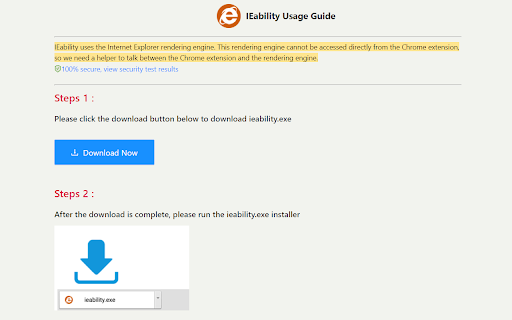
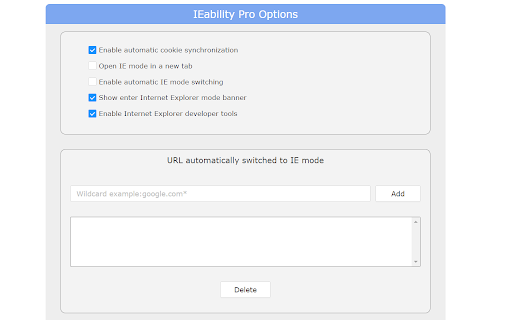

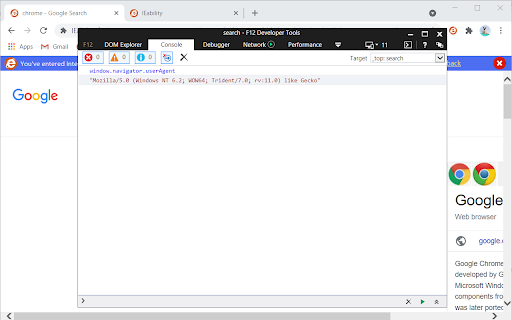
Runs Internet Explorer (IE) in Chrome with IE Tab mode, supporting legacy websites, Java, ActiveX, Flash and enterprise systems. IEability integrates the Internet Explorer (IE) rendering engine directly into Chrome, allowing users to open web pages in IE Tab mode seamlessly, just like using a regular Chrome tab. Access legacy websites, Silverlight, ActiveX, SharePoint, Flash and Java applications seamlessly in Chrome with IE Tab mode! The ultimate Internet Explorer integration extension, enabling you to browse all websites in a single browser environment. Ideal for: Enterprise users, developers, and anyone requiring IE compatibility without switching browsers. 1. Advanced IE Tab Mode: - Instantly access legacy websites with the native IETab rendering engine. - Full support for IE versions (IE7 - IE11). - Perfect for banking, enterprise portals, and outdated web applications. 2. Smart Automation: - Automatically switch to IE Tab mode based on custom URL rules. - Seamless cookie synchronization between Chrome and IE. - Single sign-on support—no repeated logins required. 3. Enterprise-Grade Compatibility: - Complete support for ActiveX controls. - Full compatibility with Flash, Java, SharePoint, and Silverlight. - Includes built-in IE Developer Tools for efficient debugging. 4. Effortless User Experience: - Operates just like a standard Chrome tab. - Quick and smooth switching between Chrome and IE modes. - Clean and familiar interface for ease of use. 1. Why is ieability.exe necessary? It enables integration of the IE engine within Chrome, especially after NPAPI support was discontinued. 2. Is it safe? Yes, it is fully security-certified and virus-scanned. You can verify its safety at: (https://www.virustotal.com/gui/file/123437a7f07d96d245681620b4103af2e05b2dab3a7e22a6d987e734e975bcaf). - Basic Version: Free forever. - Premium Version: Unlocks advanced features for enhanced functionality. For more details, view our Privacy Policy: (https://ieability.com/privacy.html)

Advanced Java Launch
Java desktop launcher. Requires compatible web pages, native application and Java. The extension uses downloads API and native application API to mediate between browser and Java.

CCTV View
Watch up to 20 webcams or CCTV cams within your browser. This extension allows you to define up to 16 cctv or webcam urls. Every time the toolbar button is clicked it will show an updated version of the image. I wrote it to be able to look at my cctv cameras with the click of a button. I use Zoneminder (http://www.zoneminder.com), an open source cctv monitoring system. you can either use the image url from the watch window or the jpeg stream url from the montage window. For still images just copy the image url from the watch window (should look something like http://server/cgi-bin/nph-zms?mode=single&monitor=13&scale=100&connkey=193577&rand=1314794770 and paste this in the image url fields on the CCTV View options page. For streaming jpeg images you'll need to copy the url parameter from the video stream on the montage window. This extension needs access to connect.facebook.net to allow the facebook like button. It also needs access to tabs which unfortunately includes browsing activity, this is needed to allow the monitor page to be loaded and for the target links you can set for each camera. 1.1.0.6 - Removed paypal donation button (Apparently Google doesn't like it...) - Replaced minified jquery and jquery-ui by the non-minified versions (Another thing Google may not like) 1.1.0.5 - Updated jquery to 2.1.1 - Updated jquery-ui to 1.10.4 - Removed unused javascript and css files 1.1.0.0 - Settings are now synchronised to all your chrome instances on other computers when logged into chrome - some minor layout changes and code improvements. 1.0.9.5 - Fixed manifest.json again. - Fixed issue with html element creation (createElement('image') no longer works, should be createElement('img') now). - Replaced background page with a script - Updated jQuery to a more recent version 1.0.9.4 - updated manifest to version 2 - removed the 'Share' tab from the options page until I can work out how to make that work again - moved all javascript to separate files as per Google's requirements 1.0.9.3 - Major overhaul of the options page 1.0.9.2 - Added tabbed support for up to 16 cameras 1.0.8.6 - Added Facebook like button to the options page 1.0.8.5 - Added fadeIn effect to images in popup - Added 'Target Url' fields on the settings page. This allows you to add a url to each cam image. Clicking on the cam image will open a new tab to the Target Url. - Added a Monitor Page, clicking the 'Monitor Page' link on the popup will open a new tab with all camera images, this allows you to keep your cameras open. - Opens the CCTV View wiki page at first installation 1.0.8.4 - fixed layout issue with the homepage link 1.0.8.2 - Added tool tips on the options page - Fixed a javascript issue that caused 4 (broken) images to be displayed when less than 4 images were added on the option page - Fixed scaling of the popup depending on the amount of images configured - Added an option to display a link to your CCTV homepage in the popup. This option requires access to tabs. 1.0.8.1 - Cosmetic fixes - Popup window scales to the amount of images - Removed default image for empty image fields - Added options to hide donation and help box on the options page - Display Advanced Options is now persistent Leave a comment with any bugs/requests @Dai Saabaru: Authentication will be added in one of the next releases.

CheerpJ Applet Runner
With the CheerpJ Applet Runner extension, you can run legacy Java Applets on modern browsers without a Java plugin or a Java installation. Using the CheerpJ Applet Runner is simple. Just install and pin the extension. Next, visit your Applet-based website, click the extension icon in the upper-right corner of your browser, and then press the 'Enable' button in the popup. Once enabled, the extension is activated for the current domain, and Applets will start automatically if they are present. This extension works by 'converting' the Java Applet to WebAssembly and JavaScript on the fly. It is private and secure, runs fully client-side (i.e. it does not contact any server), and does not collect any data or analytics at all. All your data, as well as your application are kept within the boundaries of your browser. This extension, developed by Leaning Technologies, is based on CheerpJ, a JVM/JRE replacement for modern browsers. More information on CheerpJ are available at https://www.cheerpj.com. This software is free to use for non-business purposes on public-network Applets. For any other use, such as internal network applets, or if you are a company or public-sector organisation and would like to license CheerpJ, please get in touch with sales@leaningtech.com.

Open with Switchbar
Integrate Switchbar with your browser, so you can move a web page from one browser to another at the click of a button. This extension integrates the Switchbar app to your browser, so you can move a web page from one browser to another with a single click. Switchbar is a desktop app that lets you choose where links open. Whenever you click a link, it prompts you to select the browser, browser profile, or email client you want to use. Learn more at https://webcatalog.io/switchbar. With this extension installed, you can right-click any link and select “Open with Switchbar” to send it to another browser, or use the toolbar button to move the page you’re currently viewing. Switchbar must be installed on your computer to use this extension.
