
modkfkgmcjbkjhjmhjakohhnfbleghoj
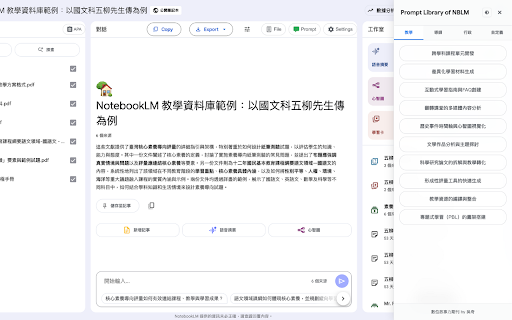


NotebookLM EDU Enhancer(TW) — 整合教育提示詞庫、Google Workspace 匯出、原型渲染,以及從 X、Threads、Facebook 匯入貼文到筆記本。 NotebookLM 匯出工具 由 數位敘事力期刊(吳奇)開發 功能描述如下: 1️⃣ 提示詞模板)可以選取直接輸入至提示詞欄位 2️⃣ 提示詞保留,可以按下按鈕保留提示詞紀錄 3️⃣ 社群媒體爬蟲,在Facebook、Threads、X匯入貼文資訊(不穩定) 4️⃣ 設定筆記本,透過AI將筆記本設定優化為YAML結構 5️⃣ 工作室功能:新增「原型渲染」,將來源轉換為html 提醒:本插件需要透過 Google AI Studio 獲取API

NotebookLM Quiz Exporter
Export quizzes from Google NotebookLM to multiple formats for teaching, studying, and sharing 📚 The simplest way to save and share quizzes created in Google NotebookLM to 15 different formats. Perfect for teachers, students, and trainers. No account required. 🎯 WHAT YOU CAN DO: - Save quizzes as documents or spreadsheets (CSV formats to most platforms) - Create printable worksheets for your classroom - Build interactive online quizzes - Import quizzes into learning management systems - Generate presentation slides for review sessions - Question Selector — pick which questions to export - Include/Exclude — answers, rationale, hints 📖 HOW TO USE: 1. Open a quiz in NotebookLM 2. Click the extension icon (Google Chrome) 3. Choose your export format 4. Done! 🔒 PRIVACY FIRST: - Only activates on notebooklm.google.com - No data collection or tracking - Everything stays in your browser Version History v2.0.0: NEW: Google Forms export (via Sheets) NEW: Moodle XML format for direct LMS import NEW: QTI 2.1 for Canvas/Blackboard/Brightspace IMPROVED: Math rendering with 200+ LaTeX symbols IMPROVED: Better spacing command handling v1.4.0: FIXED: Correct answer detection (was always showing A) Improved answer extraction with multiple fallback strategies Separate "Include answers" and "Include rationale" checkboxes

NotebookLM Jetpack
NotebookLM is an incredible AI knowledge tool, but getting your content into it shouldn't be the hard part. Jetpack fixes this. • Substack — Precision extraction with 14 noise filters (subscribe buttons, comments, etc.). Free posts imported cleanly, paid articles extract visible portions • WeChat articles — Renders full page in-browser, bypassing anti-scraping. No more "silent failures" with empty content • X.com (Twitter) Articles — Auto-detects long-form article format, renders in-browser for full extraction • Dynamic/SPA pages — JS-rendered pages that NotebookLM can't fetch? Handled 🛟 Smart failure detection: Open your notebook page and the extension auto-scans all sources, flags failures and silently broken imports, then rescues them all in one click. 📦 Break the 50-source limit Only 50 source slots per notebook? Jetpack's built-in read-later list lets you collect articles, then merge 10-20 into a single PDF. One PDF = one source slot = 20 articles of knowledge. Organize by collection for different projects. No more pasting 200 URLs manually. Open any doc page, click "Analyze Site", and Jetpack auto-detects the framework and extracts the full page tree. Select chapters, then batch import or export as PDF. Supports 14+ popular documentation frameworks (Docusaurus, MkDocs, Mintlify, and more). Also supports llms.txt for AI-native content discovery. Paste an Apple Podcasts link, pick episodes, download audio, drag into your notebook. AI-generated notes from a 2-hour podcast in minutes. Paste a YouTube video, playlist, or channel link — the extension extracts the video list, lets you select which to import, and batch-sends them to NotebookLM. Open the extension on any YouTube page to auto-detect and one-click import the current video. NotebookLM auto-parses YouTube transcripts. Open the extension on any Claude, ChatGPT, or Gemini conversation page. It auto-detects the platform, extracts Q&A pairs, and lets you selectively import valuable exchanges as structured content. Too many sources cluttering your notebook? Use NotebookLM's native checkboxes to select sources, then click "More actions" at the bottom of the source list to batch delete. Confirmation dialog prevents accidental deletion. Want to share a brilliant AI conversation on social media? Select Q&A pairs in the AI Chat tab, then click "Generate Share Card". Warm editorial styling with JPEG/PNG/PDF export or copy to clipboard. iPhone Dynamic Island safe area, 3x Retina rendering. ⚡ Also includes: • 🖨️ PDF export upgrade — warm serif styling (Noto Serif SC + cream background), X.com articles and CJK support • 📋 Clipboard copy — one-click Markdown copy button next to PDF export in bookmarks and doc sites • 🏗️ Huawei Developer Docs — HarmonyOS docs now supported with full catalog traversal • 📡 RSS feed import — Substack, Medium, any standard RSS/Atom feed • 🖱️ Right-click context menu for instant import • 📋 Import history — last 100 entries • 🌐 Bilingual UI — Chinese and English, auto-detects browser language 🔒 Privacy & Security • 100% free, no account required • Runs entirely in your browser — zero data sent to third-party servers • Open source: github.com/crazynomad/notebooklm-jetpack • Chrome Manifest V3 compliant

NotebookLM Exporter
Export your NotebookLM conversations, notes, and sources to PDF, Markdown, HTML, and more with authentic styling ⚠️ You may see a Chrome safety alert during install. This extension runs 100% locally — no backend, no data collection, ever. 🚀 Export Your NotebookLM Content in Seconds Tired of being stuck with your NotebookLM conversations and notes only in the browser? NotebookLM Exporter transforms your valuable research, study notes, and AI conversations into beautifully formatted documents you can use anywhere. 📊 What Can You Export? Export your NotebookLM content in 6 professional formats: - 📄 PDF - Professional documents with custom themes, watermarks, page numbers, and table of contents - 📝 DOCX - Editable Word documents with complete formatting preservation - 🌐 HTML - Interactive web pages with 9 beautiful themes and dark mode support - ✍️ Markdown - Perfect for GitHub, wikis, and markdown editors - 📋 JSON - Structured data for developers and integrations # 🎨 Professional Styling - 9 beautiful color themes (Light, Dark, Sepia, Blue, Green, Purple, Nord, Dracula, Monokai) - Adjustable font sizes (Small, Medium, Large) - Custom page margins and spacing - Professional typography and formatting # 🎯 Smart Selection - Export all conversations or selected messages only - Filter LLM responses only (exclude your questions) - Select specific notes from your notebook - Batch export multiple conversations at once # 📑 Advanced Features - Automatic Table of Contents generation - Conversation summaries with message counts - Custom watermarks for document branding - Page numbering and pagination - Preserves all formatting: bold, italics, code, lists, tables, links - Automatic scrolling detection for long conversations # 💡 Smart Extraction - Background tab processing for complex notes - Automatic title extraction - Content structure preservation - Handles formatted text, code blocks, and media references - Progress tracking with real-time updates 🎓 Perfect For - Students: Export study notes and research conversations for offline study - Researchers: Archive and organize AI-assisted research findings - Content Creators: Convert AI-generated content into publishable documents - Professionals: Export client communications and meeting notes - Educators: Share learning materials with students in multiple formats - Developers: Export conversations as JSON for data analysis ✅ Academic Research - Export comprehensive research notes with proper citations ✅ Legal Documentation - Create official records of important conversations ✅ Business Analysis - Convert analysis and insights into shareable reports ✅ Content Creation - Transform AI-generated content into blog posts and articles ✅ Knowledge Management - Archive institutional knowledge in accessible formats ✅ Compliance - Generate audit trails and documentation records 1. Open NotebookLM - Navigate to any conversation or notes page 2. Click the Extension Icon - Open NotebookLM Exporter from your toolbar 3. Choose Format - Select PDF, DOCX, HTML, Markdown, JSON AND ETC 4. Customize - Adjust theme, font size, margins, watermarks (optional) 5. Select Content - Choose all or specific messages/notes 6. Export - Download your document in seconds - Fast: Exports complete conversations in under 30 seconds - Reliable: Handles conversations with hundreds of messages - Smart: Automatically extracts and formats content correctly - Efficient: Minimal memory footprint, works on any machine ✓ 6 export formats (PDF, DOCX, HTML, Markdown, JSON AND ETC) ✓ 9 professional color themes ✓ Unlimited exports ✓ No watermarks or branding (except optional custom watermarks) ✓ No subscription or premium features ✓ Free updates forever ✓ No ads or tracking ✓ 100% open source development approach This extension: - ✅ Requires ONLY access to notebooklm.google.com - ✅ Processes everything locally on your device - ✅ Never sends data to external servers - ✅ Never stores your data - ✅ Never tracks you - ✅ Respects your privacy completely

FolderLM: NotebookLM Folders, Bulk Import, Merge Sources & Prompts
Organize NotebookLM with folders, dashboard, bulk import, merge sources, prompts, full screen, source tools, and copy citations. FolderLM for NotebookLM Create Folders, Bulk Import, Merge Sources & Prompts FolderLM is a productivity extension built for NotebookLM users who want a cleaner, faster, and more organized research workspace. NotebookLM is powerful for AI research, learning, writing, study, analysis, and knowledge work. But when you create many notebooks, add many sources, reuse prompts, and work across multiple projects, your NotebookLM dashboard can quickly become difficult to manage. With FolderLM, you can organize NotebookLM notebooks into folders, manage your dashboard more easily, import sources in bulk, merge notebook workflows, use a prompt library, work with source tools, copy answers with citations, switch to full-screen mode, and use a cleaner multilingual NotebookLM workflow. FolderLM helps NotebookLM users reduce clutter and move faster. If you use NotebookLM for school, research, writing, product work, business documents, client projects, legal notes, market research, YouTube transcripts, PDFs, reports, meeting notes, or study material, you probably know the problem: 1. Too many notebooks 2. Too many sources 3. Repeated prompts 4. Hard to find projects 5. Messy dashboard 6. Slow manual source imports 7. Research split across multiple notebooks 8. Extra effort when copying source-backed answers 9. Limited workspace control for deep research sessions FolderLM gives you a better way to organize and manage your NotebookLM workspace. Create folders for your NotebookLM notebooks and keep related work together. Use folders for school subjects, research topics, client projects, product research, writing projects, meeting notes, market research, legal documents, study material, personal knowledge bases, and archived notebooks. Instead of scrolling through a long, messy NotebookLM dashboard, FolderLM helps you group notebooks by topic, project, client, course, team, or workflow. If you have ever searched for “how to create folders in NotebookLM” or “how to organize NotebookLM notebooks,” FolderLM is built for that exact need. FolderLM improves the NotebookLM dashboard experience so your workspace feels easier to scan and manage. A clean dashboard helps you find notebooks faster, keep active projects visible, reduce visual clutter, separate important work from old work, and navigate your NotebookLM workspace with less friction. FolderLM is designed with a calm, NotebookLM style interface so it does not feel like a heavy external tool. Use favorites or quick access for daily research notebooks, active client work, current study material, ongoing writing projects, important business notes, and frequently used NotebookLM workspaces. Instead of searching again and again, keep your most important notebooks close. 📥 Bulk Import for NotebookLM Sources Adding sources one by one can be slow, especially when you work with many files, documents, links, notes, PDFs, articles, or research materials. FolderLM helps speed up source heavy workflows with bulk import support. This is especially useful when you are preparing research notebooks, study notebooks, content research, product research, competitive research, client knowledge bases, project documentation, reports, and analysis notebooks. Bulk import helps you spend less time doing repetitive setup and more time working with your sources inside NotebookLM. You may start with one notebook, then create another for a related topic, then another for a sub-topic. After some time, your useful sources and notes are scattered. Use merge workflows when you want to combine related research, bring sources from different notebooks into one place, clean up fragmented workflows, prepare a stronger research notebook, consolidate project material, or organize scattered NotebookLM work. This makes FolderLM especially useful for long research projects and multi-source workflows. NotebookLM becomes more powerful when your sources are organized and easy to work with. FolderLM adds source-focused workflow improvements to help you manage source-heavy notebooks more comfortably. Source tools are useful when you work with PDFs, Docs, articles, reports, notes, research files, meeting transcripts, policy documents, study material, business documents, and long-form references. FolderLM helps make source management cleaner and less repetitive. ✍️ Prompt Library for NotebookLM Stop rewriting the same prompts again and again. FolderLM includes a prompt library so you can save, manage, and reuse your best NotebookLM prompts. Create prompts for summaries, study guides, research analysis, content writing, source comparison, question generation, flashcard preparation, PRD and product analysis, meeting note analysis, legal or policy review, competitive research, blog writing, script writing, report generation, and citation-based answers. A prompt library helps you build repeatable workflows inside NotebookLM. This saves time and helps you keep your NotebookLM workflow consistent. 🖥️ Full Screen Mode FolderLM adds a cleaner full screen workflow for NotebookLM users who want fewer distractions. Full-screen mode is helpful for deep research, long reading sessions, writing from sources, studying, reviewing notebooks, working with large source sets, focused analysis, and presenting research. If you use NotebookLM for serious work, a cleaner full-screen experience can make your workspace feel more focused and comfortable. 📋 Copy with Citations FolderLM makes it easier to copy useful responses with citations so your research output stays traceable and easier to reuse. Copy with citations is useful for students, researchers, writers, analysts, product managers, consultants, and teams working with source-backed information. Use it when you want to move NotebookLM answers into notes, documents, briefs, reports, drafts, or research files while keeping citation context available. FolderLM is designed for global NotebookLM users. A multilingual interface helps more users work comfortably with NotebookLM productivity features in their preferred language. This is useful for students, researchers, and professionals who work across regions, languages, and international projects. FolderLM is built with privacy in mind. We focus on improving your NotebookLM workflow, not collecting unnecessary personal data. FolderLM does not sell your data. FolderLM does not use your notebooks for AI training. FolderLM does not use your NotebookLM content for advertising. FolderLM is built to support organization, productivity, and workflow improvements inside NotebookLM. FolderLM is useful for anyone who uses NotebookLM regularly. 🎓 Students can organize subjects, lecture notes, PDFs, assignments, research material, and exam preparation notebooks. 🔬 Researchers can organize sources, papers, reports, citations, topic-based notebooks, and long-term research projects. 📝 Writers can manage book research, article research, scripts, references, outlines, interviews, and draft support material. 🎬 Creators can organize content ideas, video research, newsletters, scripts, audience research, and source-based content workflows. 🧑🏻💻 Product managers can organize PRDs, customer research, competitor research, meeting notes, user feedback, strategy docs, and product discovery material. 🚀 Founders can organize market research, investor notes, customer calls, strategy documents, hiring research, and operational knowledge. 👨🏻💼 Consultants can organize client work, discovery notes, project documents, research sources, and reusable prompts. 👩🏻🏫 Teachers and educators can organize lesson material, reading sources, student resources, teaching notes, and study guides. NotebookLM power users can keep large workspaces clean, searchable, and easier to maintain. Benefits of FolderLM ━━━━━━━━━━━━━━━━━━━━ FolderLM helps you: 1. Organize NotebookLM notebooks into folders 2. Reduce NotebookLM dashboard clutter 3. Find important notebooks faster 4. Keep active work easy to access 5. Import sources more efficiently 6. Manage source-heavy workflows 7. Save and reuse prompts 8. Merge related notebook workflows 9. Copy source-backed answers with citations 10. Work in a cleaner full-screen mode 11. Improve your NotebookLM productivity 12. Build a more structured research system 13. Save time on repetitive tasks 14. Make NotebookLM feel more complete FolderLM is not just a folder add-on. It is a complete NotebookLM productivity extension for users who want better organization, faster workflows, and a cleaner research experience. There are many NotebookLM extensions on the Chrome Web Store, but most of them are either focused on one narrow use case, locked behind paid upgrades, overloaded with complex features, or built more like external toolkits than a clean NotebookLM-native productivity layer. FolderLM is designed for users who want the most practical NotebookLM workflow upgrade in one clean, simple, and currently free extension. • Folders for NotebookLM organization • Cleaner dashboard management • Bulk import support • Merge notebook and source workflows • Prompt library • Source tools • Full-screen mode • Copy with citations • Favorites and quick access • Multilingual usability improvements • Privacy-first workflow • Native NotebookLM-style experience FolderLM is not just another importer, sidebar, or export tool. It is a complete productivity layer for NotebookLM. Kortex is a large power-user toolkit for NotebookLM. It includes many features such as LLM archiving, social media import, web capture, source downloading, chat export, audio overview tools, automation rules, prompt management, source views, and an advanced dashboard. But for many NotebookLM users, Kortex may feel like a heavy toolkit instead of a clean daily workspace upgrade. FolderLM focuses on the most important NotebookLM workflow problems: • How do I organize my notebooks? • How do I create folders in NotebookLM? • How do I keep my dashboard clean? • How do I import sources faster? • How do I merge related NotebookLM work? • How do I reuse prompts? • How do I copy source-backed answers with citations? • How do I make NotebookLM feel easier, cleaner, and faster? Kortex is built like a broad knowledge hub. FolderLM is built like the missing productivity layer NotebookLM should already have. Why FolderLM wins for everyday NotebookLM users: • Cleaner and simpler workflow • More focused on NotebookLM organization • Easier for students, researchers, and normal users • Less overwhelming than a large all-in-one toolkit • Better fit for users who want folders, prompts, citations, dashboard control, and source workflow in one place • Currently free to use • Designed to feel native to NotebookLM If you want a huge toolkit, Kortex may look powerful. If you want NotebookLM to become cleaner, faster, and easier to manage every day, FolderLM is the better choice. NotebookLM Tools is another strong extension with many advanced features, including bulk import, source folders, custom prompts, duplicate cleanup, source merge, studio tools, tags, language switching, dark mode, and backup options. FolderLM is built for clarity. FolderLM gives NotebookLM users the essential productivity features without making the experience feel complicated or overloaded. FolderLM focuses on the core workflow: That is why FolderLM is easier to understand, easier to explain, and easier for new NotebookLM users to adopt. • Folder-first organization for NotebookLM users • Cleaner dashboard experience • Simple source and notebook management • Prompt library for daily research workflows • Copy with citations for source-backed outputs • Full-screen mode for focused work • Currently free alternative to paid or freemium tools • Built around the real NotebookLM user journey, not just a long feature list NotebookLM Tools has many features. FolderLM focuses on the features users actually need to make NotebookLM usable at scale. If you want a technical toolbox, NotebookLM Tools is one option. If you want a clean, practical, everyday NotebookLM productivity system, FolderLM is the stronger choice. Q: What is the subscription cost of FolderLM? A: FolderLM is currently completely free to use and provides better value than many paid extensions available online. Q: What is FolderLM used for? A: FolderLM is used to organize NotebookLM notebooks, manage sources, reuse prompts, import sources faster, support merge workflows, copy with citations, and work in a cleaner full-screen NotebookLM environment. Q: Can you make folders on NotebookLM natively? A: No, Google NotebookLM does not currently support native folders. FolderLLM adds this functionality via a browser extension, allowing you to create, manage, and color-code folders instantly. Q: How do I create a new folder in my notes if I have multiple accounts? A: FolderLLM works locally on your browser. If you switch Google accounts within the same Chrome profile, your folder structure remains consistent based on the notebooks available. Q: Is FolderLM useful for research? A: Yes. FolderLM is especially useful for research-heavy NotebookLM users who manage many notebooks, sources, prompts, and citations. Q: Can FolderLM merge NotebookLM work? A: FolderLM supports merge-style workflows for users who want to bring related NotebookLM sources and projects together. Q: Does FolderLM support citations? A: FolderLM includes copy with citations workflow support so source-backed NotebookLM answers are easier to reuse. Q: Is FolderLM private? A: FolderLM is designed with a privacy-first approach. It focuses on organization and workflow improvements and does not sell your data, use your notebooks for AI training, or use your NotebookLM content for advertising. 🔒 100% Private & Local Your data is yours. FolderLM operates with privacy first architecture. No Cloud Sync: All your folder structures and organization settings are saved locally in your browser (chrome.storage.local). No External Servers: We do not track your notes, read your content, or send data to third-party servers.
