
jgjgpfgcbdblgejodmooigkhlciejjhg


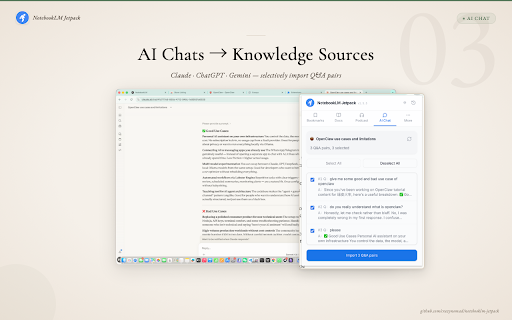


NotebookLM is an incredible AI knowledge tool, but getting your content into it shouldn't be the hard part. Jetpack fixes this. • Substack — Precision extraction with 14 noise filters (subscribe buttons, comments, etc.). Free posts imported cleanly, paid articles extract visible portions • WeChat articles — Renders full page in-browser, bypassing anti-scraping. No more "silent failures" with empty content • X.com (Twitter) Articles — Auto-detects long-form article format, renders in-browser for full extraction • Dynamic/SPA pages — JS-rendered pages that NotebookLM can't fetch? Handled 🛟 Smart failure detection: Open your notebook page and the extension auto-scans all sources, flags failures and silently broken imports, then rescues them all in one click. 📦 Break the 50-source limit Only 50 source slots per notebook? Jetpack's built-in read-later list lets you collect articles, then merge 10-20 into a single PDF. One PDF = one source slot = 20 articles of knowledge. Organize by collection for different projects. No more pasting 200 URLs manually. Open any doc page, click "Analyze Site", and Jetpack auto-detects the framework and extracts the full page tree. Select chapters, then batch import or export as PDF. Supports 14+ popular documentation frameworks (Docusaurus, MkDocs, Mintlify, and more). Also supports llms.txt for AI-native content discovery. Paste an Apple Podcasts link, pick episodes, download audio, drag into your notebook. AI-generated notes from a 2-hour podcast in minutes. Paste a YouTube video, playlist, or channel link — the extension extracts the video list, lets you select which to import, and batch-sends them to NotebookLM. Open the extension on any YouTube page to auto-detect and one-click import the current video. NotebookLM auto-parses YouTube transcripts. Open the extension on any Claude, ChatGPT, or Gemini conversation page. It auto-detects the platform, extracts Q&A pairs, and lets you selectively import valuable exchanges as structured content. Too many sources cluttering your notebook? Use NotebookLM's native checkboxes to select sources, then click "More actions" at the bottom of the source list to batch delete. Confirmation dialog prevents accidental deletion. Want to share a brilliant AI conversation on social media? Select Q&A pairs in the AI Chat tab, then click "Generate Share Card". Warm editorial styling with JPEG/PNG/PDF export or copy to clipboard. iPhone Dynamic Island safe area, 3x Retina rendering. ⚡ Also includes: • 🖨️ PDF export upgrade — warm serif styling (Noto Serif SC + cream background), X.com articles and CJK support • 📋 Clipboard copy — one-click Markdown copy button next to PDF export in bookmarks and doc sites • 🏗️ Huawei Developer Docs — HarmonyOS docs now supported with full catalog traversal • 📡 RSS feed import — Substack, Medium, any standard RSS/Atom feed • 🖱️ Right-click context menu for instant import • 📋 Import history — last 100 entries • 🌐 Bilingual UI — Chinese and English, auto-detects browser language 🔒 Privacy & Security • 100% free, no account required • Runs entirely in your browser — zero data sent to third-party servers • Open source: github.com/crazynomad/notebooklm-jetpack • Chrome Manifest V3 compliant

NotebookLM AI Sidebar
Use NotebookLM AI Sidebar to import web links into a notebook and add YouTube videos and shorts with one click! 📒 The NotebookLM AI Sidebar Chrome extension is a powerful tool designed to streamline note-taking and research. With AI-driven features, it allows users to easily create and manage structured links. Whether you're gathering documents, generating insights, or add webpages into a notebook, Notebook LM makes in-depth research seamless and efficient. This extension allows you to effortlessly create documents in NotebookLM and easily add various articles to existing documents. 🛠️ Quick Start Guide: 1. Install the extension by clicking 'Add to Chrome' from Google Chrome Store 2. Click the icon in the top right corner of the browser tab. 3. Start creating or adding sources to your projects effortlessly! Why Choose This Extension? 1️⃣ Instantly create a notebook lm sidebar with just a click 2️⃣ Easily add sources to existing projects, add YouTube links or YouTube shorts 3️⃣ Enhance your investigation experience with artificial intelligence-powered assistance 4️⃣ Seamlessly integrate with Google for a smoother workflow 5️⃣ Improve productivity and organization with notebook lm sidebar features 6️⃣ Quickly access, edit, remove and manage your notebooks anytime 7️⃣ Optimize information gathering with notebook lm sidebar 8️⃣ Maximize efficiency using the extension 9️⃣ Find the perfect notebook lm sidebar alternative for your workflow 🔮 Discover a smarter way to organize with NotebookLM! 📚 Take a Audio Deep Dive 👍 Easily compile documents for deep research 💡 Generate insights using notebooklm capabilities 🤝 Discover how to use effectively for various purposes 📱 Podcast Feature 🔄 Transcribe, summarize, and analyze podcasts 📈 Get structured insights from audio discussions 🎤 Enhance learning with the AI podcast generator 💡 What is this extension? 🦊 This NotebookLM AI Sidebar Chrome Extension is an advanced powered tool designed to help users organize, easily create new projects and seamlessly add sources and also generate insights with ease. Whether you're working on deep research or need an ai-powered assistant, it is the ultimate solution. 🛠️ How to Use It? 1️⃣ Install the extension from Google Chrome Store 2️⃣ Click on the icon of this extension to right corner of the broweser tab 3️⃣ Start adding documents or creating new notebook instantly 🔍 Explore Alternatives 🚀 Looking for a NotebookLM alternative? Explore similar AI Notebook solutions with comparable features, ensuring flexibility and efficiency. 💻 Enhance Your Research with Google LM 📡 Use artificial intelligence-powered tools to generate summaries ✨ Organize your notes with Notebook Google KLM 📃 Collaborate effectively using LM Notes 🌟 AI notebook lm for Smarter Research 🏷️ Improve productivity with NotebookLM Podcast tools 🖋️ Leverage the notebook lm for structured insights ⚛️ Utilize NotebookLM for academic and professional work 🎧 AI Podcast Generator & Learning 🗣️ Convert discussions into structured notes 💬 Learn how to generate artificial intelligence podcasts with google lm 🔑 Access key insights quickly using google lm features 💡 Google AI Podcast Generator 💡 Automate podcast transcription and summarization ⏳ Save time with artificial intelligence-generated text from discussions 📀 Enhance learning and research with AI-driven insights 🧠 AI Revolution 🚀 Google ai notebook transforms how you interact with information online. This NoteboolLLM solution provides intelligent assistance for: ➤ Summarizing complex topics ➤ Identifying key concepts ➤ Generating insights from multiple sources ➤ Creating connections between different pieces of information ➤ Producing comprehensive reports and analyses 💪 Boost Productivity with Google AI 📅 Stay organized with intuitive NotebookLM features 💰 Get instant insights from NotebookLM 🎚️ Simplify research with an advanced notebook ai 🔄 Source Management Made Simple Wondering how many sources can handle or how to download sources from extension? The extension offers robust documents management: ➤ Add unlimited documents to your projects ➤ Organize sources by topic, project, or custom categories ➤ Easily download and export source materials ➤ Track documents origins automatically ➤ Cite sources properly with built-in citation tools 💰 Great Value at Any Level Concerned about cost? Rest assured that the extension offers tremendous value: ➤ Free tier with essential features ➤ Affordable premium options for power users ➤ Enterprise solutions for teams and organizations ➤ Special pricing for educational institutions ➤ Flexible payment options to suit any budget 📱 Cross-Platform Compatibility The Google AI app works across your devices: ➤ Chrome browser on desktops and laptops ➤ Mobile browsers for on-the-go access ➤ Tablet compatibility for flexible use ➤ Consistent experience across all platforms ➤ Automatic syncing between devices 🔒 Privacy & Analytics To improve the extension, we collect anonymous usage statistics (e.g., which features are used and how often) linked to a randomly generated device identifier. No personal data, Google account info, notebook content, or browsing history is ever collected or shared. 🌐 Can I Use Offline? 📢 Currently, Its requires an internet connection. However, users can save content for offline access within their browser. 📝 How many sources notebooklm? ✈️ Google lm allows users to add multiple sources without restrictions ⛄ Ideal for deep research, content creation, and knowledge organization 💾 How to download sources from notebook lm? 🌊 Access your sources in google lm site 🦊 Use the built-in export function to download sources 🐶 Organize and store your data efficiently 📌 Can ai notebook generate content based on my sources? 💡 Yes! The ai can create summaries, reports, and even creative content based on your collected sources. 📌 Can I use Notebook LM for academic research? 💡 Absolutely! The extension is perfect for academic research with proper citation and source tracking capabilities. 📌 Does Notebook LM support multiple languages? 💡 Yes, the extension supports dozens of languages for truly global research capabilities. 📌 Is my data secure with NotebookML? 💡 Yes! Your data is protected with industry-standard encryption and Google's robust security practices. 🚀 Install the Chrome extension now and take your research experience to the next level with Notebook LM!

WebSync for NotebookLM
Your NotebookLM is only as good as the context you give it. WebSync turns entire websites, emails, and dynamic content into NotebookLM sources. If you ever: - Need to add multiple web pages or videos as sources - Try to import entire documentation or wiki sites - Hit a paywall or login wall that blocks NotebookLM's add source method - Need to add sources from email or Google drive → This is for you. 🚀 What you can do - Crawl and import full websites (not just one page) as sources - Capture login-protected & dynamic content - Import YouTube videos, playlists, and search results - Import from email - Automatically sync sources from Google Drive ✨ What makes WebSync different * Smart Crawl for any website - Perfect for multi-page or interactive sites where other tools fail - Tell us what to capture — we configure the crawl logic for you - If you can see it in your browser, then WebSync can create a NotebookLM source from it * Email → Notebook - Don't let context die in your inbox. - Forward emails or newsletters directly into NotebookLM transforming them into searchable AI context * Google Drive → Notebook - Automatically update your Notebook when you drive updates ⚡ How to Start - Navigate to your target website - Click the WebSync extension and select your target notebook - Import page or crawl entire site (Optional) Sign in for advanced features like Smart Crawl and Email → Notebook. ❓ More details: https://websync-for-notebooklm.com/faq 🤝 Support Need help or a Smart Crawl setup? 📬 support@websync-for-notebooklm.com 📩 https://tally.so/r/nGYE42 🔒 Privacy Runs locally in your browser using your NotebookLM session. No data sent unless you opt in.

NotebookLM Source Helper
A powerful web research assistant and media extractor that seamlessly integrates with NotebookLM. Seamlessly bridge the gap between your favorite content and your research notebooks. With NotebookLM Source Helper, you can capture, organize, and import vast amounts of information with a single click. ✅ One-Click Capture: Add any webpage, article, or PDF to your selected notebook instantly. ✅ Bulk Media Extraction: Save entire YouTube channel video lists, playlists, or Apple Podcasts, Pocket Casts, and Ximalaya episodes. We automatically handle metadata, transcripts, and audio URLs. ✅ Academic Researcher Pro: Direct "Add" buttons embedded in Google Scholar and ArXiv. Bulk-save search results and papers in seconds. ✅ Cloud & PDF Bypass: Native support for Dropbox and OneDrive. Smart proxy technology bypasses download restrictions on sites like ScienceDirect and ACM DL. ✅ AI Watermark Remover: High-quality removal of watermarks from PDFs, Videos, and Images. Runs entirely in your browser for maximum privacy. ✅ Privacy Focused: No data collection. Your research content flows directly from your browser to Google’s servers. ✅ Export to Anki: One-click export of flashcards to Anki decks with tags. Efficiency meets Intelligence. Start building your perfect knowledge base today.

NotebookLM Toolkit
Enhance your NotebookLM web experience with keyboard shortcuts, enhanced buttons, and quick access to NotebookLM. - Mind Map - Provide a "Clone" button that, when clicked, can copy the text of all expanded nodes in Markdown format. - Notes - Adds a button on the NotebookLM notes page to quickly copy the complete note content. - Custom Audio Summary Prompt Saving - Automatically saves prompt content you enter in custom audio summaries - Right-click the extension icon and select "Custom Audio Summary Prompt History" to view saved prompts - Supports prompt management: view, expand/collapse, and delete functions - Prevents duplicate saves, automatically manages the most recent 50 prompts
