
mobmnpcacgadhkjfelhpemphmmnggnod


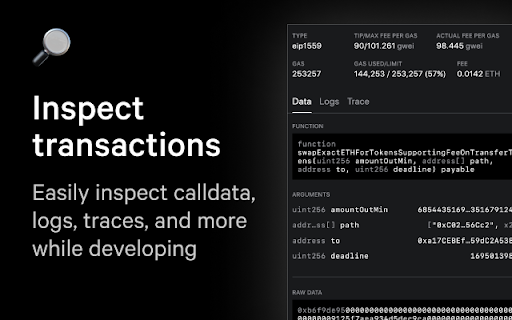
Developer Wallet & DevTools for Ethereum Rivet is a developer Wallet & DevTools for Anvil. It is a browser extension that enables developers to inspect, debug, modify, and manipulate the state of Ethereum: accounts, blocks, contracts & the node itself. Rivet is also compatible with any production dApp, meaning you can simulate any type of action from either an Account attached on the Anvil instance, or by "impersonating" another Account on the network.

ethui
The companion extension to the ethui desktop app ethui is an Ethereum desktop app that connects to your browser while providing an OS native safe & performant integration with Ethereum. With the extension, you can connect ethui to any Ethereum-enabled application (or "Dapp"). The extension injects the Ethereum web3 API (as defined in EIP-1193), which dapps can connect to to read/write data to the blockchain. ethui is focused on providing developer-oriented features such as tighter integration with Foundry & Anvil, the popular toolking for Ethereum development. With ethui, you get access to faster feedback loops and automatic data resyncs when testing contracts locally. You can also enjoy features previously available only on live nets, such as the ability to impersonate addresses directly from your provider. ethui also allows you to manage multiple identities (Wallets) and conenct different dapps to different wallets according to your preferences.

Charged: Add breakpoints to transactions
Charged is a blockchain transaction debugger which allows you to add breakpoints to your transactions. This means you can pause your transactions before sending them on chain, edit the input and simulate the new transactions to see how they perform. With charged, you can catch and fix broken transactions within seconds! Today, people use Metamask as the de facto wallet for development. While Metamask is an amazing wallet for production purposes, it slows down the development speed. As a developer, I DON'T WANT TO - Collect testnet/mainnet funds before testing my transaction - Submit and wait for my transaction to be mined before I see the results - Go to my code, edit the transaction details and submit it again to see if my transaction finally worked - Add console logs to my smart contract to see exactly where my code is breaking - Click on confirm every time to submit my transaction - Deploy my contract repeatedly with small changes to see if it works Charged is a Chrome extension which creates a proxy on top of your existing wallet. This means all transactions to your wallet first go via the proxy. As a result, whenever Charged detects an incoming transaction it 1. Shows you a simulation of the transaction where you see asset changes and possible failures (with error messages) 2. Shows the exact input which goes into your wallet 3. Fetches the contract ABI and decodes the input so you can see if everything is working as expected 4. Allows you to edit the decoded input and re-simulate the transaction. As a result, you can see how your smart contract responds to different inputs. In case your transaction is failing, you can see the error message and edit your input accordingly till the transaction finally works. 5. Allows you to forward the modified transaction to your wallet. So once you're done editing the transaction, click on the forward button and your new transaction shall pop up on Metamask so you can finally send it on chain.

Sentio
Modern monitoring, alerting, log management and debugging for decentralized applications. Sentio etherscan plugin to provide better transaction view and contract reading experience

IPFS Companion
Harness the power of IPFS in your browser IPFS Companion harnesses the power of your locally running Kubo IPFS node (either through the IPFS Desktop app or the command-line daemon) directly inside your favorite browser, enabling support for ipfs:// and ipns:// addresses, automatic IPFS gateway loading of websites and file paths, easy IPFS file import and sharing, and more. IPFS is a peer-to-peer hypermedia protocol designed to make the web faster, safer, more resilient, and more open. It enables the creation and dissemination of completely distributed sites and applications that don’t rely on centralized hosting and stay true to the original vision of an open, flat web. Visit https://ipfs.tech to learn more. - Automatically use IPFS to retrieve sites, files, and other resources already stored on IPFS (including redirecting DNSLink hostnames to IPNS names via your choice of gateway) - Support content-addressed IPFS paths (/ipfs/) and URIs (ipfs://) in your browser, and redirect them to the gateway of your choice - Share files from your browser by importing them to your local IPFS node via right-click or drag-and-drop, including the option to preload files at a public gateway - Check gateway info and Kubo RPC status with a single click, see how many peers Kubo RPC is connected to at a glance from your browser’s menu bar - Copy shareable links, snapshot links, IPNS/IPFS paths, and CIDs for IPFS-hosted sites - Common IPFS tasks — like pinning files and launching your IPFS Web UI dashboard — are available right in your browser - Options to toggle IPFS redirects globally or per website You’ll need to have a local IPFS node running on your computer to enjoy all IPFS Companion's features — either from your terminal (https://docs.ipfs.tech/install/command-line/) or using the friendly, free IPFS Desktop app (https://docs.ipfs.tech/install/ipfs-desktop/). Learn about IPFS and how it’s changing the Internet at https://ipfs.tech See the IPFS Companion privacy policy at https://github.com/ipfs/ipfs-companion/blob/main/PRIVACY-POLICY.md
