
kkdofmcnddcnldoingfpiojnnkdcbhnf


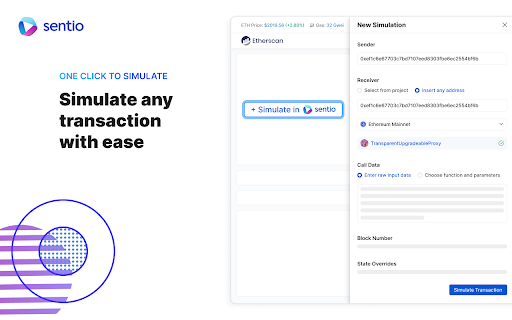
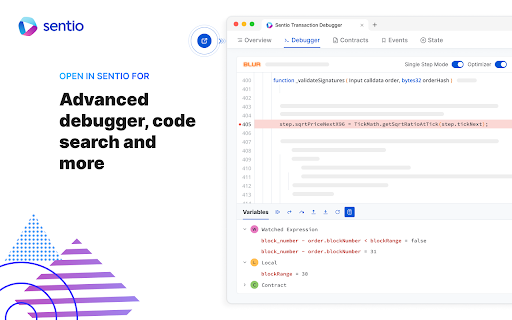

Modern monitoring, alerting, log management and debugging for decentralized applications. Sentio etherscan plugin to provide better transaction view and contract reading experience

bexio Time Tracking Templates
This extension allows saving and loading of form data within the bexio time tracking page. This extension improves handling of time tracking in bexio. How? It enables the user to save the form data as templates. The templates are placed as buttons directly on the time tracking page. So with one click the form will fill out all the values you saved earlier. Sidebar These templates are also available in the panel within the browsers sidebar. In the sidebar panel you can manage the templates (edit/delete) as well as reach out to further features: ManicTime (https://www.manictime.com) You can also import entries from ManicTime and use features like, Time, Date, Billable, Notes etc. to directly apply Time entries, including selecting a template for all the other values. Data is yours only All the data is saved in your browsers storage, they are not accessible from outside nor are they sent outside of your browser. FULL FEATURE OVERVIEW & FEATURE REQUESTS & ISSUE REPORT: https://github.com/SoulcodeAgency/bexio-chrome-extension CHANGELOG: https://github.com/SoulcodeAgency/bexio-chrome-extension/blob/main/CHANGELOG.md

Tenderly Dev Toolkit
One-click exploration & debugging tools in your browser Tenderly Dev Toolkit allows you to explore, analyze, and debug transactions directly from any block explorer. Add the extension to your browser and access Tenderly’s powerful development infrastructure and tools in just one click. Instantly open any transaction hash in Tenderly for granular insights in a human-readable format. Replay transaction execution, debug errors trace by trace, or run transactions in a new development environment for further testing and experimentation. With Tenderly Dev Toolkit available in your browser, you can jump straight to on-chain exploration and debugging from any block explorer. You no longer need to switch context or manually copy-paste transaction hashes. In a single click, you can explore, analyze, and debug on-chain data using Tenderly’s Web3-native tools for complete observability, flexibility, and efficiency. Once you install the extension, the toolbar gives you instant access to Tenderly’s industry-recognized dev tools and functionalities directly from any block explorer: - Simulate: Replay transactions with updated parameters, inputs, and even contract code. Preview transaction execution and see the expected outcomes without sending transactions on-chain. - Debug: Troubleshoot failed transactions with a trace-by-trace Debugger. Analyze human-readable error messages and identify the exact cause and line of an error. Then, quickly edit contract code to try out a fix directly in your browser. - View trace: Examine the entire execution of a transaction with a full stack trace and enriched transaction data. Dive into transaction opcodes, analyze gas usage, or highlight addresses with custom names and colors. - View state changes: Go through the state changes that happened during transaction execution, including old and new values. Understand what happened at a glance by analyzing events or variables in both decoded and raw format. - View gas usage: Analyze how transactions use gas per individual function call. Get a granular breakdown of gas consumption during execution. Identify computationally intensive lines of code and optimize them to reduce gas usage. - Run on VNet: Replay transaction execution on a new Virtual TestNet, a zero-setup development environment synced with the latest mainnet state. Run further tests and experiments with an unlimited faucet, unlocked public accounts, and custom RPC methods. Speed up your on-chain exploration and debugging across EVM chains, L2s, and rollups with powerful Tenderly tools at your fingertips.

Elon Mask
“Elon Mask” Chrome plugin is a tool for individuals who want to control the content they consume online. It is a lightweight extension that can be easily installed on the Google Chrome browser, and it provides users with the ability to specify the keywords they want to censor. When a user installs the plugin, they can enter a list of words and phrases that they want to be censored. The plugin will then scan web pages and block out any text or images that contain the specified keywords. This can be useful for individuals who want to avoid triggering content, such as violence or profanity, or for those who want to limit their exposure to certain topics or persons. The plugin is designed to be unobtrusive and user-friendly. When it blocks content, it displays a black block in its place, and users can easily toggle the plugin on and off if they want to temporarily view the content that has been censored.

Skylens
Provides blockchain explorer tools with address labeling and transaction analysis. This plugin is designed to enhance the functionality of blockchain explorers, providing users with powerful tools for navigation, analysis, and decision-making in the blockchain space. • Navigate blockchain addresses with enhanced jump links, allowing quick access to related addresses and transactions for efficient data tracing. • Parse and enhance transaction hash information, providing direct links to detailed transaction views for quick access. • Organize and display labels for millions of addresses, including exchanges, scammers, and hackers, to enhance security and awareness. • Convert UTC timestamps to your local time zone, ensuring accurate time representation for transaction analysis and reporting. • Access and manage smart contract source code with ease. View, download, and analyze contract code and ABI directly from the explorer. • Filter and manage zero-amount transfer transactions effortlessly, ensuring cleaner transaction views and more accurate data analysis. • Format smart contract parameters quickly and accurately, ensuring smooth interactions with blockchain contracts. • View and manage contract storage data, providing deeper insights into contract states and interactions. **Integration Overview** Skylens integrates effortlessly with blockchain explorers such as Etherscan, Basescan, and Bscscan, along with other EVM-compatible platforms. The plugin enriches your browsing experience by embedding powerful features directly into the explorer interface, ensuring intuitive and non-intrusive enhancements for efficient blockchain data exploration. • **Comprehensive Toolset:** A wide range of features designed to enhance every aspect of blockchain exploration. • **User-Friendly Interface:** Intuitive design ensures ease of use for both beginners and experts. • **Seamless Integration:** Works effortlessly with existing blockchain explorers, providing additional functionality without disruption. Elevate your blockchain exploration with Skylens and experience a new level of efficiency and insight.
