
mobibinbefmieblpnhabghboblgamkbj
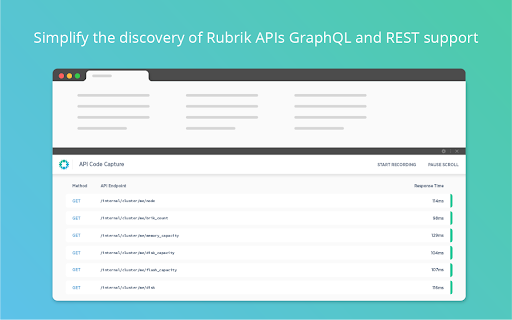
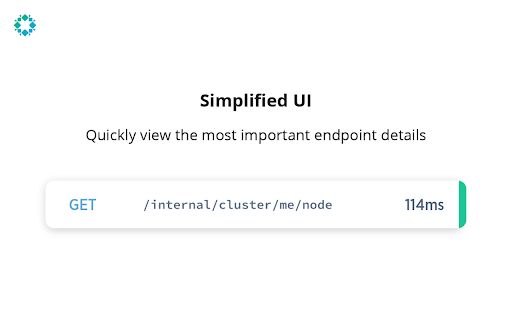
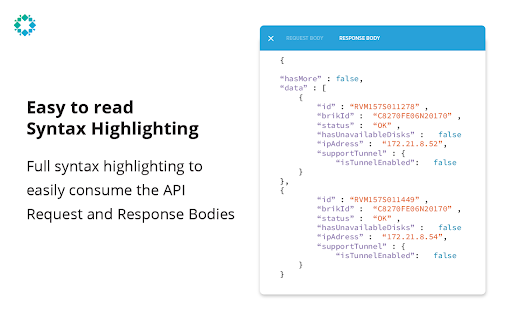
Complete a workflow in the Rubrik UI and output the exact APIs used to complete that workflow. At the heart of the Rubrik API-first architecture is the fact that every action in the Rubrik UI has a corresponding API that is documented and available for use. Or in other words, if you can do it through the Rubrik UI, you can programmatically do the same through an API. While each of those APIs are fully documented, it can still be cumbersome to search through the API documentation to find the APIs you need and then determine which information you need to send with those API calls. This is where the API Code Capture extension comes into play. The extension captures the API calls that both Rubrik CDM and Polaris UIs issue to their underlying platforms. By opening the extension and monitoring which API calls are used when you manually complete that task in the UI, you can easily answer the question “how do I automate X task?”

Get That API
Get That API is an browser extension made to test API endpoints right in the browser Introducing Get That API – the ultimate web extension for developers Get That API allows you to easily and quickly make API calls directly from your browser. With Get That API, you can access a wide range of APIs, including weather, news, financial data, and more, all in one place. Our user-friendly interface makes it easy to search, browse, and select the API you need, and our open-source library ensures secure and reliable connections. Whether you're a developer building a new app, a business owner looking for insights to make informed decisions, or anyone who needs to access API data quickly and easily, Get That API is the tool for you. Get That API is free to use and does not collect any personal data or use cookies, ensuring your privacy is protected. Plus, with regular updates and new API additions, you can be sure that you're always accessing the latest and greatest data. Try Get That API today and experience the power of easy API access right from your browser.

Quilt
Quilt Extension Automatically fill out your RFPs, security questionnaires, and due diligence questionnaires, all from within sheets. Quilt is a tool for to help automate presales tasks using generative AI.

Glean
Unlocks your company's knowledge and enables powerful work AI for everyone. The Glean browser extension unlocks your company’s knowledge and enables powerful work AI for everyone. Just hit Command + J or Alt + J on Windows to instantly access Glean from anywhere: 💡 Know what your company knows, instantly with the Glean sidebar * Discover: Glean delivers personalized content recommendations tailored to your current work context, surfacing relevant insights without you having to search. * Chat: Ask questions and get instant answers from an AI Assistant that understand both your current content and your entire company knowledge base. * Search: Find exactly what you need with intelligent search that understands context, connects related information, and identifies relevant experts. * With a simple Command + J on Mac or Alt + J on Windows - instantly summarize information from any work application ⚡️ Get quick access to the work resources you need. * Glean’s new tab page puts all of your company’s knowledge at your fingertips * See recommended documents, notifications from across applications, access calendar events, and more. * Use Glean’s Go Links feature to instantly access even the most complex URLs Glean connects with dozens of popular workplace apps like Google Drive, Jira, Confluence, Slack, and more. Use this extension if you have an account created by your company admin. Learn more about the permissions we ask for: https://help.glean.com/en/articles/3643260-why-does-the-chrome-extension-ask-for-those-permissions

Apollo Client Devtools
GraphQL debugging tools for Apollo Client. Apollo Client Devtools is a Chrome extension for the open-source GraphQL client, Apollo Client. This extension has 4 main features: 1. A built-in version of the Apollo Studio Explorer that allows you to make queries against your GraphQL server using your app's network interface directly (no configuration necessary). 2. A query watcher that shows you which queries are being watched by the current page, when those queries are loading, and what variables those queries are using. 3. A mutation inspector that displays the mutations made to your Apollo Client application data. 4. A cache inspector that displays your Apollo Client cache data. You can explore the cache through a tree-like interface, and search for specific field keys and values. Code for this extension can be found at: https://github.com/apollographql/apollo-client-devtools
