
dogjkacjoihbjjhmdnpoidblknfaocao

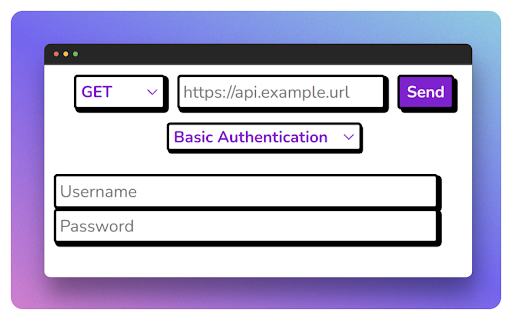
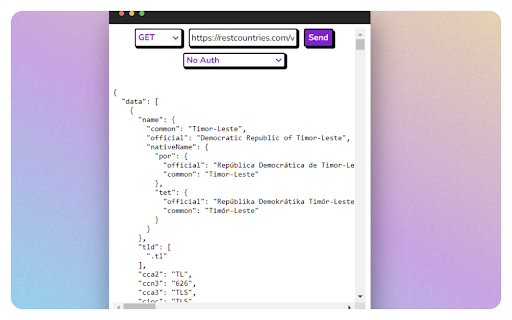
Get That API is an browser extension made to test API endpoints right in the browser Introducing Get That API – the ultimate web extension for developers Get That API allows you to easily and quickly make API calls directly from your browser. With Get That API, you can access a wide range of APIs, including weather, news, financial data, and more, all in one place. Our user-friendly interface makes it easy to search, browse, and select the API you need, and our open-source library ensures secure and reliable connections. Whether you're a developer building a new app, a business owner looking for insights to make informed decisions, or anyone who needs to access API data quickly and easily, Get That API is the tool for you. Get That API is free to use and does not collect any personal data or use cookies, ensuring your privacy is protected. Plus, with regular updates and new API additions, you can be sure that you're always accessing the latest and greatest data. Try Get That API today and experience the power of easy API access right from your browser.

API Monitor
Chrome Developer Tools [API 🔎] panel tries to gather every bit of useful information from the usage of certain native functions that are prone to human errors, or are difficult to spot intuitively. Motivation To assess Web Application implementation correctness and expedite issues discovery. See examples at https://github.com/zendive/browser-api-monitor/doc/issues.log.md Functionality - Gather callstack that is used to call every wrapped function: - short - just the nearest initiator. - full - from the root to the nearest initiator (from left to right). - Aggregate information about currently scheduled timeouts and running active intervals. - Gather details about which terminators are cancelling certain scheduled setters. - Allow to initiate a debugging session by redirecting the code flow to a `debugger` breakpoint right before the callback invocation. - Hit F11 (step inside) twice in order to progress into the callback itself. - Allow to bypass (skip) setter's callback, or terminator invocation function. - Detect anomalies in passed arguments such as: - Passing incorrect timeout delay to `setTimeout`, `setInterval`, `requestIdleCallback`. - Correct one is `undefined` or a number that is greater or equal to `0`. - Invoking terminator function with handler that is non-positive integer, or of non-existent or already elapsed setter. - Measure callback's execution self-time. - Warn if it exceeds 4/5 (13.33ms) of 60 FPS hardcoded frame-rate (16.66ms). - Count calls per second (CPS) when applicable. - Detect `eval` function usage in runtime, as well as `setTimeout` and `setInterval` when called with a `string` callback instead of a `function`. - By default - off, cause the fact of wrapping it, excludes the access to local scope variables from the `eval` script, and as a result, may break the application if it does depend on it. - Monitor Worker's methods and event handlers metrics. - Warn if number of active workers exceeds number of available CPU cores. - keep in mind: extension API can't wrap `self.close()` in worker global context (only `terminate()` in top context) - Detect anomalies: - attempt to add already added listener with `addEventListener`. - attempt to remove unknown listener with `removeEventListener`. - Monitor `scheduler.yield` and `scheduler.postTask`. - Calls, delay, priority, aborts, self-time metrics. - Monitor mounted `video` and `audio` media elements in DOM. - Present control panel with basic media functions. - Show media events and number of times they have been fired. - Show current state of properties. - Allow to toggle the state of changeable boolean properties e.g. `controls`, `preservesPitch`... - Prevent the system from going to Sleep state due to user inactivity for a better observational experience. By default - off. Note: - while measuring performance of your code – consider disabling this extension as it may affect the results.

DreamFactory API Tools
Modify HTTP headers, test APIs, and generate curl commands A comprehensive toolkit designed for DreamFactory developers and API testers. This extension combines header management, curl command generation, and API testing in one convenient interface. Key Features: • Header Management - Add, modify, and enable/disable custom HTTP headers - Domain-specific header filtering - Automatic header injection into browser requests • Curl Command Generator - Build curl commands with a user-friendly interface - Import existing curl commands - Save and manage frequently used commands - One-click current URL capture - Parameter and header management - JSON request body support with formatting • API Testing - Test API endpoints directly from the extension - Support for all HTTP methods (GET, POST, PUT, PATCH, DELETE) - Query parameter builder - Custom header management - JSON request body with syntax highlighting - Formatted response viewing with syntax highlighting - Response headers inspection - Response time metrics Additional Features: • Pin extension window for persistent access • Save and load frequently used API requests • JSON formatting and validation • Dark mode interface • Cross-browser compatibility Perfect for: • DreamFactory developers • API testers • Backend developers • Anyone working with REST APIs This extension streamlines the API development and testing workflow by providing essential tools in an intuitive, easy-to-use interface.

API Recorder
Automatically record and export API calls from your web application… Automatically record and export API calls from your web application to Postman in seconds with our Chrome Extension. Are you tired of manually tracking and exporting API calls? Our API Call Recorder Chrome Extension simplifies your workflow by automatically capturing API interactions directly from your web application and exporting them to Postman. Save time, reduce errors, and enhance your API testing efficiency with this powerful tool. - Automatic API Recording: Instantly capture all API calls made by your web application. - Effortless Export to Postman: Export recorded API calls to Postman in just a few clicks. - Comprehensive Metadata Capture: Record URLs, headers, cookies, and request/response bodies. - Improve Testing Efficiency: Eliminate manual entry and start testing faster. - Save Time: Automate the tedious task of tracking and exporting API calls. - Increase Accuracy: Reduce errors by capturing all necessary metadata automatically. - Boost Productivity: Create Postman collections quickly and start testing without delay. - Install the API Call Recorder Chrome Extension. - Put your email to login (nothing else is required) - Visit your web application and perform your actions as usual. - Our extension will automatically record all API calls. - Export the recorded API calls to Postman in seconds. - Start testing your APIs efficiently and effectively. The users love us include: QA Engineers Software Developers API Testers Automation Engineers Get Started Today Download the API Call Recorder Chrome Extension now and streamline your API testing workflow.

Hidden APIs
Find & inspect internal APIs, scrape & automate tasks with ease. Ideal for devs, data scientists & web enthusiasts. Take your web development, data science, and web scraping skills to the next level with Hidden APIs, a powerful Chrome extension that reveals hidden APIs and enables you to inspect, scrape, and automate tasks with ease. Reveal hidden APIs: Hidden APIs detects and displays the hidden APIs used by a website, allowing you to inspect and understand how they work. Inspect internal APIs: Use the extension's panel to inspect API requests, responses, and headers, giving you a deeper understanding of how the site's internal APIs function. Scrape and automate tasks: With Hidden APIs, you can extract data from websites using their internal APIs, automate repetitive tasks, and streamline your workflow. Enhance your development skills: Gain insights into how websites are built and how their APIs work, helping you to improve your own development skills and create more efficient solutions. Save time and effort: Automate tasks and reduce the time spent on manual data extraction and inspection. Improve your development skills: Gain a deeper understanding of how websites work and how to build more efficient solutions. Enhance your data science capabilities: Extract data from websites and use it to inform your analysis and insights.
