
mobdcghgbcpphlgnknmgellmcnboiegg
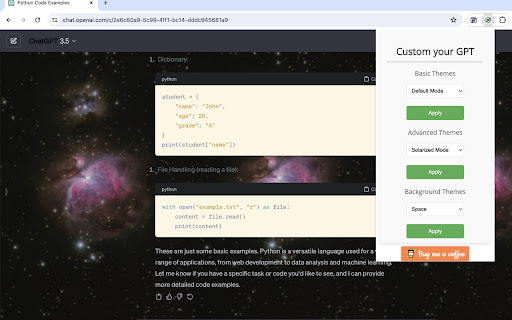


Improve the appearance of code snippets in ChatGPT code snippets. Upgrade your ChatGPT experience with our new Chrome extension! Specially designed for ChatGPT users, our extension gives you the power to customize your interface like never before. Break free from the default theme constraints and choose from a variety of stylish code snippet themes, tailored to your visual preferences and coding style. But that's not all – immerse yourself in an environment that inspires you by selecting a personalized background for the ChatGPT website. Easy to use and designed to boost your productivity and enjoyment, this extension is a must-have for every ChatGPT user.

ChatGPT Timestamp
Displays timestamps for ChatGPT messages ⭐ Love it? Star the GitHub repo! → https://github.com/Hangzhi/chatgpt-timestamp-extension Follow long chats with ease ✨ A tiny fix for a big blind spot — once you try it, you’ll never go back. ➡️ Install now and make every message count.

ChatGPT Code Highlighter
Improve the appearance of code snippets in ChatGPT code snippets. Welcome to ChatGPT Code Highlighter! This Chrome extension enhances readability and understanding by applying syntax highlighting to code snippets within ChatGPT conversations. 1. Click on the extension icon in your browser toolbar. 2. A popup will appear displaying a dropdown menu with the available themes. 3. Select your desired theme and click the "Apply Theme" button. 4. Your selected theme will be applied to all code snippets in ChatGPT.

ChatGPT Keyboard Shortcuts
Enhance your ChatGPT experience with easy-to-use keyboard shortcuts. Terminal like behavior inside ChatGPT/Perplexity and more coming... ⭐ CTRL + ArrowUp: previous prompts. Continue press to cycle through earlier prompts. ⭐ CTRL + ArrowDown: recent prompts. Continue press to cycle through your prompt history. If prompt box is empty, it starts cycling from the first prompt. ⭐ More to come... Please refresh ChatGPT/Perplexity tab after installing the extension. ✅ Added automatic functionality to expand the textarea to the ChatGPT maximum default (200px) when the text is too long. (v0.2) 🔧 Fixed bug where user couldn't send unchanged prompt. (v0.3) ✅ Added support for Perplexity AI (www.perplexity.ai). (v0.3) 🔧 Fixed support for Perplexity AI after UI change. (v0.3.1) 🔧 Fixed bug in ChatGPT where user could not cycle through recent prompts by pressing CTRL + ArrowDown. (v0.3.2) 🔧 Fixed support for Perplexity AI after UI change. (v0.3.3) 🔧 Fixed support for Perplexity AI after UI change. (v0.3.4) 🔧 Fixed support for ChatGPT after UI change. (v0.3.5) 🔧 Fixed support for ChatGPT after change. (v0.3.6) 🔧 Fixed support for ChatGPT & Perplexity AI after UI changes. (v0.3.7)

ChatGPT Equation Renderer
The ChatGPT Equation Renderer simplifies the way you work with mathematical language in ChatGPT. Features: - Copy the LaTeX code from any mathematical expression or equation from ChatGPT with a single click. - Works with both inline and block equations. The extension has a button that writes a prompt to ChatGPT asking it to write all mathematical expressions using LaTeX. The extension is open source. You can be confident that the extension is secure.
