
moapkmgopcfpmljondihnidamjljhinm
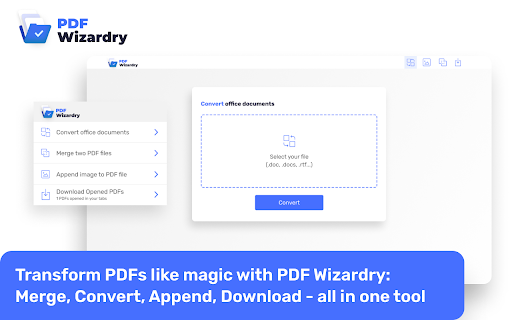
🔮📚 Introducing PDF Wizardry: The Ultimate Browser Extension for PDF Mastery! 🌟 Are you tired of struggling with PDF files, wishing for a simpler and more efficient way to handle them? Look no further! PDF Wizardry is here to revolutionize your PDF experience and empower you with a powerful set of tools. With just a click of a button, you'll unlock a world of possibilities to effortlessly transform PDFs into masterpieces. 🔑 Key Features: ✅ Convert DOCX and DOC files to PDF: Say goodbye to tedious formatting issues and let PDF Wizardry seamlessly convert your Word documents into professional-looking PDFs. Preserve fonts, layouts, and hyperlinks with ease, and effortlessly share your documents with anyone. ✅ Merge PDFs with ease: Combine multiple PDF files into a single, well-organized document. Whether you need to merge reports, contracts, or presentation slides, PDF Wizardry has got you covered. Simplify your workflow and enhance productivity like never before. ✅ Insert images into PDFs: Add a touch of visual appeal to your PDFs by effortlessly inserting images. Whether it's a company logo, product shots, or captivating illustrations, PDF Wizardry allows you to seamlessly integrate them into your documents. Impress your clients, colleagues, or readers with stunning visuals. ✅ Download opened PDFs: Sometimes, you come across a PDF that you urgently need to save, but the browser won't let you. With PDF Wizardry, you can effortlessly download any opened PDF directly to your device. No more frustration—simply click and save! Students: Convert lecture notes, research papers, and assignments into PDF format, merge multiple PDFs into a single comprehensive document, and add relevant images for more engaging presentations. Professionals: Easily transform important reports, proposals, and contracts into PDFs, merge multiple versions into one cohesive file, and enhance your documents with impactful visuals. Small Business Owners: Streamline your document management by converting invoices, receipts, and agreements into PDFs, merging related documents, and adding your company logo or product images. Content Creators: Convert your blog posts, articles, or e-books into PDF format, merge multiple chapters into one seamless document, and include captivating images for an enhanced reading experience. With PDF Wizardry, the power to manipulate and enhance PDFs is at your fingertips. Say goodbye to complex software installations and embrace the simplicity of a browser extension. Boost your productivity, improve collaboration, and transform your PDFs like magic. 🌟 Get PDF Wizardry today and unlock the true potential of your PDF files! 🌟

iLovePDF 2 - Chrome Extension
iLovePDF2 is the only 100% free PDF toolkit to Edit, Merge, Split, Compress, and Convert your files. iLovePDF2 Chrome extension offers a fortunate "Open With" button for any PDF document you encounter browsing Chrome. This feature lets you open PDF files directly in the I Love PDF 2ool, enabling you to perform various actions such as PDF conversion, compression, merging, splitting, or converting it into any desired file format for free. ✓ Compress PDF: Reduce PDF file sizes to desired quality and size. ✓ Merge PDF: Combine multiple scanned PDFs into one or insert images in PDF. ✓ Split PDF: Extract all pages as individual files or a range of PDF pages into multiple high-quality PDFs. ✓ PDF Converter: Convert various document formats to or from PDF, including Word, Excel, PNG, PSD, and more. ✓ Screenshots: Capture and save screenshots of the active tab for further processing and sharing. ✓ OCR Scanner: Convert scanned PDF documents into text-selectable PDF files. ✓ HTML to PDF: Capture webpages as PDFs for offline reading. ✓ Rotate PDF: Adjust and reposition specific pages within your PDF. ✓ Add Page Numbers: Customize PDFs with page numbers, choosing position, typography, and size. ✓ PDF Editor: Modify text, insert images, shapes, annotations, and more directly within your PDFs. ✓ Share PDF: Connect to Google Drive and Dropbox for easy access, selection, and sharing of PDFs from the Cloud. Experience the convenience of the I Love PDF 2 Chrome extension today and easily streamline your PDF tasks. Say goodbye to the complexities of PDF handling and hello to efficient, professional results. Your PDFs will thank you! Explore the I Love PDF 2 Chrome extension today. Say goodbye to PDF complexities and welcome professional-grade efficiency. Your PDF tasks have become significantly more straightforward, accurate, and free of charge.

Free PDF Editor & Reader — Compress, Merge, Convert PDFs · PDFly
PDFly extension gives you everything you need to work with PDF files — right inside Google Chrome and easy-to-use. • PDF reader with smooth scrolling and zoom controls • Handle large PDF files with optimized rendering • Navigate via Thumbnails, Bookmarks, or Headlines • Annotate PDF - add comments, highlights, text, and free hand drawings • View PDF comments, reply and add new comments • Fill PDF forms with automatic form detection • PDF to Word (DOCX) converter including OCR • Word to PDF - create PDF from Word documents instantly • PDF to JPG and JPG to PDF conversion • PDF to PNG and PNG to PDF transformation • PDF to Excel for data extraction and editing • Batch mode to convert multiple files at once • Merge PDF files - combine multiple PDFs into one document • Split PDF - separate large PDFs into smaller files • Extract PDF pages - save specific pages as new documents • Rotate PDF pages and delete unwanted pages • Reorder PDF pages with drag-and-drop simplicity • Delete PDF pages - delete any PDF page from your PDF document • Reduce file size while keeping quality • See preview which files require optimization • Choose from two advanced compression levels • Option to preserve Metadata, Bookmarks, Annotations and advanced PDF compatibility • Batch mode to compress multiple files at once • Password protect PDF files with encryption • Custom allow printing, text copying, form filling even for password-protected PDF • Unlock PDF - remove password protection from secured files • Secure PDF sharing with built-in protection • 256-bit encryption as standard • Batch mode to password-protect multiple files at once • Translate PDF - translate entire documents to 50+ languages with auto-detection of document language • Copy the translated output • Translations are processed securely using cloud connectivity • Summarize PDF - get instant AI summaries of long documents • Choose summary length, focus of summary (general, technical points, key points) and output langauge • Summaries are processed securely using cloud connectivity PDF editor, PDF reader, PDF converter in one app Replace multiple PDF tools with this single solution Compatible with Adobe PDF standards and all PDF formats Handle large PDF files with optimized rendering Batch process multiple PDF documents simultaneously Modern, intuitive interface designed for Windows Free: Unlimited free PDF reader and all basic PDF editing tools Pro: Advanced options, batch mode, no ads, AI tools (summaries, translate, OCR), unlimited files

PDF Combiner
A powerful and easy PDF combiner to merge documents in one click. Your go-to tool for PDF files. 🚀 Need a simple solution to join multiple PDF files? Combine them instantly with our lightning-fast PDF merger. No uploads. No limits. Just results. ✨ Why PDF Combiner is Your Ultimate Solution Transform scattered documents into one organized file. Built for speed, designed for simplicity, crafted for you. 1. Add Your Files - Drag and drop PDFs or click to upload. Even right-click PDFs from any website to add them instantly! 2. Arrange Your Order - Reorder files with simple drag-and-drop. Perfect sequence every time. 3. Merge & Done - Click "Combine" and your merged PDF downloads automatically. That's it! 🚀 Lightning Speed - Merge unlimited PDFs in under 10 seconds 🔒 100% Secure - All processing happens locally on YOUR computer. Zero server uploads. Your files never leave your device. 📶 Works Offline - No internet required. Perfect for sensitive documents. 🎯 Smart Right-Click - Save PDFs from any website directly into the combiner ✨ Intuitive Interface - Clean design. Zero learning curve. 💻 Universal Compatibility - Works on Windows, Mac, and Linux 📄 Unlimited Files - Combine 2 files or 200 files. We handle it all. 🎯 Perfect For Every Professional 👨💼 Office Managers - Organize reports and invoices seamlessly 💼 Corporate Teams - Maintain compliance documents for audits 📚 Teachers - Create comprehensive course materials 👨🎓 Students - Merge assignments and research papers effortlessly ✍️ Writers - Combine chapters into complete manuscripts 🔬 Researchers - Compile journals into single reference documents 💡 Key Benefits You'll Love ✅ No Registration Required - Install and start merging immediately ✅ Privacy First - Your data stays on your device. ✅ No File Size Limits - Handle large documents without breaking a sweat ✅ Instant Results - Process files faster than any online tool ✅ Professional Quality - Crystal-clear output every time ✅ Flexible Workflow - Upload first, arrange later Your privacy is sacred. Since everything runs locally, your files never touch our servers. No data collection. No storage. No tracking. Just pure, secure PDF combining. Most PDF tools force you to upload files to their servers. Not us. We built PDF Combiner to work entirely on YOUR machine. Faster processing. Better security. Total peace of mind. – Support for additional file formats – Split PDFs into separate files – Advanced editing capabilities – Custom page selection Install PDF Combiner in 2 clicks and experience the fastest, most secure way to merge PDFs. No learning curve. No complications. Just effortless document management. Your ultimate PDF combining solution is one click away!

PDF Candy | online PDF tools
A fast and easy way to edit, merge, split, compress, and secure PDF files. PDF Candy is an all-in-one online solution for working with PDF files on the go. Fast and easy to use tools at your fingertips. Simplify your PDF tasks directly in your browser! Official extension from PDF Candy. 19 languages. With this extension, you can work with PDF files easily and quickly: compress, convert to JPG, and extract text or images from files without having to visit the website. Access tools right from the toolbar and context menu for faster productivity. Convert webpages and images from context menu. ★ Main features of the extension: - Compress PDF files - Convert PDF to JPG - Extract text from PDF - Extract images from PDF ★ Quick access to 90+ online tools: - Edit PDF - Merge PDF - Convert PDF to Word - Split PDF - Unlock PDF - Convert Word to PDF - Edit PDF Metadata - Crop PDF - Rearrange pages - and many others Access more than 90 PDF related tools directly from the extension, making it easier to manage and edit PDFs on the fly. By installing this extension, you agree to PDF Candy Privacy Policy and Terms of Use.
