
mnmhllblhgknfjgaclgckpalcenbbcba

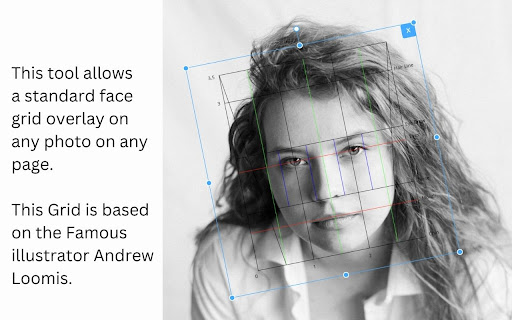
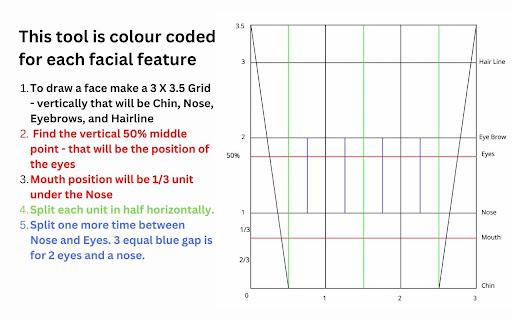
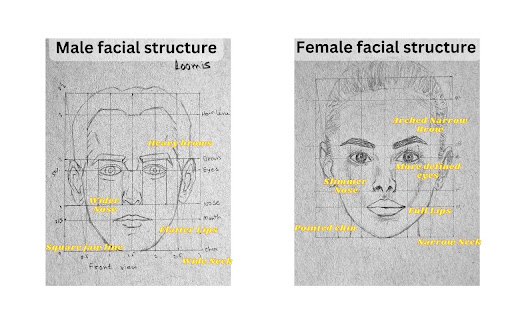
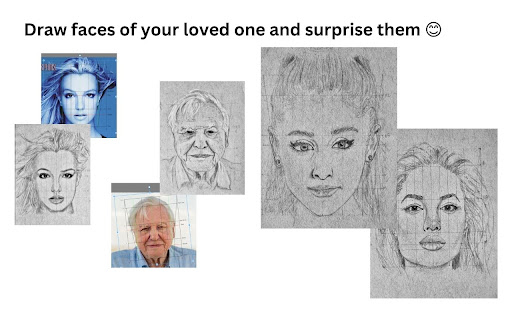
Drawing faces can be challenging, especially when aiming for specific details. Even small variations in measurements can drastically alter the appearance of a face. This Chrome extension is designed to assist artists struggling with facial proportions. Built on the principles of the Loomis portrait method, it enables users to sketch faces with precision. Additionally, it empowers artists to depict any desired facial features accurately. Over time, this tool aids artists in developing a keen instinct for facial nuances. By understanding the unique characteristics of each individual's face, artists can enhance their ability to capture likeness in their sketches. Please feel free to reach out with any questions or suggestions for improvement. I'm always eager to assist! 😊

Save To Google Photos
The Save To Google Photos Extension adds a button to your right click that instantly uploads images to your Google Photos account. The extension will upload the image to the currently signed in google account. The image will be saved in its original quality. If the image is not hosted publicly or is hosted locally the extension my not be able to fetch the image.

Photo Editor
A simple in-browser photo editor - use this when you want to do some quick edits to your photos Use this free online tool to quickly and easily perform common photo editing tasks directly in your browser... Features: - edit images from your computer - edit images from a URL you enter - select an image in a browser tab, then choose "Edit Photo" from the right-click context menu - adjust brightness, contrast, saturation, change orientation, image scaling, apply presets and filters, crop and scale, add watermarks and signature. - provides links to other tools from LinangData from the More tools menu, including: XML Formatter; CSV - JSON Converter; Grammar, spelling and style checker; Calculator; Photo Exif Data Viewer; Weather Forecast; World Clock - It's free!

eBank AI Art Generator
Create Beautiful AI Art and Search AI Community Art Create Beautiful AI Art right from any selected text or use any prompt you like! Leading AI Art Generator creates 1024px square or even 1080p HD AI Art in 16:9 and 9:16 - landscape or portrait.

Carla Draw
Allows drawing on existing images and saving a nice picture in SVG format Search for an image to draw in Google or anywhere on the internet. Choose an image, activate Carla Draw and you will be presented with a minimalistic drawing interface to draw on top of it. At the end of the process, you can save your drawing in SVG format to re-use anywhere it fits. This extension has been created in the context of offering more autonomy in the creative process of mentally disabled artists. Developed by boblemarin for La "S" Grand Atelier in Vielsalm, Belgium.
