
mnloceeicbhfhinjcnfieonmpindkmpb



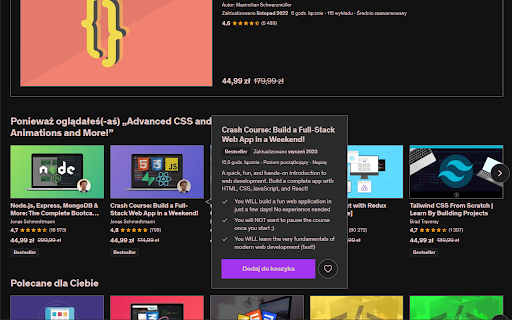
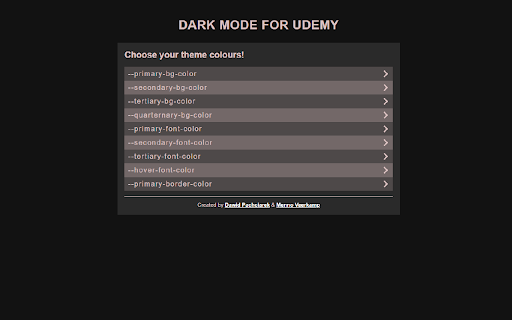
A dark theme for the udemy website Adds dark theme for the udemy.com website Features: - adds a dark theme for all views inside the udemy.com domain - allows you to configure custom colours to create your own theme Github: https://github.com/Pachciar3/udemy-dark-mode-extension

Midnight Dark mode - Dark theme Chrome
Turn on dark mode across all websites. Customize dark theme and brightness. Dark reader - dark skin for Chrome. Dark Mode - Midnight Chrome: A Night-Time Companion for Your Browsing Experience Transform your browsing experience with Dark Mode - Midnight Chrome, the ultimate Chrome extension designed for comfortable and eye-friendly internet usage at any hour.* Key Features and Benefits: 1. Universal Dark Mode: Instantly apply a sleek, dark theme across all your favorite platforms, including YouTube, Facebook, and more, ensuring a consistent and strain-free viewing experience. 2. Reading Night Shift Mode: Automatically adjusts your screen to warmer tones during night-time, reducing blue light exposure and aiding in better sleep quality. 3. Collaborative Browsing Support: Enhance group work or shared screen experiences with an interface that's easy on everyone's eyes, ideal for late-night study sessions or team projects. 4. Customizable Viewing: Tailor your browsing experience with adjustable brightness, contrast, grayscale, and color temperature settings, providing personalized comfort and accessibility. 5. Enhanced Contrast for Accessibility: Specialized contrast settings to aid users with visual impairments, ensuring the web is accessible and enjoyable for everyone. 6. Free to Use: Enjoy all these premium features at no cost, making it an ideal choice for students, professionals, and casual users alike. 7. Multi-Language Support: Catering to a global audience, ensuring a user-friendly experience for diverse users. 1. Install with a Click: Simply add the "Dark Mode - Midnight Chrome" extension to your Chrome browser from the Chrome Web Store. 2. One-Touch Activation: Enable dark mode across all sites with just one click. 3. Customize Your Experience: Access the extension's menu to adjust brightness, contrast, and more to fit your viewing preferences. 4. Enjoy Collaborative and Individual Browsing: Whether it's for personal use or while collaborating, the extension adapts to your needs. - Eye Comfort: Reduces eye strain, particularly during night-time browsing. - Enhanced Readability: Improves text clarity and reduces glare. - Energy Efficient: Can lead to reduced screen power consumption. - User-Friendly: Intuitive design for ease of use and customization. With "Dark Mode - Midnight Chrome," night-time browsing is no longer a strain on your eyes. Whether you're a night owl, a professional working late, or someone who enjoys a customizable browsing experience, this extension is your go-to solution for a more comfortable and personalized internet experience.

Ecosia Dark Mode
A dark theme for the Ecosia search engine This simple extension has a toggle for the dark mode, to allow you to turn it on and off whenever you like. Permissions & Privacy details and information can be found on the GitHub homepage in the link above. This extension is also available for the FireFox browser! Please allow a few days for updates if you notice any styling issues, as Ecosia are constantly updating their web-pages.

Blackfy
Dark Reader for Chrome. Apply dark theme & night mode on all websites with Blackfy. Transform your browsing experience into a relaxing, customizable, and eye-friendly journey with DarkMode for Chrome! This easy-to-use extension offers dark mode, night mode, and many other options to protect your eyes and enhance your browsing experience. Important Disclosure: This extension uses affiliate links to recommend hotel deals. We may earn a small commission if you make a booking through the links provided. Thank you for supporting us! Key Features: Dark Mode & Night Mode: Activate a full dark mode or customizable night mode for comfortable browsing in the dark. Light Mode: Easily switch between dark mode and light mode to adapt to any lighting environment. High Contrast & Grayscale: Choose high-contrast or grayscale modes for an optimized visual experience. Website Exception List: Add your favorite websites to the exception list to keep them in light mode or customize them individually. Eye Protection: Reduce brightness and adjust colors to protect your eyes, even in low-light conditions. Universal Compatibility: Works on any website, including Google Chrome, Google Search, Sheets, and many more. Advanced Customization: Tweak colors, brightness, and contrast to create the perfect dark theme for you. Easy Installation: Just a few clicks to activate dark mode and start browsing comfortably. Why Choose DarkMode for Chrome? Accessible & User-Friendly: Perfect for everyone, from beginners to advanced users. Optimized for Chrome: Works seamlessly on Google Chrome and Chrome Browser, offering smooth integration. Protection & Comfort: Reduce blue light and adjust colors to protect your eyes and enhance your browsing experience. Full Customization: Change colors, adjust brightness, and create the perfect browsing experience tailored to your needs. Google Chrome, Chrome Browser, Browser Extension Perfect For: Nighttime Browsing: Ideal for those who use Chrome at night or in low-light environments. Eye Protection: Reduce eye strain and protect your eyes from bright light. Advanced Customization: Create the perfect browsing experience tailored to your preferences. Install DarkMode for Chrome today and enjoy a better, more comfortable, and eye-friendly browsing experience! What’s New: Light Mode: Added the ability to switch between dark mode and light mode. Website Exception List: Highlighted the functionality to add websites to an exception list.

Auto Dark for YouTube™
Automatically turns on Dark Theme at night for YouTube™ A tool which automatically toggles the darkmode based on the time of the day
