
mngoabhpahpmhhkkjdconfmdnknmdjff

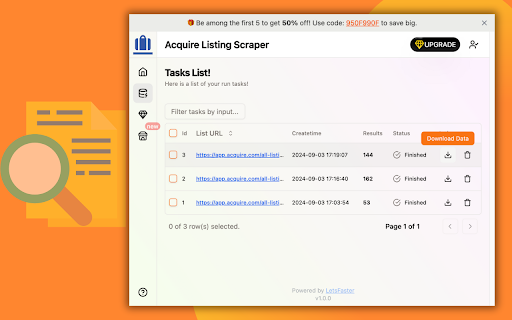


One-click extract Acquire listing data from the listing page as Excel/CSV/JSON/HTML/XML file. 🚀 Effortlessly extract acquire.com listings data from the listing search page to a Excel/CSV/JSON/HTML/XML file. 🔧 How it Works: 1️⃣ Go to the Acquire.com listings search page. 2️⃣ Perform a search, then click the "Start" button on extension popup. 3️⃣ Choose to download from the data scraping pop-up or the task list on extension. 🌳 What groups data can I extract using this tool? Like date, startupId, uid, financing, type, hasMetrics, openToOffers, askingPrice, revenueMultiple, profitMultiple, advisorId, listingHeadline, listingType, managedByMicro, topPickedAt, businessVerified, totalRevenueAnnual, totalProfitAnnual, totalGrowthAnnual, location, dateFounded, team, about, status, revenue, customers, keywords, annualProfit, growthAnnual, techStack, techStackKeywords, businessModel, businessModelKeywords, competitors, weeklyViews, score and so on. 💡 Why Use Acquire Listing Scraper? 1️⃣ Quick Search and Comparison ⚖️ Users can rapidly gather detailed information on multiple SaaS listings, simplifying the comparison of features, pricing, and potential growth. 2️⃣ Regular Market Monitoring 📈 For users who need to stay updated on market trends—such as investors and entrepreneurs—the plugin enables automatic scraping of the latest listings, ensuring they have current data. 3️⃣ Data Analysis and Reporting 📝 Users can export the scraped data into formats like CSV or Excel, facilitating further analysis and helping in the creation of insightful reports. 4️⃣ Save Time and Effort ⏰ Manually collecting data from multiple listings can be tedious. The Acquire Listing Scraper simplifies this process, allowing users to focus on what matters most: making informed decisions. 🎬 Who Use Acquire Listing Scraper? 1️⃣ SaaS Entrepreneurs 💼 SaaS entrepreneurs looking to buy or sell startups can benefit from quick access to relevant listings. The Acquire Listing Scraper allows them to efficiently extract and analyze data, facilitating informed business decisions. 2️⃣ Investors 💰 Investors interested in acquiring SaaS startups need timely information to identify lucrative opportunities. The plugin streamlines the data-gathering process, enabling them to make strategic investments. 3️⃣ Business Analysts 📊 Analysts researching market trends in the SaaS industry can use this tool to collect comprehensive listing data, enhancing their insights and reports. 4️⃣ Advisors and Brokers 🤝 Business advisors and brokers who assist clients in buying or selling startups can utilize the scraper to gather essential data quickly, improving their service offerings. By using the Acquire Listing Scraper, users can efficiently gather and utilize SaaS startup listing data from Acquire.com, enhancing their work efficiency and enabling smarter decision-making. Whether for buying, selling, or analyzing SaaS startups, this extension meets a variety of user needs. 🌟 Note: This extension is an independent creation and is not affiliated with or endorsed by Acquire❗️🔒

Linkedin Sales Navigator Email Finder & Lead Scraper – Scrupp
The application extracts, cleans & enriches data by emails in one click to CSV/XLSX. Scrupp is a LinkedIn lead generation tool that helps you find leads, reveal business emails, scrape Sales Navigator and LinkedIn search results, and export clean prospect lists for outreach. Built for sales teams, recruiters, agencies, and founders, Scrupp combines LinkedIn scraping, email finding, lead enrichment, and list export in one workflow. You can extract leads from LinkedIn Sales Navigator, LinkedIn search, posts, jobs, and Apollo, then enrich them with company data and export everything to CSV or XLSX. Scrupp helps you: Scrape leads from LinkedIn Sales Navigator Extract people from LinkedIn search results Find business emails from LinkedIn profiles Collect leads from LinkedIn posts and jobs Import and extract leads from Apollo Enrich contacts with company data Export lead lists to CSV or XLSX Core features LinkedIn Sales Navigator Scraper Extract leads from Sales Navigator searches in bulk and build prospect lists faster. LinkedIn Search Scraper Scrape LinkedIn search results and collect people without manual copy-paste. LinkedIn Email Finder Find verified business emails for leads discovered on LinkedIn. LinkedIn Post and Job Scraper Extract leads from LinkedIn posts, commenters, likers, and job-based workflows. Apollo Lead Extractor Pull leads from Apollo and bring them into the same prospecting workflow. Lead Enrichment and Export Enrich contacts with company data and export clean lead lists for CRM and outreach tools. Why teams use Scrupp Build lead lists faster Reduce manual prospect research Find business emails from LinkedIn Keep prospecting and export in one workflow Prepare outreach-ready data for CRM, cold email, and recruiting workflows Use cases B2B lead generation Sales prospecting Cold outreach Recruiting and talent sourcing Agency list building CRM enrichment Market research Scrupp helps you turn LinkedIn, Sales Navigator, and Apollo into a faster lead generation workflow.

Table Exporter - Scrape & Extract Data to Excel, Sheet, CSV & JSON
Automatically detect and extract tables data from any website. Export HTML tables to Excel, CSV, JSON, or Clipboard in one click. Table Exporter is a fast and easy browser extension that lets you extract and export any HTML table from any webpage in just one click. Perfect for anyone working with data from dashboards, reports, analytics tools, research pages, admin systems, or business reports. No manual copying, no formatting issues, and no extra tools required. The extension automatically detects all tables on the page and allows you to export them as CSV, XLS, or Copy. If a webpage has multiple tables, you can choose which one you want. For users working with complete datasets, Table Exporter can also **extract and keep hyperlinks inside table cells**, ensuring you don’t lose important reference URLs such as product pages, document links, resource pages, or tracking information. 📍Export Any Webpage Table ✅ Automatically detects and extracts data from HTML tables. 📍 Export to CSV, XLS, JSON or Copy & Past ✅Compatible with Excel, Google Sheets, BI tools, and reporting systems. 🧩 Works with Multiple Tables on a Page ✅Export one table or all tables with a single click. 🔗 Extract Hyperlinks from Table Cells ✅Preserve important URLs and references in your exported data. ⚡ No Copy-Paste Needed ✅Clean and structured data without manual work or formatting. 👨🎓 Ideal for All Types of Users Great for students, researchers, data analysts, SEO specialists, developers, testers, and business professionals. 🧠 Simple and Easy to Use Lightweight interface with instant one-click exporting. 🎯 Who Is Table Exporter For? Students gathering research data Data analysts extracting online reports SEO professionals collecting SERP or competitor tables Developers testing content or UI output Business users preparing spreadsheets or presentations Content creators organizing online information Anyone who needs fast and accurate data extraction 🚀 So what are you waiting for? Install it now and start exporting tables in seconds!

Table Extractor
Extract tables on webpage to CSV or JSON. Forget about manually selecting tables and content. The tool will find all html tables on a page and make a json or csv of each one.

Zillow Data Exporter
Instantly export Zillow property listings into clean CSV or Excel (XLSX) files, right from your browser. Zillow Data Exporter is the ultimate tool for real estate professionals, investors, and data analysts. Capture detailed property data from Zillow in a single click, saving you hours of manual work. You can easily export four types of listings: - Properties For Sale - Properties For Rent - Sold Properties - Your Saved/Favorite Properties A free Property Data Labs account is required to use the extension. Signing up is quick, free, and no credit card is needed. Get started at https://www.propertydatalabs.com. ❓ What do I get with the Free plan? Our free plan is designed to be generous and genuinely useful. It includes: - 50 exports per month. - Up to 40 listings per export, totalling 2,000 listings monthly. - Data saved in CSV format. Note: On the free plan, you export one page of results at a time. Our paid plans unlock powerful automation and data features designed for serious professionals. Basic Plan - Supercharge Your Exports: - 300 exports per month - Multi-Page Exports: Capture up to 800 listings across many pages in a single click. - Custom Columns: Choose exactly what data you want to export. - Time Filters: Automatically avoid exporting duplicate listings you've already seen. - Rich Data: Export over 35 data points per listing and all image URLs. - Building Units: Export all sub-listings for rent (e.g., all units in an apartment building). Pro Plan - The Ultimate Data Toolkit: - Includes all Basic plan features. - Unlimited Exports: No monthly limits. - Google Sheets Integration: Automatically send your exported data directly to Google Sheets. - Cloud Features: Save your export history and use our Cloud Importer and Monitor tools. - Custom Templates: Create and save export settings for different projects. - Parquet File Exports: For advanced data analysis workflows. Yes. Your privacy is a priority. All data is processed and stored locally in your browser. We do not have access to your exported files. If you uninstall the extension, your data is automatically deleted. We'd love to hear from you! For help, bug reports, or suggestions, please email us at support@propertydatalabs.com or use the contact form on our website. If you find the extension useful, please consider leaving a five-star rating. It helps us immensely! Zillow Data Exporter is an independent tool developed by Property Data Labs and is not affiliated with, endorsed by, or in any way officially connected with Zillow, Inc. For more information, please visit our disclaimer page at https://www.propertydatalabs.com/legal/disclaimer.
