
mnejhfjohfbgdoadgjmfigodfagokeme

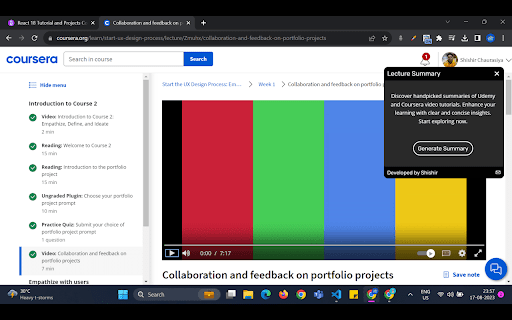
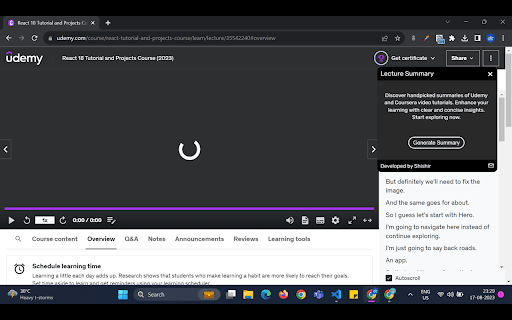
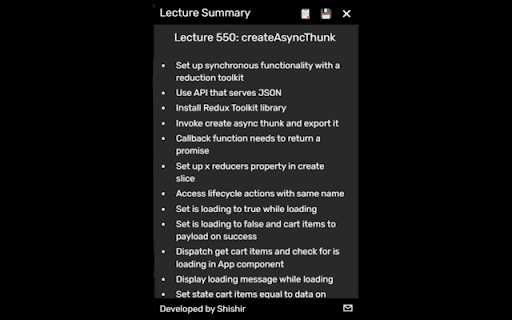

Helping you easily get summaries from #youTube, #udemy & #coursera video courses. Introducing Lecture Summary: YouTube, Udemy And Coursera: Your Ultimate Learning Companion for Udemy and Coursera Note: This extension now supports YouTube as well, with a stipulation that videos should be under 28 minutes in duration, and transcript length should not exceed 4000 words. Previously known as "SpeedySynopsis," the extension has been rebranded to "Lecture Summary: Udemy and Coursera." Once you've installed this extension, you can either click on the extension itself or use the shortcut Ctrl + B on Windows and cmd + B on Mac to activate it. Unlock the Power of Summarized Learning: Enhance your online learning experience with Lecture Summary: – the must-have Chrome extension designed exclusively for YouTube, Udemy and Coursera users. Dive into the world of efficient learning, where video summaries meet transcript insights, giving you a unique edge in mastering your chosen courses. Effortless Summaries, Instant Brilliance: Tired of sifting through lengthy course videos? Say hello to Lecture Summary! We're here to transform the way you learn. With our seamless integration, each video comes with a concise summary that distills key concepts, enabling you to grasp vital information at a glance. Transcripts Unveil the Details: Uncover the intricacies of each lecture with our integrated transcripts. Whether it's a complex formula, an important definition, or a mind-boggling theory, our meticulously crafted transcripts ensure you don't miss a single detail. Read along as you watch or use them to quickly find specific points in the video. Copy or Download – It's Your Choice: Lecture Summary empowers you to take control of your learning. Copy the summary to your clipboard for quick reference or download it in text format to create your personalized study guide. Now, reviewing crucial points and revisiting key takeaways has never been easier. One-Time Hassle-Free Setup: Concerned about data privacy? We've got you covered. Lecture Summary values your security. Set up your account with Eden AI by providing your API key – a one-time process that grants you seamless access to the extension. Rest assured, your API key remains strictly local and confidential. Why Lecture Summary? ✓ Transform lengthy videos into insightful summaries. ✓ Seamlessly navigate through course content with integrated transcripts. ✓ Create a personalized learning experience with downloadable summaries. ✓ Secure setup with a one-time API key submission. Experience a new era of efficient learning with Lecture Summary. Elevate your YouTube, Udemy and Coursera journey today. Maximize your time, amplify your knowledge. Download now and revolutionize the way you learn!

Udemy - Improved Course Library
Adds current ratings and other detailed information to all courses in your Udemy library. This extension adds additional course information to the courses in your Udemy library. It uses the Udemy API to retrieve additional information about the courses in your library and adds the following elements to each course: • The total runtime • The rating • The total number of ratings • The number of enrolled students • The date of the last update • Info about available subtitles Additionally it displays a thin colored strip at the bottom of the course card, from red (3.5 stars and below) to green (5 stars). This should give you a good idea of which course is worthwhile and which you might want to archive instead. Note: If a course has stopped enrollment and is no longer publicly visible, no stats are available for that course. If you like the extension, I'd appreciate a review! ★★★★★ This extension is open-source: https://github.com/tadwohlrapp/udemy-improved-course-library Udemy is a trademark of Udemy, Inc. This browser extension is not a product of Udemy, Inc. and is not affiliated with Udemy, Inc. in any way.

Quicksense - Ultimate YouTube Summary Tool using AI
YouTube Summary Tool using AI. Take notes of lectures, Podcast or any other videos and gain insights instantly. Quicksense - The Ultimate YouTube Summary Tool for Effortless Note-Taking and Insight Generation Revolutionize the way you learn and consume content on YouTube with Quicksense, the most powerful AI-driven YouTube video summarizer available as a Chrome extension. Our cutting-edge tool harnesses the power of artificial intelligence to generate concise, high-quality summaries directly within the YouTube interface, saving you time and elevating your learning experience. 🚀 Instant YouTube Summaries: Grasp the core message of any YouTube video in seconds, enabling you to quickly absorb the main points and ideas without watching the entire video. 🎯 AI-Powered Key Insights Extraction: Our advanced AI algorithms identify and highlight the most crucial information from the video, ensuring you never miss important concepts or takeaways. 🧩 Seamless YouTube Integration: Access summaries effortlessly without leaving YouTube, thanks to our intuitive and user-friendly extension design that blends perfectly with the platform. ⚡ Lightning-Fast Processing: With an average summary generation time of just 5 to 10 seconds, depending on the length of the video, you can quickly digest even the longest videos and take notes using AI. 💬 Interactive Video Chat: Engage in meaningful conversations with the video content, asking questions and receiving AI-generated responses for a more immersive learning experience. 🔗 Enhanced Sharing Options: Discover new ways to share your learnings from videos, making it easier to collaborate with others and showcase your knowledge. Perfect for: - Students and lifelong learners seeking to expand their knowledge efficiently by taking notes using AI-generated YouTube summaries - Professionals looking to stay up-to-date with industry trends and best practices through concise video insights - Content creators and researchers analyzing video content for inspiration and extracting key information quickly - Busy individuals who want to make the most of their time while consuming informative content on YouTube - Anyone looking to enhance their learning and productivity on the world's largest video platform Powered by fine-tuned AI models specifically crafted for summarizing different categories of videos, Quicksense delivers unparalleled accuracy and reliability in YouTube video summarization. Our extension is designed to cater to a wide range of topics and genres, making it the ultimate tool for anyone seeking to unlock the full potential of YouTube as a learning and personal growth platform. Experience the future of content consumption with Quicksense, the best YouTube summary extension for effortless note-taking and insight generation. Download our Chrome extension today and take your YouTube learning experience to new heights!

Better coursera subtitle
・We recommend turning off the original subtitles for a better experience ・You can switch the language of the subtitles by switching the language of the Transcript ・Please refresh the page if it is not displayed properly

CSA - Asst. for saving files from Coursera
Assistant for saving media files from coursera.org, such as videos, subtitles, and video descriptions. Assistant for saving media files from the website www.coursera.org, such as videos, subtitles, and video descriptions. The assistant prepares the file names for saving, and the user saves the files with the new name to their own folder. "CSA - Assistant for saving files from Coursera" - a browser extension for Google Chrome that makes saving Coursera video materials easy and convenient. Did you know that once you finish a course, you lose access to its video materials? If you want to retain those valuable insights for future reference, you may have resorted to recording videos onto your own storage devices. However, this process can be inconvenient, especially when it comes to renaming files or making mistakes. With "CSA - Assistant for saving files from Coursera", you can effortlessly tackle this challenge in a legal and user-friendly manner. Our extension enables you to save Coursera videos with logical and intuitive file names. Say goodbye to tedious renaming and errors - our assistant takes care of it all! To get started with the extension, simply visit the Chrome Web Store and install it. Saving Coursera video materials has never been easier! We understand the importance of retaining knowledge, and our mission is to empower you in your learning journey. Join thousands of satisfied users who have embraced "CSA - Assistant for saving files from Coursera" and enjoy seamless video saving from Coursera. Experience the convenience and peace of mind today! What's new: ##version 2.2.0 Adapted to changes to the Coursera website (2024.01) Fixed the automatic translation of subtitles. Language code has been added to the file name of subtitles and texts. The language is determined only by the language of the entire portal, not by the selected language in the video menu. To change the language of subtitles that are different from the portal language, turn off the subtitle storage in the settings, and select the option to store additional subtitles and define your own list of additional languages. ## version 2.1.2: The integration of the video subtitle translation module (CST) into the automatic mode has been implemented. ## version 1.9.0: - New option to add a video duration in minutes to the file name. The duration is rounded to the nearest whole number. - If the video search function is enabled, a color mark is added to the list of videos in the left pane to indicate whether the file has already been downloaded. This mark changes when the page is loaded, analyzing the status of the file (new - green, existing - red). It also changes at the beginning of file download (yellow) and after all files are downloaded (red). The status of whether the file has been downloaded or not is calculated only on the basis of the previously saved video file. ## version 1.8: Search for videos in a list. Find the name of the video in the list in the left pane. And scroll through the list to the name of the current video. It is useful when the module has a large number of sections and you need to take the course again, but in a different language. (https://youtu.be/ajOcopEuxGI) ## version 1.7: - For compatibility with some browsers, an alternative file download method has been added to the settings section. This can solve the problem of saving on some operating systems, such as earlier versions of macOS. - The mechanism for counting saved files has been redesigned. - Added information about a previously saved file when you hover over the name of this extension. - Added an indicator that this is a new object to be saved. Green or red dot as a prefix to the title name. ##version 1.6: - The mechanism for saving files has been redesigned, now it is done through the browser API. - Added a background process to control notifications from processes about saving files. - Added a counter of stored files and its decrease after the actual saving of these files. - Control of saved files by yourself/others. - Added a prefix with the course name to the file name - Added automatic change to dark and light theme according to browser themes ##version 1.5: - Displays information about all available additional languages for the current video when you hover over the video title. - Added the option to store additional video description and subtitles in other languages. The list is separated by commas. - Saves additional media files in all selected languages. - Information about the generated file name is displayed when you hover over the save button.
