
mmppdfhhckpgceoomllmhccdhlhdcfip
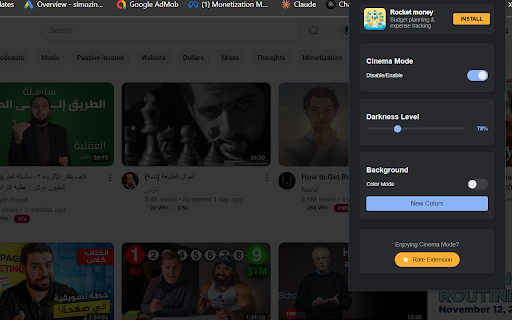


Turn Off the Lights -Dims the webpage except for videos, creating a cinema-like experience # Turn Off the Lights - Cinema Mode for YouTube ## Description Transform your YouTube viewing experience with Turn Off the Lights - a sleek extension that creates the perfect **cinematic** atmosphere. When activated, it intelligently dims everything on the web page except for the video you are watching, simulating the cinema experience right in your browser. ## Key Features - One-click activation: The entire page will be fading to dark while keeping the video bright - Smart video detection: Automatically identifies and highlights YouTube videos - Adjustable darkness: Customize the dimming level to your preference - Dynamic color modes: Choose between solid black or gradient color backgrounds - Smooth transitions: Elegant fade effects for a premium feel - Video-centric design: Keeps video controls easily accessible ## How It Works 1. Install the extension 2. Navigate to any YouTube video 3. Click the toggle to activate cinema mode 4. Enjoy your video in a distraction-free environment ## Controls - Enable/Disable toggle: Quick access to cinema mode - Darkness slider: Fine-tune the dimming intensity - Color mode: Switch between classic dark and gradient backgrounds - New Colors button: Generate fresh gradient combinations Perfect for: - Late-night viewing - Distraction-free watching - Enhanced video focus - Reduced eye strain - Professional presentations Experience YouTube videos the way they're meant to be watched - in a true cinematic environment.

Youtube Lights
Introducing "Youtube Lights" - the Chrome extension that enhances your Youtube viewing experience. It brings the ambient "cinema lights" of your favorite videos to your entire screen, creating a stunning and immersive experience. With Youtube Lights, you have complete control over the colors and intensity of the lights, allowing you to personalize your viewing experience. The beauty of Youtube Lights lies in its simplicity. It seamlessly integrates with your Youtube page and is easy to use. With just one click, you can activate the lights and transform your screen into a breathtaking cinema-like atmosphere. Whether you're watching a movie, concert, or simply browsing videos, Youtube Lights adds a touch of magic to your experience. You can choose from a range of colors and adjust the intensity level to create the perfect atmosphere for your mood. Whether you prefer a relaxing and calming environment or a lively and energetic one, Youtube Lights has got you covered. It's a perfect tool for movie nights, studying, or simply relaxing and watching your favorite videos.

Turn off the lights with one button
Click one click to turn off the lights and the page will switch to dark mode

YouTube Backlight
Enhance your YouTube experience with YouTube Backlight! Customize themes and smart lighting for immersive, comfortable viewing. Enhancing the visual experience of online content is crucial in today's digital age. One of the latest innovations in this realm is the YouTube Backlight extension. This tool transforms your YouTube viewing experience by adding a dynamic, Smart Light effect around your videos, similar to ambient lighting in high-end home theater setups. Key Features of YouTube Backlight Extension The YouTube Backlight extension is designed to provide users with a visually immersive experience. Here are some of its standout features: ✅ Dynamic Backlighting: - Adds ambient lighting around the video, changing in real-time with the video content (Smart Light). - Creates a theater-like experience, reducing eye strain and enhancing immersion. ✅ Customizable YouTube Theme: - Allows users to choose from various themes to match their preferences. - Options include dark mode, light mode, and several custom themes to personalize the YouTube interface. ✅ Smart Light for YouTube Videos: - Adjusts the backlight based on the dominant colors in the video. - Enhances the viewing experience by creating a harmonious visual effect. ✅ User-Friendly Interface: - Easy to install and use, with intuitive controls for adjusting backlight settings. - Minimal impact on browser performance, ensuring a smooth and enjoyable experience. Entertainment: Movie Nights: Dynamic backlighting transforms YouTube movie nights into a cinematic experience. The extension adjusts the light to match the scenes, making viewing more engaging and immersive. ✓ Music Videos: Enhance the visual appeal of music videos with Smart Light effects that sync with the beat and mood of the video. Education: ✓ Online Lectures: Improve focus and reduce eye strain during long online lectures by using a theme that reduces screen glare and adds a soft backlight. ✓ Tutorials and How-To Videos: Make learning more enjoyable with a personalized YouTube theme that keeps you engaged throughout the tutorial. Gaming: ✓ Game Streams: Elevate your gaming streams by adding ambient lighting that enhances the visual quality of the gameplay. ✓ Walkthroughs and Reviews: Watching game walkthroughs and reviews with backlighting that matches the game’s environment provides a more immersive experience. ☑️ Increased Engagement: - Studies show that visual enhancements like backlighting can increase viewer engagement by up to 30%. - Users are likelier to watch videos for extended periods when the viewing experience is enhanced. ☑️ Reduced Eye Strain: Research shows that ambient lighting can reduce eye strain by up to 60%, making it easier to watch videos for extended periods. - Users report feeling less tired after using the YouTube Backlight extension, especially during nighttime viewing. ☑️ Improved User Satisfaction: - Surveys indicate that over 85% of users feel more satisfied with their YouTube experience after installing the YouTube Backlight extension. - Enhanced visual effects lead to higher user retention and frequent platform use. Practical Tips for Maximizing the YouTube Backlight Extension Customize Your Settings: Use the customizable YouTube theme options to create a viewing environment that suits your preferences. Experiment with different themes to find the one that best enhances your experience. 🔸 Optimize Viewing Conditions: Use the Smart Light feature to adjust the backlight based on your environment. For example, increase the backlight intensity in a dark room to reduce eye strain. 🔸 Explore Different Content: Try using the extension with various types of content, such as movies, music videos, and educational tutorials, to see how the backlighting enhances each experience differently. The YouTube Backlight extension is a powerful tool for anyone looking to elevate their YouTube viewing experience. With features like dynamic backlighting, customizable themes, and Smart Light adjustments, it offers a unique and immersive way to watch videos. Whether watching movies, learning new skills, or enjoying music videos, this extension provides a visually stunning and engaging experience. By leveraging the benefits of the YouTube Backlight extension, you can transform your YouTube sessions into a truly cinematic experience. Embrace the future of online video viewing with this innovative tool and enjoy the enhanced visual effects that come with it. Install the YouTube Backlight extension today and see how it changes your digital life.

YouTube Video Zoom
Resizes YouTube videos to fill the entire screen, removing black bars 🎬 YouTube Video Zoom – Maximize Your 21:9 Ultrawide Experience Transform your ultrawide monitor into the ultimate YouTube cinema! Tired of those annoying black bars stealing precious screen space on your 21:9 display? This extension eliminates letterbox bars (top and bottom black bars) from YouTube videos, ensuring you get the most out of every pixel on your ultrawide screen. 1. Install the Extension - Add the extension to Chrome from the Chrome Web Store. 2. Activate the Extension - Navigate to any YouTube video. - Click the extension icon in your browser toolbar to activate the zoom effect. 3. Fullscreen Mode - Switch the YouTube player to fullscreen mode after activating the extension. 4. Toggle Zoom - Click the extension icon again to disable the zoom effect and return the video to its original size. 🚀 Perfect for 21:9 Ultrawide Monitors: * Maximize Screen Real Estate – Turn wasted black bar space into immersive video content on your 2560×1080, 3440×1440, or any 21:9 display * True Cinematic Experience – Enjoy movies, trailers, and cinematic content the way they were meant to be seen on ultrawide screens * One-Click Activation – Simply click the extension icon in your browser toolbar when you encounter videos with top/bottom black bars * Fullscreen Optimization – Works seamlessly in YouTube's fullscreen mode, essential for ultrawide viewing * YouTube-Exclusive Access – Your privacy is protected. We only access YouTube, never your other browsing data * No Complex Setup – No confusing menus or technical knowledge required. Just install and enjoy * Movie trailers and cinematic content that appear with black bars on standard 16:9 uploads * Gaming videos and reviews that benefit from expanded viewing area * Music videos and documentaries where maximum immersion matters * Any YouTube content where you want to eliminate wasted screen space on your 21:9 monitor * Zero data collection – we don't track, store, or monitor your viewing habits * Lightweight and efficient – won't impact your browser's performance * Works exclusively on YouTube – your other browsing stays completely private Ready to unlock your ultrawide monitor's full potential? Install now and experience YouTube without limitations on your 21:9 display!
