
gonifeibcjmgehblikgpgoadbilccakf


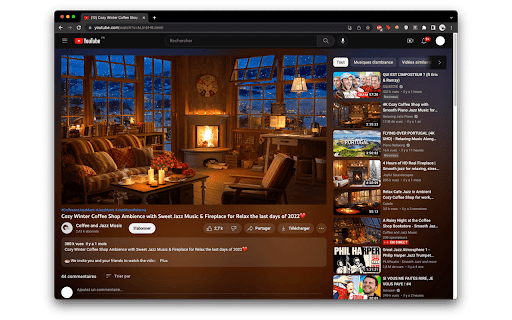
Introducing "Youtube Lights" - the Chrome extension that enhances your Youtube viewing experience. It brings the ambient "cinema lights" of your favorite videos to your entire screen, creating a stunning and immersive experience. With Youtube Lights, you have complete control over the colors and intensity of the lights, allowing you to personalize your viewing experience. The beauty of Youtube Lights lies in its simplicity. It seamlessly integrates with your Youtube page and is easy to use. With just one click, you can activate the lights and transform your screen into a breathtaking cinema-like atmosphere. Whether you're watching a movie, concert, or simply browsing videos, Youtube Lights adds a touch of magic to your experience. You can choose from a range of colors and adjust the intensity level to create the perfect atmosphere for your mood. Whether you prefer a relaxing and calming environment or a lively and energetic one, Youtube Lights has got you covered. It's a perfect tool for movie nights, studying, or simply relaxing and watching your favorite videos.

YouTube MrBeastify
Enhance your browsing experience with MrBeastifier. Is your browser experience boring? Are you having trouble finding engaging click-baity videos? Fear no more. This extension adds famous youtuber MrBeast to every thumbnail. Compatible with all browsers If you are experiencing issues, report them on Github For discussion about this extension, go to my Discord: http://discord.gg/bQvtauxXWp Notes: - This extension was inspired by Unnecessary Inventions: http://www.youtube.com/@UnnecessaryInventions - This extension is unofficial and not affiliated with MrBeast or YouTube. Source: https://github.com/MagicJinn/MrBeastify-Youtube

Bigger Theater Mode
Increases the size of YouTube's Theater mode. Do you want YouTube™ videos to show up bigger, but still be able to see other useful information on your desktop? Are you tired of how useless Theater Mode currently is? Do you want to focus on the video your currently watching instead of being distracted by what's "recommended?" Then, you should try this extension! With this small CSS tweak, your videos will be larger and easier to view in the browser.

Better YouTube Theatre Mode
Improves YouTube's theatre mode by making use of all of the available height

YouTube Livestreams Theater Mode
Improves the viewing experience of YouTube livestreams with an enhanced theater mode. Theater mode features: - display chat next to the video - move chat to the left side - show chat on top of the video - hide or popout chat - display livestream information (title, view count, description, ...) without leaving theater mode Theater mode options: - force dark theme in theater mode - show YouTube header while in livestreams theater mode - chat width (next to video) - chat width (over video) - chat over video margin top & bottom - display livestream information on hover over the video / info-icon - overlay and chat over video background opacity - show overlay text shadows - default chat side and mode - automatically enter livestreams theater mode (live & replay) - shortcut to toggle livestreams theater mode Chat customization options: - default chat (top chat / live chat) - colored usernames - hide profile pictures - hide live reactions - super chat currency converter: adds the converted currency under / next to the original currency, shows the name of the original currency on hover. Other features: - display obvious hint when the video is behind on a livestream Permissions: - storage permission is needed to save settings - optional host permission for 'napalighost.com' is needed when super chat currency converter is turned on
