
mmjbdbjnoablegbkcklggeknkfcjkjia

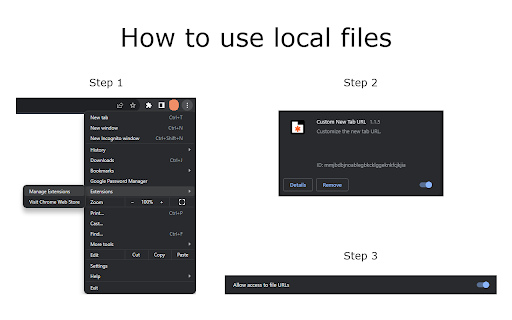
Customize the new tab URL. Chrome doesn't allow you to configure a new tab URL. It always opens its New Tab Page with a search bar and some browsing history. With this extension, you can use the options page to store a link to a page or even a path to a local file that will be loaded when a new tab is created. It is very lightweight and easy to use! For people who prefer dark mode, try enabling the following Chrome builtin flag: chrome://flags/#enable-force-dark ATTENTION: Since Chrome Version 118.0.5993.71, setting the new tab to a local file requires to turn the "Allow access to file URLs" option in the extension management page. Open the Manage Extension page, find the Custom New Tab URL extension and click the Details button, then find the option "Allow access to file URLs" and turn it on.

New Tab Override
Most extensions that allow a custom URL for the new tab page do so by redirecting to the URL then attempting to focus on the address bar. The second step of focusing on the address bar when using the redirect method was broken in Chrome 61. This extension fixes the second step by using a new method, rather than redirecting it loads the URL in the background then injects its content into a empty new tab page. This means there is no redirect, and therefore the address bar never actually loses focus in the first place. Permissions: * Read and change all your data on the websites that you visit - Used only to load the URL in the background, none of your data or websites you visit are ever read or changed. * Replace the page that you see when opening a new tab - Duh!

New Tab Changer
Load a custom web page or url in a new tab. Fast, light, and easy to use. * Load a custom web page or url in a new tab. * Make new tabs automatically load Gmail, Bing, or any web site. * Easily setup a new tab redirect to a local file url. * Automatically sets focus to url bar. * Supports Incognito mode. * Fast, light, and easy to use. * Clear cache when loading new tabs. * Redirect to last visited url. * Advanced statistics to display a history of max and total tabs open per day. Automatically set a custom url to load in new tabs. Setup a new tab redirect to Gmail, Yahoo, Bing, or any web page you desire! Simply enter the desired web site url and click Save. Any time a new tab is opened, the web site you selected will automatically display. New Tab Changer supports web site urls and local file urls. New Tab Changer lets you automatically setup a new tab redirect to a custom url.

Blank New Tab Page
Override the default new tab page with blank page. This extension prevents "Google search" page from showing up when you open a new tab. You can also disable the "Sign in to Chrome" page that is shown when you open a new Chrome window, just go to "chrome://settings" page, choose "Open a specific page or set of pages" and enter "chrome://newtab".

BNTP: Bookmarks in New Tab Page
Lightweight New Tab Page with Bookmarks and Top Sites * List bookmarks by folders * Collapse a folder * Move a bookmark by Drag and Drop * Edit a bookmark * Automatic dark mode * Sync the preferences (theme or folder collapse) It will request the following permissions:
