
mlmifkfgafheljfcjlgoiggcfjenjeed
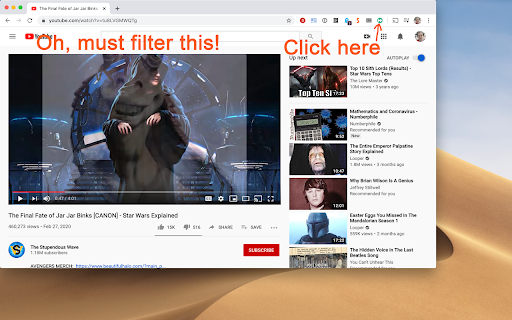

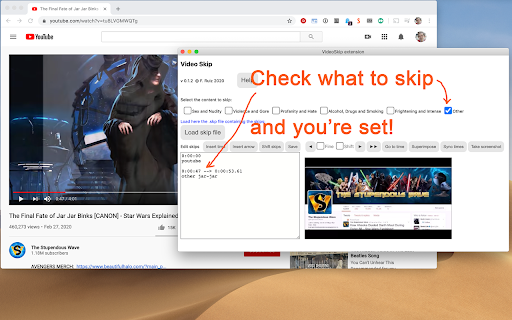
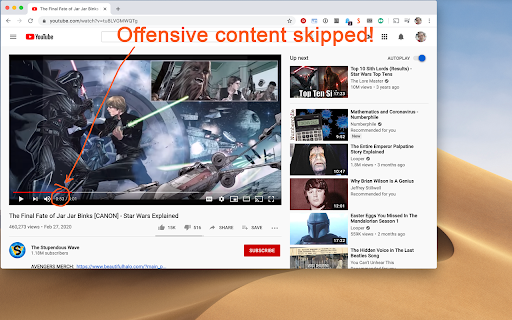
VideoSkip allows you to filter out several types of objectionable content from video streams. It uses the same categories as the "Parents Guide" section of IMDB.com. It can skip sections entirely, or simply mute the sound or blank the video, at your discretion. Because it does not modify the videos in any way, but rather plays them selectively, it does not infringe media copyrights. 1. Load the video from a streaming service normally and begin play so it loads some data (not full-screen), then stop it and click the VideoSkip icon on the upper-right of the browser. A new window will appear next to the video. You can move it, or resize it like a regular page with Ctrl + or Ctrl -. 2. If you have a .skp file containing the skips, you can load it now with the "Load skip file" button. Once loaded, its contents will appear in a box on the "Edit" tab. There is a growing number of skip files for popular films at the VideoSkip Exchange, loaded by a button on the interface. 3. If the skip file has been previously synced with your video service, you will be taken to the "Filter" tab so you can set the filter strengths as described in the next step. Otherwise, you'll be taken to the "Sync" tab. There, you will be asked to scrub the video with the arrow buttons until it looks okay again. When the screenshot finally matches the video, click "Sync times" to sync everything for your service. A new version of the skip file will be made so the people you share it with can skip this step from now on. 4. Set the category filters using the sliders, according to the audience. The higher, the more stringent the filter. High = for children, Medium = for teens, Low = for adults. If a filter is Off, the flagged content will be shown. 5. Start the video from its own page, sit back, and enjoy. Skips will take place when their time arrives. A message will appear on the fullscreen video when you move the mouse, telling you which filters are engaged. You can make your own skip files and share them with your friends freely. They will work even if the videos being played are from a different source. The skip file exchange is located at https://videoskip.org/exchange There's also a standalone web app, which works with videos that you have saved to your computer. Get it at https://videoskip.org/app for computers, or https://videoskip.org/mobile for mobile devices. Legal Notice: Content copyright owners and distributors are hereby informed that users and developers of this software are exercising their right of free speech, guaranteed by law in many nations, by voluntarily refraining from seeing or hearing content without modifying said content in any way. Legal action that ignores this notice will be considered harassment and infringement of basic rights, and prosecuted according to the law.

Kick Video Seek & Skip Controller
Take full control of your video-watching experience on Kick with Kick Video Control Enhancer! This extension allows you to customize video playback on Kick with precision. Set custom seek times for both forward and backward jumps, making it easy to skip or rewind videos by the exact number of seconds you want. Say goodbye to default seek times and enjoy tailored video controls that fit your viewing style. Key Features: Customizable Seek Times: Choose how many seconds to skip forward or backward with simple arrow key controls. Seamless Integration: Works automatically with any video on Kick, no need for manual setup. Quick Controls: Use your keyboard's arrow keys to jump forward or rewind by your preferred time increments. User-Friendly Interface: Easily adjust forward and backward times through an intuitive settings menu. Save Your Settings: Your customized seek times are saved, so you don’t need to reconfigure them every time. Whether you want to fast-forward through replays or catch missed moments in live streams, Kick Video Control Enhancer gives you the flexibility and control you need for the perfect viewing experience. Enhance your Kick video experience with Kick Video Control Enhancer, the ultimate tool for personalized playback control! Skip forward or rewind videos by exactly the number of seconds you want using your arrow keys. This simple yet powerful tool ensures you never miss a moment or waste time watching unwanted content. Perfect for streamers, gamers, and video enthusiasts who love complete control over their media playback. How to Use: Customize your forward and backward seek times through the extension’s settings. Use arrow keys to jump forward or backward in the video by your chosen time increment. Enjoy faster, more precise control over all Kick video content! No more frustrating default seek times. Take charge of your video-watching experience with Kick Video Control Enhancer today!

Custom Skip Time
Use the arrow keys to skip forwards or backwards on a video by a custom amount. Supports skipping by a different amount while… Use the arrow keys to skip forwards or backwards on a video by a custom amount. Supports skipping by a different amount while holding shift. You can also choose to adjust the skip amount based on the playback speed (i.e. if you are playing the video at 0.5 speed, the skip amount will be halved).

Advanced Profanity Filter
Advanced Profanity Filter helps to clean up bad language on the websites you and your family visit. Advanced Profanity Filter helps to clean up bad language on the websites you and your family visit. Whether you choose to censor, substitute, or hide offensive words, APF is here to improve your browsing experience. Individuals around the world can now be protected from profanity in their homes, organizations, and schools. APF has a variety of options to meet your personal needs. APF is not limited to filtering text alone! With the use of captions and subtitles it can also mute audio while you sit back and relax to watch your favorite movies and shows from a collection of supported sites. Have a suggestion for a new supported site? Contact us! For a detailed overview of the features and settings, please see the Getting Started page here: Thank you for supporting the ongoing development of this project.

Jump Cutter
⏩ Skips (or fast-forwards) silent parts in videos in real time and completely automatically. 🌐 Supports YouTube, Coursera, Twitch, local files, and (almost) any other website. Useful for watching 👨🏫 lectures,🔴 stream recordings (VODs), 🎙️ podcasts, webinars, 📞 call & audio recordings, and other unedited videos where the speakers spend a portion of time on things other than talking. But even if the video is tightly packed, it can also save a bit of time, so it's generally fine to keep it always on. 🕵️🚫 Fully offline and local. Does not track you or send your data anywhere. 🔃 Easy to turn on and off, without having to reload the page (it's there to save time after all!). ⚙️ Has a lot of different settings, but generally you won't have to constantly tune them or touch them at all. ⌨️ Has a lot of handy shortcuts (hotkeys): control video playback and extension settings without using a mouse (or eyes). 🆓🍺 Completely free, both as in "freedom" and as in "free beer" (at least for now): Licensed under GNU Affero General Public License v3.0 or any later version (AGPL-3.0-or-later) — the most based license out there. 👨💻 Source code: https://github.com/WofWca/jumpcutter
