
mlibklmbmofhgjkgihcpmdellkabedad
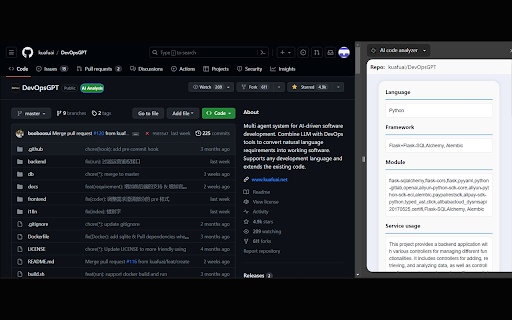
AI analyzes code with KuaFuAI to help you understand its purpose, language, framework,module, and code structure quickly. AI analyzes code with KuaFuAI to help you quickly learn code purpose, code language and development framework, module,and even detailed code structure information.

CodeSensAI
Enhance your coding with AI-driven insights! CodeSensAI offers intuitive code reviews directly in your side panel. Introducing CodeSensAI, a revolutionary Google Chrome extension that leverages the power of OpenAI to enhance your code reviews and code comprehension. Whether you're a solo developer, part of a coding boot camp, or working in a large software development team, CodeSensAI is your reliable assistant for effective and efficient code reviews. AI-Powered Code Review: Harness the capabilities of OpenAI to review your code. Get insights into potential bugs, vulnerabilities, and improvement areas that you might have overlooked. Customizable Review Focus and Personality: Tailor the focus of the review and the AI's personality to your needs. Whether you want a detailed inspection for bugs, a high-level check for best practices, a friendly companion, or a strict reviewer, you are in control. Customizable Parameters Level: Choose your desired level of creativity with our exclusive feature. Higher creativity levels lead to more exploratory reviews, possibly offering unconventional insights, while lower levels stick to common patterns and best practices. Support for Multiple Languages: Whether you're coding in Python, JavaScript, Java, or any other popular language, CodeSensAI is here to help. It's like having a coding expert fluent in multiple languages at your side. Free SensAI Card: Sign up and get a free SensAI card which you can use to enhance your coding skills further. With CodeSensAI, ensure your code adheres to best practices, is free of bugs, and is as efficient as possible. Install CodeSensAI today and step into the future of code reviews!

AI Code Generator
Using AI technology, convert screenshots, design drafts, and prompts into front-end code(HTML/Tailwind/React/Vue/Bootstrap/Ionic). Using powerful AI technology, convert screenshots, design drafts, and prompts into front-end code(HTML/Tailwind/React/Vue/Bootstrap/Ionic). Screenshot to code, convert design to code, prompts to code. AI-powered UI builder: convert screenshots, mockups and Figma designs and prompts into clean, functional code using AI. Effortless UI Translation: Transform screenshotss, design drafts, and prompts into front-end code seamlessly, streamlining the development process. Intuitive Integration: User-friendly extension that seamlessly integrates with your workflow for instant code generation. Accelerate Development: Boost productivity by converting visual designs into front-end code in a fraction of the time. Visual Learning Aid: Learn and understand UI development through a visual translation of design elements to code. Support for mainstream front-end frameworks: We support generating code for these front-end frameworks: HTML + Tailwind, HTML + CSS, React + Tailwind, Vue + Tailwind, Bootstrap, Ionic + Tailwind, and many more!

Qodo Merge: AI-Powered Code Reviews & Chat
Chat with your GitHub pull request code, and get AI-powered reviews, descriptions, and code suggestions Integrate AI-powered chat and code review tools directly into your GitHub environment to analyze pull requests, automate reviews, highlight changes, suggest improvements and ensure code changes adhere to best practices. Qodo merge Chrome extension is free to use in public/open-source repositories. For private repositories, users can access PR-Chat along with additional features like documentation suggestions and component analysis with a free two-week trial. ---------------------------------------------------- 🚀 Key Features: 💬 AI-Powered Chat in PRs: Ask targeted questions about specific code changes and receive context-aware answers within the pull request comment section. 🔍 Automated Code Reviews : Instantly review pull requests and identify potential bugs, security vulnerabilities, and adherence to best practices with the /review command. ⚙️ Code Improvement Suggestions: Use the /improve command to get actionable recommendations for optimizing code efficiency, robustness, and maintainability. 📝 Auto-Generate PR Descriptions: Save time with the /describe command to create comprehensive PR descriptions, including summaries, labels, and step-by-step walkthroughs. 🔒Private chat sessions: Your conversations remain private and are not visible to other users. ⭐️ Streamlined Configuration Export: Effortlessly export your preferred PR-Agent settings to a configuration file, which can be applied at either the repository or organizational level for seamless team-wide adoption. ---------------------------------------------------- Compatibility: - Open-Source Repositories: Fully supported and free to use - Private Repositories: requires the installation of Qodo merge Pro for full functionality, visit these links to learn more about Qodo merge pro: ---------------------------------------------------- Privacy & Security: - The Chrome extension will not send your code to any external servers. - For private repositories, we will first validate the user's identity and permissions. After authentication, we generate responses using the existing Qodo merge Pro integration. ---------------------------------------------------- Documentation: https://qodo-merge-docs.qodo.ai/chrome-extension/ PR-Agent: https://github.com/Codium-ai/pr-agent ----------------------------------------------------

Ai Code Editor
Ai Code Editor is an AI-powered Chrome extension that helps you modify HTML, CSS, and JS code using natural language descriptions. Simply paste your code, describe the changes you want, and let the AI transform or create your code. Perfect for web developers, designers, and content editors who want to make quick modifications without manual coding.
