
kjekbopjnhikohneogealgmbncfneafl


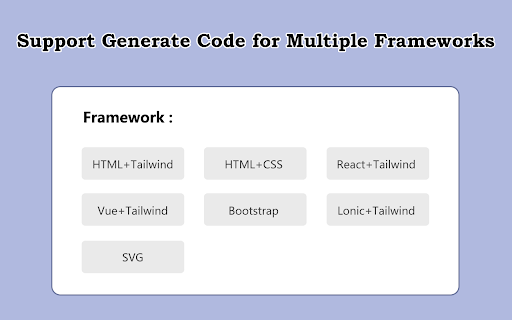
Using AI technology, convert screenshots, design drafts, and prompts into front-end code(HTML/Tailwind/React/Vue/Bootstrap/Ionic). Using powerful AI technology, convert screenshots, design drafts, and prompts into front-end code(HTML/Tailwind/React/Vue/Bootstrap/Ionic). Screenshot to code, convert design to code, prompts to code. AI-powered UI builder: convert screenshots, mockups and Figma designs and prompts into clean, functional code using AI. Effortless UI Translation: Transform screenshotss, design drafts, and prompts into front-end code seamlessly, streamlining the development process. Intuitive Integration: User-friendly extension that seamlessly integrates with your workflow for instant code generation. Accelerate Development: Boost productivity by converting visual designs into front-end code in a fraction of the time. Visual Learning Aid: Learn and understand UI development through a visual translation of design elements to code. Support for mainstream front-end frameworks: We support generating code for these front-end frameworks: HTML + Tailwind, HTML + CSS, React + Tailwind, Vue + Tailwind, Bootstrap, Ionic + Tailwind, and many more!

CodePal - The Ultimate Coding Companion
CodePal.ai Official Extension Try it for free at CodePal.ai 🚀 - Code Explainer: Easily understand any piece of code. - Code Documentation Creator: Automatically document your code. - Bug Detector: Identify and fix bugs, issues, and potential problems in your code. - Code Refactor: Restructure and clean your code. - Code Rephraser: Rephrase your code without changing the logic. - Code Unminifier: Transform any minified code into its unminified form. - Unit-Tests Writer: Provide unit tests for your code. - Code Reviewer: Get professional-level code reviews to your code. - Code Simplifier: Get a simpler version of your code. - Code Visualizer: See your code in a graphical format, illustrating the relationships within. - Code Security Scanner: Check your code for potential security vulnerabilities. - Big-O Analyzer: Evaluate the space and time complexity of any code segment. ...and many more! For the full list of AI coding tools, visit CodePal.ai

Code Review AI
🚀 Level Up Your Coding with Code Optimizer Assistant! Improve your code reviews with this handy Chrome extension. It helps you… 🚀 Level Up Your Coding with Code Optimizer Assistant! Improve your code reviews with this handy Chrome extension. It helps you quickly check and refine your code, whether you're working on a big project or a small script. Instant Code Analysis 🔍 Automatically boost your code’s performance, readability, and maintainability with lightning-fast insights. Modern, User-Friendly Interface ✨ Enjoy a clean, intuitive design with smooth transitions and responsive elements that make coding a breeze. Syntax Highlighting 🎨 Powered by Prism.js, get crystal-clear syntax highlighting for multiple languages at a glance. Copy & Share 📋 Instantly copy optimized code snippets with one click and share them with your team effortlessly. Retry Functionality 🔄 Not happy with the optimization? Click "Retry" to get a fresh, refined version of your code. Detailed Explanations 📚 Receive concise notes on every optimization so you can learn best practices and understand each improvement. Important: To get started, add your own OpenAI API key in the extension's options page for secure, personalized access to top-tier code analysis. Enjoy coding smarter and faster!

IMG2HTML: Screenshot Capture to code
Capture screenshots and get the code of your current webpage. Use the Image to HTML Chrome Extension for Windows, Mac & Linux to remove image backgrounds in bulk in seconds. Whether you are creating product photos for e-commerce websites, car images for dealerships, portraits - and more - the img2html.com chrome extension is the fastest tool on the market to convert images to html code, providing high-quality results even for some of the trickiest bits, such as hair.

ChatGPT Bottom Copy Code Button & Statistics
Adds an additional 'Copy Code' button and code statistics at the bottom of code snippets in ChatGPT. This tool adds a 'Copy Code' button below code snippets, making it easier to copy and use code examples without scrolling to the top. This feature saves time and helps avoid website performance issues that occur when generating long messages and trying to scroll to the top simultaneously. Additionally, it can display code statistics, showing the number of lines & characters in each snippet. Useful for recognizing changes in code length. 📋 Effortless Code Copying: Adds a 'Copy Code' button at the bottom of each code snippet, so you don't have to scroll to the top. 🔢 Live Code Statistics: Continuously displays the number of lines and characters in the code snippet as it’s being generated. 🎨 Seamless Integration: Blends perfectly with the website’s design, matching the original 'Copy Code' button style. ⚡ Smooth Performance: Works flawlessly even during message generation. 💻 Language Detection: Automatically identifies and displays the programming language of the code. 🔧 Customizable Options: Easily toggle the additional bar and code statistics through the extension popup. 📅 Up-to-Date: Fully compatible with the latest version of ChatGPT as of Q3 2024. ✅ Perfect for developers and programmers who need efficient code snippet copying and quick access to line and character counts. 🔴 Official extension website: https://strona.plus/project/3 ⚙️ Popup Settings ➊ Enable additional 'Copy code' button ➋ Display code's programming language ➌ Show line and character count ⭐ If you find this extension helpful, please rate it. Consider buying me a coffee ☕ https://buymeacoffee.com/kgniewek 🛠️ For any questions or feedback, contact me at contact@kgniewek.com or visit kgniewek.com/project/3 🔒 This extension does not collect any data. Your settings are stored locally. Details: kgniewek.com/project/3 🔲 Image by Freepik
