
mlhidkbpmldlcilkmoljkhmemeodfagn
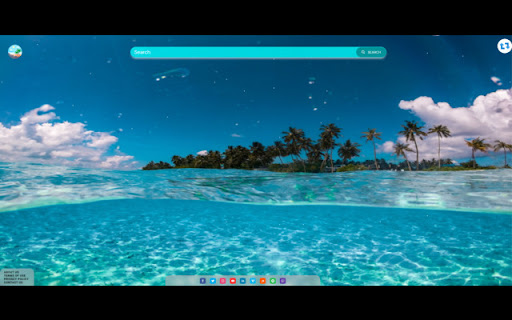
'Tropical Horizons Wallpapers' is an extension that brings a touch of paradise to your desktop. Tropical Horizons Wallpapers is a Chrome extension that offers a wide range of stunning tropical-themed backgrounds to choose from every time you open a new tab. Users are also presented with a shuffle button located in the top right corner of the screen that let's them switch out the current background. In addition, social widgets are located at the bottom of the screen enable easy access to your social media accounts. By clicking "add to chrome", I accept and agree to installing Tropical Horizons Wallpapers extension and setting chrome new tab search provider to Microsoft Bing as described by the service in terms of use https://www.agile-soft.dev/terms.html and Policy https://www.agile-soft.dev/privacy.html All pictures took from Unsplash with commercial license You may uninstall the extension at any time To remove our extension from Google Chrome: 1) Click on the three vertical dots icon in the upper right-hand corner of your Chrome browser 2) Go to "Settings" 3) In the left menu that appears, click on "Extensions" 4) From the list of installed Extensions, locate the extension you would like to uninstall

Architecture Tab
Inspiration Architecture From Around The World Architecture Tab transports you to unique and interesting feats of architecture from across the world. Every time you open a new tab you will be see architecture from somewhere in the world. By clicking "Add to chrome", I accept and agree to installing the Architecture Tab extension and setting Chrome New Tab search to that provided by the service. The search will be powered by Bing. We hope you enjoy viewing unique feats of architecture from around the world. If you have any other cool architecture pictures you think we should add or any other questions please reach out to us at support@oz.works

Wikiped Today
Step into the past with 'Wikipedia Today,' a captivating browser extension that unveils intriguing historical events Discover history's footprint today with "Wikiped Today" - an engaging and enlightening Chrome extension that connects you to the past in a uniquely personal way. Have you ever wondered what remarkable events, breakthroughs, and milestones occurred on the same date in different years? With "Wikiped Today," you can now effortlessly unveil the layers of history that have shaped our world. By clicking "Add to Chrome" I accept and agree to install the "Wikiped Today" Chrome extension and hereby agree to set the Chrome New Tab to that provided by the service and the Privacy policy and Terms of Use. The search results will be provided by Microsoft Bing. You may uninstall the extension at any time To remove our extension from Google Chrome: 1) Click on the three vertical dots icon in the upper right-hand corner of your Chrome browser 2) Go to "Settings" 3) In the left menu that appears, click on "Extensions" 4) From the list of installed Extensions, locate the extension you would like to uninstall All of the events shown on this extension are taken from Wikipedia.com the free encyclopedia

Nature Wallpapers
Over 100+ of the best nature wallpaper images with our extension! Nature Wallpapers is a Chrome extension that allows it's users to enjoy the beauty of nature as their background. The extension features a collection of stunning nature landscapes including pictures of mountains, forests, beaches, and more. Users can easily shuffle through the different backgrounds by clicking the shuffle button located on the top right corner of the screen. This extension is perfect for those who love nature and want to have a refreshing view while browsing the web. By clicking "Add to chrome", I accept and agree to installing the Nature Wallpapers Chrome extension and setting Chrome™ New Tab and Default Search to that provided by the service and the Terms of Use and Privacy Policy. The new tab search engine will be provided by Microsoft Bing. You may view our terms and conditions at https://www.app-solute.com/terms-of-use and our privacy policy at https://www.app-solute.com/privacy-policy Disclaimer - All the images and backgrounds of natural landscapes are sourced from Unsplash, and are entirely free to use under the Unsplash license - unsplash.com/license You may uninstall the extension at any time To remove our extension from Google Chrome: 1) Click on the three vertical dots icon in the upper right-hand corner of your Chrome browser 2) Go to "Settings" 3) In the left menu that appears, click on "Extensions" 4) From the list of installed Extensions, locate the extension you would like to uninstall

Personalized Backgrounds
Customize your browsing experience with personalized background images. The ultimate tool for personalizing your Google Chrome browsing experience. With this extension, you can easily customize and set your own background image for your Chrome browser. Personalized Backgrounds lets you personalize your browsing experience and make your browser truly your own by letting you choose a background from your own photos. The extension also changes the default search engine to Bing. By clicking "add to chrome", I accept and agree to install the Personalized Backgrounds extension and set Chrome's new tab search result by Microsoft Bing as described by the service in terms of use https://www.leadpromediallc.com/terms and Policy https://www.leadpromediallc.com/privacy 1. Click on the extension icon in the top right corner of your browser 2. Choose a photo from your library you want to set as your background (maximum size is 4MB) 3. Click "Submit" *You are able to clear your chosen background by clicking on the extension icon and then "Clear"
