
mlemdblfhpkkmabeegnifhnhedhclhln
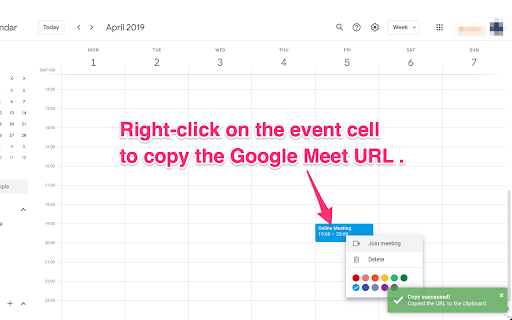
Copies only the Google Meet URL from Google Calendar without any extra information by right-clicking once. You copy not only the Google Meet URL, but also extra information such as phone numbers when you use the default copy button on Google Calendar. This extension eliminates that frustration. Right-click on the event cell on the calendar or on the \"Join with Google Meet\" button to copy only the Google Meet URL to the clipboard. - See screenshot for getting how to use. - A green toast appears in the lower right corner of the window when copying succeeds. - Copying fails when the window does not focused (another window is used). Focus on the window and try again when a red toast appears in the lower right corner. - extension-meet-url-extractor (https://github.com/takahirostone/extension-meet-url-extractor)

Google Calendar Grouping
## Please Give Us a High Rating!! ## This is an extension for Google Calendar. When you have multiple calendars, you can instantly switch between them by creating groups. 【How to Use】 1. Select "Google Calendar Grouping" from the extension list in the top-right corner of your browser. 2. Create your groups within the pop-up window. 【Notes】 ・Due to how Google Calendar renders elements, only calendars currently visible on the screen are processed initially. Off-screen calendars will be selected once they are rendered (e.g., by scrolling). ・This extension is developed by an individual developer free of charge. Positive ratings and an increasing user base are highly motivating, as they show that people find the extension useful. Please provide your feedback! 【Contributions】 If you have suggestions for improvements or are interested in contributing directly to development, please contact support! Your help is welcome. Specifically, I currently lack the resources/time to implement the following: ・Allowing group editing directly on the Google Calendar interface instead of only through the pop-up. 【Tips】 Due to limitations within Google Calendar itself, the extension has some intentional restrictions. By design, when a group selection is active, if you attempt to select a calendar outside that group, the selection of the outside calendar will be automatically cancelled to maintain the group view. To work around this behavior, please deselect the current group first. By doing so, the strict enforcement of showing only group calendars is removed; the calendars previously selected by the group will remain checked, and you will then be free to manually select any other individual calendars alongside them.

Meets Link Copier for Google Calendar
Google カレンダーの「コピー」ボタンで Meet URL のみをクリップボードにコピーします。 Google カレンダーの「コピー」ボタンで Meet URL のみをクリップボードにコピーします。

教えてURL
- 特長 ✓ 独自調査による1,900種類以上のサービスを42カテゴリに分類・検出 ✓ 検出履歴機能:閲覧したサイトの検出結果を自動記録(ローカル保存) ✓ ランキング表示:よく検出されるサービスを一目で把握 ✓ 高度なフィルター:AND/OR条件、除外条件を組み合わせた検索 ✓ グループ管理:競合サイトやクライアントサイトをお気に入り登録 ✓ バブルアラート:指定カテゴリが検出されたらページ上に通知 ✓ ライトモード・ダークモード対応

Calendar Selector for Google Calendar
Save and restore groups of calendars selected Version 0.1.7 - Bug fix: More resilient finding of calendar in the left panel, will skip list items that do not appear to be built-in Google calendar entries Version 0.1.6 - Enhancement: quick fix for Chrome deprecating Manifest v2, upgraded to v3. Some keyboard shortcuts for preset management don't work, but functionality is available in the UI. Version 0.1.5 - Bug fix: Breakage introduced by Google Calendar changing the page HTML structure Version 0.1.4 - Bug fix: Agenda view displays items correctly - Enhancement: Added a license file to the repository (MIT), and provided privacy policy and data practices in the store listing (no data is ever shared or leaves the user's browser). See https://gitlab.com/bluenexa/google-calendar-selector for all version updates This extension creates a set of buttons in the Google Chrome UI that allow you to easily create, save, and display groups of calendar presets. If you have many calendars and often need to switch between which calendars are shown (such as colleagues and teams), this extension is for you. Your presets are stored in your local browser storage and sync across devices automatically (using Chrome's built in syncing mechanism). Keyboard Shortcuts: Press Ctrl+Alt and the highlighted key for the main functions (highlighted key is one of e, s, r, c, i, x, or p). Except Chrome's built-in sync mechanism, the extension functions completely offline in the browser and no data leaves the user's computer. Local storage in the browser is used to persist saved calendar groups and to sync saved groups across computers via Chrome's built-in sync mechanism (tied to the logged in Chrome user). All software is fully open source and available at https://gitlab.com/bluenexa/google-calendar-selector. Built by the team at Bluenexa.
