
mldcbljigenkngcbbbgcifilnepkipab
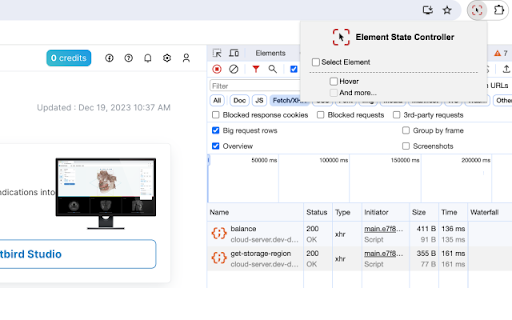


EN) "Element State Controller" is a Chrome extension developed to overcome the limitations of the "Force Element State" feature in… EN) "Element State Controller" is a Chrome extension developed to overcome the limitations of the "Force Element State" feature in Chrome DevTools. This extension allows web developers and designers to access DOM elements on a web page and trigger actual JavaScript events, thus providing capabilities beyond mere imitation of CSS state changes. Users can test and verify interactions and style changes on web pages in real-time, enhancing the efficiency and accuracy of the web development and design validation process. - Direct DOM Element Selection: Users can click to directly select any desired element within a web page. - JavaScript Event Triggering: Directly triggers JavaScript events on selected elements to simulate real interactions. This Chrome extension is an essential tool for web developers and designers who wish to test specific elements' state changes and behaviors in real environments on complex web pages. It saves time and simplifies the development process, enabling more precise and effective web development.

Event Listener Visualizer
Track and display event listeners on a webpage. Developers can track all event listeners on the active tab in their browser.

Peek Element
Peek Element is a browser extension that allows you to view the HTML of any element on a webpage. 📢 Latest Update: v1.2 📢 🚀 Major Feature Update! Now with HTML editing, style inspection, and more interactive tools! ✨ New Features: - ✏️ View & Edit selected element HTML directly in the popup - 🎨 Inspect Styles of both selected and parent elements - 🏷️ View & Copy Attributes of selected and parent elements - 🖱️ Draggable UI for better workspace positioning - 🔍 Enhanced element selection visualization 📢 Previous Updates: v1.1 - Minor bug fixes and performance improvements v1.0 - Initial release with basic element inspection 🛠️ Core Features: - Instantly inspect any element with a simple right-click - Lightweight & fast with minimal permissions - Works seamlessly across all websites - Detailed parent element hierarchy navigation 💡 Your Feedback Matters! Love the new editing features? Found a bug? Have suggestions for v1.3? Please leave a review or send feedback - we're constantly improving based on your input!

Simple Headers
Simple editor for response headers. - Remove, set, and add response headers. - Block features through Permissions Policy. - Unblock features that were blocked.

Attribute Reporter
Dev Tools Extension to report on elements attributes and copy their value as text or xpath expression Attribute Reporter is a DevTools panel for inspecting HTML element attributes across a page. Select any element, type an attribute name (or pick class, id, or data-testid with one click), and instantly see a list of all matching child elements with their values — or which ones are missing them. - 🔍 Inspect any attribute by name across all child elements - ✅ Spot missing or empty attribute values at a glance - 📋 Copy individual values, XPath expressions, or CSS selectors to the clipboard - 📦 Export all results as JSON (element, value, CSS selector, XPath) - 🔒 No special permissions required What's New in v2.1.0 - 🔍 Missing attribute finder — Toggle "∅ missing" to instantly see all elements that lack the target attribute (e.g. buttons without aria-label). - 🏷️ Element-type filter — Filter results by element type (button, input, div…). Multi-select, composes with the missing toggle. - 🟢🟡🟠🔴 Status indicators — Every row now shows a color-coded status: OK, duplicate value, empty value, or missing attribute. Hover for details. - 📋 Copy as CSV — Export the current filtered list as CSV, ready for spreadsheets or bug reports. - 💾 Remembers your last attribute — The target attribute name is now saved between DevTools sessions. - aria-label shortcut added to the quick-select badges.
