
mklijjhfngobcgpmmoncpojpfohjoeba
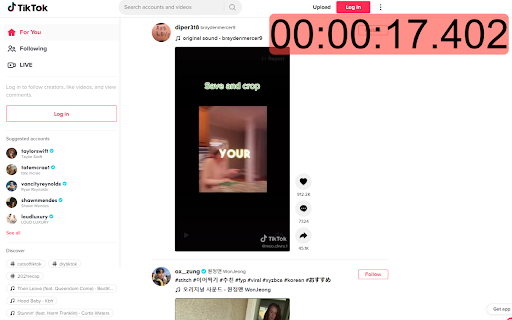
session timer for popular social media websites

Web Activity Time Tracker - Block Websites, Pomodoro & Web Analytics
Track time of your web activity, limit and block distracting websites. Monitor your web usage. Web Activity Time Tracker keeps track of how you spend time on the web and presents the stats in a useful and intuitive way. Take control of your online time! Tracking and limiting your use of any website helps you stay productive and focused. Stay focused and maximize your productivity. Whether you're managing work projects, studying for exams, or simply want to understand your browsing habits better, this tool is your go-to companion. Web Activity Time Tracker is a powerful Chrome extension designed to help you monitor and optimize your online productivity. Effortlessly track the time you spend on each website, set goals, and get detailed reports to boost efficiency and focus. With a sleek, user-friendly interface and real-time insights, this tool empowers you to make the most of your web browsing. You can set a daily visit limit for sites and block them after the expiration of the limit. Alternate work and rest times with Pomodoro Mode. ✅ Real-Time Tracking: Get instant insights into the time spent on each website you visit. ✅ Daily and Hourly Reports: Receive summary reports that highlight your browsing habits and patterns. Comparison of time by day. ✅ Limit and Block Distracting Websites: Set daily time limits for specific websites to help you stay focused. ✅ Usage Statistics: Effortlessly monitor the time you spend on different websites. ✅ Notifications for Websites and daily summary notification. Set goals and receive notifications to stay on track. ✅ Pomodoro Mode ✅ Track files in the browser, including .pdf, .png, .json and so on ✅ Export Data to CSV Web Activity Time Tracker helps you: 🍀 Stay focused 🧠 Understand how you use the internet 👀 Reduce distraction 🍅 Overcome web addiction ⏲️ Self-control 💯 Boost productivity 🚀 Increase your digital wellbeing 💪 Reduce wasted time This version introduces an OPTIONAL banner widget powered by Media IntelliView. When enabled by the publisher of a participating website, the extension may display a small contextual banner on that website's page. What is sent over the network when the widget is enabled: - The page origin (e.g. "https://example.com") — never the full URL or page content - A randomly generated per-install identifier (no personal data, no account, no login) - Banner display/click/dismiss event timestamps The widget is fully described in our prominent disclosure shown on install AND update (Welcome page), and you can disable it at any time in the Options page. Local time tracking and blocking features continue to work exactly as before — they do NOT depend on the widget. Take control of your online habits and make every minute count with Web Activity Time Tracker.

UnDistracted - Hide Facebook, YouTube Feeds
Rise above the time-sinks This Chrome extension assists in managing time spent on distracting platforms like Instagram, Facebook, YouTube, Twitter, and LinkedIn. The extension identifies the most attention-grabbing elements on these platforms and allows selective hiding of these sections or full blocking of the websites. Note: No browsing history is accessed, and no browsing-related data is sent or stored. New feature (paid): Block gambling and NSFW sites

Minute – A timer to track your scrolling time
A small timer designed to keep you exploring without losing track of time. This extension adds a simple, always visible timer to any website you choose, keeping you aware of how long you have been browsing — so you can stay in control. Some facts - The timer stays on your screen, no matter where you scroll. - Keep track of time on distracting sites like social media. - Choose the websites where the timer is displayed. - A no-fuss tool that works seamlessly in the background.

Limit - Set Limits for Distracting Sites
Limit your time spent on distracting sites. Limit is an extension that allows you to set time limits for distracting websites. When you control your time on distracting websites, you’ll find you have far more time to focus on the things that matter most. To use Limit, simply enter the websites you find distracting and choose a daily time limit. For example, you could limit yourself to ten minutes a day on Facebook, or half an hour a day on Duolingo. When you approach your limit, Limit gently notifies you your time is almost up, so you can wrap up. And when you've reached your limit, you'll be directed to Freedom's calming Green Screen when you try to visit a limited website. - You can add or delete any website from the list of sites - Your time limit for each site is configurable, from 5 to 500 minutes - Limit comes pre-seeded with 10 distracting sites Limit is a product of Freedom Labs, where we develop new tools to help you balance your relationship with technology. Like our other extensions, Limit is highly privacy-conscious. None of your data is sent anywhere (the cloud, our servers, etc.) It remains secure on your own device. Learn more about Freedom here: https://freedom.to We hope you find Limit to be a simple and useful tool for developing healthier online habits and routines. Please note: Limit 1.0.3 is third release with Manifest 3 compatibility. You may experience slight differences in behavior due to the significant changes required to comply with Manifest V3. Please send us your feedback at support@freedom.to and we'll continue to improve Limit. Thank you! Release notes - 1.0.3: 🐞 Fixes a bug with our countdown timer notifications
