
mklfpioabebeengggdpanllkjjcpjoja

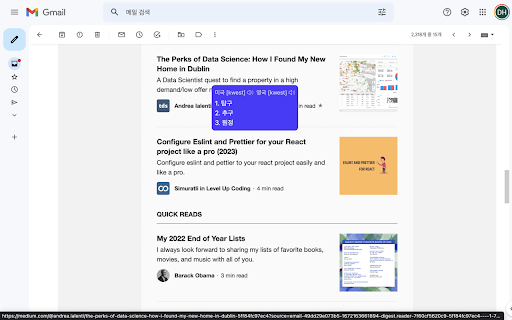
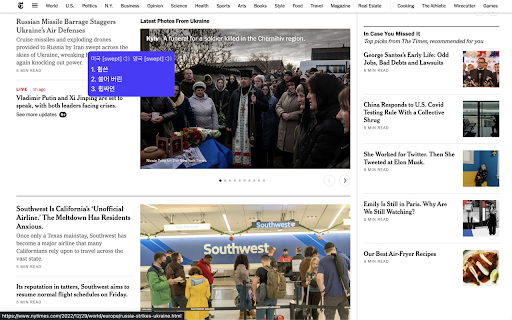
영어 단어에 마우스를 올리면 뜻, 발음 및 발음기호에 대한 번역 정보를 툴팁을 통해 제공해 줍니다. ⚠️ 이 익스텐션은 더 이상 유지보수 되지 않습니다. 안정성을 개선하여 English Copilot이라는 이름으로 새롭게 생성되었습니다. 지금 바로 설치하기: https://chromewebstore.google.com/detail/peehaoopjonpbekednbcchkfdaapaddn

Duey.ai — Auto Typer for Google Docs, Slides & Microsoft Word Online
Duey.ai's Auto Typer types your work naturally in Google Docs, Slides & Microsoft Word Online. Includes humanizing tools. Duey.ai Humanizer + Auto Typer for Google Docs, Google Slides & Microsoft Word Online ------------------------------------------------------------------------------------------------------------------------------------ 🚀 Duey.ai v2.4.8 — What's new We added the ability to move the typing window around on your document/slides window. We also fixed a couple issues based on your feedback. ⚡ Type in the background — for real now - Last update warned you that switching tabs slows Duey down. Not anymore: Duey now keeps typing at full speed even when the tab is in the background, minimized, or hidden behind another window. Start a run, go do something else, and come back to a finished document — we'll even notify you when it's done. 🏷️ Progress in your tab - Check how far along a run is straight from the browser tab. Your tab title shows the live percentage — like "[42%] My Doc" — so you can keep an eye on progress from anywhere without switching back. ✍️ More natural typing - Refined the rhythm of typos and corrections so a run reads even more like a real person at the keyboard. 🖼️ Smoother Google Slides - Stray keystrokes no longer slip in while Duey is typing into a slide, for cleaner, more reliable Slides runs. ------------------------------------------------------------------------------------------------------------------------------------ 🚀 Duey.ai v2.4.5 — What's new 🕶️ Stealth Mode - Hide Duey's in-page UI when you don't want it visible to passersby. Toggle the floating pill and the Docs titlebar button independently, or swap the Duey icon for a neutral pencil, file, or clock so a glance at your tab reveals nothing. 🎚️ Adjust speed mid-session - Realized your run is too slow (or too fast) after Duey started? Expand the pill and tune the speed live. Pro users get a smooth slider; everyone gets − / + nudge buttons. ↔️ Move and minimize the pill - Drag the pill anywhere on screen with the new grip handle, or collapse it to a small side tab when you want it out of your way. Click the tab to bring it back. ⚠️ Smarter tab-timing - If you switch away from your document while Duey is typing, Chrome slows things down dramatically. Your tab title now shows a clear warning so you notice from anywhere in your browser — and a one-time tip explains how to keep your run on schedule. 📊 Cleaner Slides output - Typos introduced for realism on Google Slides are now corrected the same way they always have been on Docs. Quality of life - Refreshed extension popup with cleaner branding and real toggle switches - New "Open Duey on this page" button in the popup - Custom typing settings save reliably across sessions - Keyboard shortcut moved to ⌘/Ctrl + Shift + E (rebindable at chrome://extensions/shortcuts) ------------------------------------------------------------------------------------------------------------------------------------ 🤖 Humanize your text in Google Docs and Word Online! 🦾 Let our AI Auto Typer write your Google Docs & Word Online documents for you ⏰ Free up your time by letting this extension write your documents for you ✅ Use our Essay Checker to get AI-powered feedback on your writing ☑️ Generate Citations from any website! Our Auto Typer is a Chrome extension that simulates human-like typing in Google Docs and Microsoft Word Online. You've already done the hard work — researched, outlined, written your content. Duey handles the last mile: getting it into your document with a full Version History, so you can spend your time on what matters. NEW IN 2.2.4 — - Session Summary — See your typing stats at a glance when a session completes: duration, word count, average WPM, and more - Dark Mode — The panel now matches your system theme automatically - Smarter Notifications — Get browser notifications at 25%, 50%, 75%, and 100% progress so you can safely tab away - Dedicated Window Support — Duey detects your window setup and guides you to an optimal configuration for hands-free typing - Paste & Go — Paste your text and the Start button highlights automatically - Improved Reliability — Better handling of extension updates, error recovery, and Word Online free plan tracking - Dark Mode Support for Word Online — Consistent theming across Google Docs and Word Online NEW IN 2.2 — Word Online Support (Pro): Auto Typing and Humanizing now work seamlessly in Microsoft Word Online for Pro users, so whether your workflow lives in Google Docs or Word, Duey has you covered. NEW IN 2.0 — Auto Typer Pro: Our most realistic typing mode yet. Pro simulates natural human typing with adaptive rhythm, context-aware pauses, and realistic error correction — so your sessions are indistinguishable from a real person at the keyboard. Every free user gets one Pro session to try it out. Paired with Duey.ai's proprietary AI, the extension can also humanize your text, making it read more naturally and authentically in your own style. • Free to use — Get started with no limitations on how much it will type for you, no account required. Sign up for free to unlock additional settings, or upgrade to Pro for the most realistic typing experience available. • Works where you work — Supports Google Docs for all users, plus Microsoft Word Online for Pro subscribers. • Save your valuable time — You've already done the hard work of creating your text. Let Duey write it for you so you can get back to research, studying, family, or whatever matters most. • Show your work — Duey writes it keystroke by keystroke, so your document has a full Version History for review. • AI that writes naturally — Can be configured to match your natural writing style and speed. • Humanize your text — Duey.ai's Humanizer makes your text flow like authentic writing, helping you stand out and pass AI detection. • Know how long it will take — Duey tells you the estimated typing time upfront, so you know exactly how much time you're getting back. • Set it and forget it — Start it, walk away, come back to a finished document. Start and stop whenever you want. • Auto Typing in Word Online — The same realistic, human-like typing experience now works natively in Microsoft Word Online. • Humanizing in Word Online — Run Duey.ai's Humanizer directly in your Word Online documents, just like in Google Docs. • Seamless cross-platform workflow — Switch between Google Docs and Word Online without changing your process. • Available to Auto Typer Pro and Duey.ai Unlimited subscribers. • Adaptive typing rhythm — Speed fluctuates naturally instead of staying robotic and constant. • Context-aware pacing — Pauses at paragraph breaks and sentence boundaries, the way a real person stops to think. • Realistic error correction — Occasional typos with natural backspace-and-fix behavior, just like a human would. • Configurable WPM — Set your target speed and Pro builds a realistic typing session around it. • Pre-computed sessions — Your entire session is planned before it starts for smooth, uninterruptible execution. • One-click upgrade — Switch to Pro mode directly from the standard auto typer. • Free trial — Every user gets one Pro session to try, no card required. • Bring your text from wherever you created it and paste it into the extension. • Optionally humanize it with Duey.ai before typing. • Pick your configuration — standard or Pro — and set your preferences. • Open your Google Doc or Word Online document (Pro), click Start, and Duey takes care of the rest. • Writes naturally in Google Docs and Microsoft Word Online (Pro), including pauses and corrections. • Humanize text automatically using Duey.ai's proprietary AI. • Enhance your writing using the Duey.ai app (https://app.duey.ai) to create and humanize your documents. • Check for AI detection using the Duey.ai app (https://app.duey.ai). • Essay Checker for AI-powered writing feedback. • Citation Generator — create citations from any website. • More features coming soon! • Free — Full auto typer for Google Docs with no limitations. Always free. • Free with account — Additional settings and configurations at no cost. • Auto Typer Pro — $5/month for the most realistic typing simulation available, including Word Online support. Every free user gets one Pro session to try. • Duey.ai Unlimited — $9.99/month for Pro typing + Word Online + all Duey.ai tools.

Translate - Translator, Dictionary, TTS
Accurate translate words, phrases and texts using Google Translate. Full page translator, dictionary and text to speech (TTS). Translator uLanguage the best and easiest way to quickly translate part of the content that you need, such as words, phrases, or even menu items. Highlight the word or text you want to translate and you will immediately see the translation into your language. All in one simple and understandable browser extension. ➖ Completely free. Doesn't require registration or any subscriptions; ➖ Supports over 120 languages; ➖ Automatic language detection; ➖ Text voice acting for 60 languages; ➖ Reverse translation; ➖ Works on all sites including Gmail, Facebook, Twitter and others; ➖ Convenient and intuitive user interface of the extension; ➖ Translating words using a dictionary (+ dictionary works offline). Translator reads and reproduces words, phrases and entire texts using quality human text-to-speech (TTS) translation. It shows transcription and transliteration, also knows how to reproduce words or texts with the correct accent and with correct stress. Learn the correct pronunciation words right away, without postponing it for later! Functionality: ✔️ Web page Translation - full web page translation with mouse hover translation ✔️ Dictionary - Word meaning, pronunciation, synonyms, hypernyms, hyponyms and more. ✔️ Bookmarks - Keeps track of all the changes you made to your bookmarks. Saving translation history. ✔️ Text to speech - correct pronunciation and play words and texts with correct accent. ✔️ Image translation (image recognition) - Just select the area on the monitor that you want to translate (the principle of work is as in the screenshot tool). In the new version of the extension, we have added the ability to select translators. Now you do not need to install additional programs or applications to use Google Translate, all in one convenient extension, with all the features that are available for the uLanguage. Text-to-speech Use TTS function that helps you learn how words sound as well as phonetic transcription. Full-page translations Translate entire web pages into your desired language with just one click. This is a new feature provided by Google Translate for free that we integrated into our translator. We really hope that our extension will be useful to you! We look forward to your feedback and ratings! Also write your suggestions for improving the functionality.

WordsMine! Your one-stop solution for vocabulary
WordsMine! Tools that help you gather words fast Translate, save, and boost your vocabulary while you browse. WordsMine lets you translate with a double-click, save words to your personal word bank, and review with flashcards using spaced repetition. It works across websites, YouTube subtitles, and PDFs/eBooks, so learning fits your browsing, not the other way around. Never look up twice. It’s easy to forget a word you looked up a few days ago—when it appears again, you search again, and the cycle repeats. WordsMine breaks the loop: saved vocabulary is auto-highlighted whenever you meet it across the web, with quick meanings in context so you keep reading and keep learning. What you can do • Translate instantly: Double-click, select text, or hover over a word while holding the Ctrl key (Windows or MacOS) to get inline translations for words and phrases easily. • Save anything: Add words/phrases from webpages, YouTube captions, and PDF/eBooks to your word bank. • Review smarter: Turn saves into flashcards with spaced repetition to retain faster, longer. • Learn in context: See examples, highlight previously saved words on pages, and mark “hard” words. • Works everywhere: Web, PDF reader, YouTube; syncs across devices. • Multilingual support: Bi-directional lookup across 120+ languages. Perfect for Students, test prep (IELTS/TOEIC/SAT), professionals upskilling on technical terms, and lifelong learners. Privacy & control Toggle translation popups, manage saved words, and customize review—your learning, your pace. Recognition 50+ recognitions and awards from local and global organizations, including Google for Startups, Microsoft for Startups, Qualcomm, and UNDP. What’s new • Quick translation by pressing Ctrl + Hovering over a word to get inline translations easily • New features for Youtube translation, stability fixes and performance improvements. Support Need WordsMine work on your favorite sites? Visit the Support section on this page.

AI Grammar Checker & Paraphraser – LanguageTool
Instantly Enhance Your Texts with LanguageTool’s Grammar Checker and Paraphrasing Tool This extension ensures that your writing is error-free. LanguageTool detects many errors that a simple spell checker cannot, such as grammar issues, commonly confused words, and punctuation oversights. Additionally, LanguageTool offers style suggestions to elevate your writing: synonym replacements for overused words, concise rephrasing of wordy sentences, and formal alternatives to commonly used expressions. LanguageTool is designed with simplicity in mind, instantly analyzing your text as you type. It is compatible with most platforms, including social networks such as Twitter and LinkedIn, and e-mail services such as Gmail. With LanguageTool, our aim is to give users a full-feature grammar checker and proofreader that will enable them to have control and confidence over their content. While LanguageTool is a vital extension for non-native speakers, it also recognizes many mistakes that are frequently made by native speakers. This grammar and spelling correction works across several varieties of commonly spoken languages, and is capable of distinguishing between American and British English. LanguageTool also features a personal dictionary for exceptions or words that you might commonly use, but are not found in a conventional dictionary; it will learn to recognize these words for future grammar checking and proofreading. Unlike other services like Grammarly (a.k.a. Grammerly :-), QuillBot, and Ginger, LanguageTool supports more than 25 languages including English, Spanish, French, German, Polish, and Russian (see below for the complete list). Your privacy is important to us: By default, this extension will check your text by sending it to https://languagetool.org over a securely encrypted connection. No account is needed to use this extension. We don't store your IP address. See https://languagetool.org/privacy/ for our privacy policy.
