
mjjdebghfjfcmnjglapjhkclbgdemigi
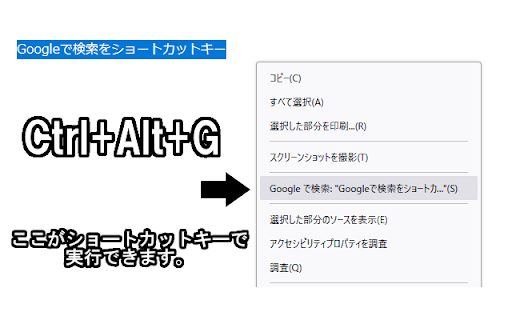
「Googleで検索」をショートカットキーに登録して実行できます。 テキストを選択してショートカットキーを入力してください。 ショートカットキーはオプションから変更可能です。 ※アドオンの動作テストは設定ページ以外で行ってください。 マウスのボタンにショートカットキーを割り当てて使用する事を想定しています。 デフォルトでは"Ctrl+Alt+G"がショートカットキーに割り当てられています。 ショートカットキーはブラウザで割り当てられていないキーか、他のアドオンと競合しないキーを登録してください。

Mouse Dictionary
A super fast dictionary for language learners Mouse Dictionary is a super fast dictionary for Google Chrome. Designed mainly for English and Japanese. Features: * Super fast!!! * Awesome phrases detection * Capable of importing your own text data * Customizable view * Available on various documents: * PDF documents * YouTube captions * input elements * textarea -------- In addition to the built-in default English-Japanese dictionary, you can import data as you like including Japanese-English, English-English and so on. Please check here.

Link Blanker
When you click a link to open in a new tab. Anyway open in a new tab. (You can also open in the background. ) And you can close tabs cluttered together. The browser 'back' how to hate, why strangers.

Google search results shortcuts
Keyboard shortcuts for google search results J/K(Down/Up): Navigate links H/L(Left/Right): Navigate page /: Focus input field G + [A/I/V/M/N]: [All/Image/Videos/Maps/News] G + shift-V: verbatim search

Selection Command – Instantly search, use AI, or launch tools.
Search, use AI, or run tools with selected text in one click, and speed up your browsing. Say goodbye to tedious copy-paste and repetitive templates!🚀 Selection Command is a Chrome extension that lets you instantly search, chat with AI, autofill forms, and preview links—all with a single click from any text you select on a web page. Perfect for These Scenarios: ・🔍 Instantly search or translate any word or sentence you find online ・🤖 Auto-fill your favorite prompts into AI chat tools like ChatGPT ・👥 Share useful commands and prompt templates with your team Who Should Use This? ・🧑💻 Marketers, creators, business professionals—anyone who wants to gather information or work more efficiently ・🧙♂️ Anyone who wants to make daily tasks like researching, summarizing, or using AI faster and smarter Ridiculously Simple to Use 😆 Just select text on any web page → Trigger a command from the popup menu → Your “usual task” is done in an instant! 🎉 🌟 You can even customize and share commands, making it perfect for boosting team productivity! Key Features: - Instantly search selected text with your favorite search engine - Launch any AI chat (like ChatGPT) with your chosen template auto-filled - Preview links without opening new tabs - Fine-tune style and popup position to fit your workflow - Trigger commands with keyboard shortcuts - Fully customize, share, and download your own command sets Ready to make your browser workflow lightning-fast? Try Selection Command now and transform the way you work!
