
mjgilapnpopkjeilfkgknmfglegnidpn
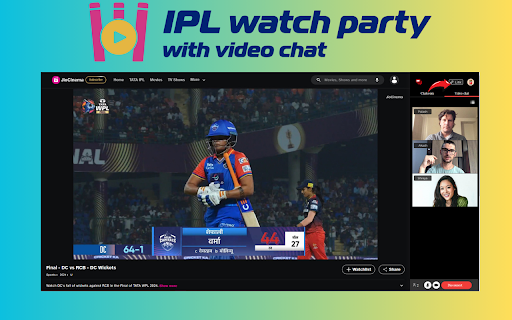

Activate this chrome extension to view IPL matches together with your friends through one click 🏏👫 Do you want to stand out from the crowd and make the IPL experience even more intense by sharing the fun with your friends? Install IPL watch party with video chat Chrome extension. You just press a button, and you are there, with your friends who are miles away from each other, but you are still watching the game together. It is not only about observing the game on the screen because you can exchange messages, emojis, and chat, which gives the impression that you all are sitting on the same couch, cheering together. It is an awesome way to feel the game vibes, so you are not just sitting at home in front of TV screen but with your friends 📺🎉 Key features of IPL watch party with video chat chrome extension: >>Host IPL watch parties instantly: Click a button and join your friends to watch matches on your TV. No delays, no hassles—straight to the action. >>Enjoy lively chats with emojis: Spice up the game with emojis and chat, sharing every thrilling moment as if you're right there in the crowd. >>Easy integration: It seamlessly integrates into your browser in just a few steps. No worries—we've got it all set up for you. >>Connect from anywhere: Distance is no barrier with IPL watch Party. Whether you're in different cities or countries, feel united and share the excitement of the game together. 1. First, launch your Chrome browser and enter the Chrome Web Store website. Search for "IPL Party with video chat Chrome Extension", press "Add to Chrome" to install it, and then pin it to the browser for easy access. 2. Then, go to JioCinema app, click on the IPL match or the highlights you want to watch and then activate our extension to get a unique link for your watch party. 3. Copy this link. Lastly, send this link to your friends, start a video call to bring everyone together in perfect sync and use the link to watch the game without delays and enjoy the atmosphere as if you were all in the same room. Why is it useful? 1. Beat Distance: Experience matches together with friends from anywhere and feeling that you are all in the room. 2. Talk and Enjoy: Chat and send emoji to friends as you watch, it's like you're together. 3. Easy Setup: This feature is added, the one is chosen, and the friends are invited within a short time. 4. Make Memories: Sharing the excitement of IPL matches together is a great source of all that makes memorable moments, and it creates a bond. Whom it is Useful? Remote Friends and Family: Greatly appropriate for the fans who are far away from their loved ones but bound together by their love for cricket, enabling them to watch IPL matches together in real time, and thus promote closeness despite the miles. Busy Professionals: Convenient for people with busy schedules, it will give them a great opportunity to watch IPL games together with friends without having to modify their usual routines. Tech-Savvy Cricket Fans: Specifically for enthusiasts who desire to explore innovative ways to improve their cricket experience, the app offers a smooth interconnection and fun features that enable them to enjoy watching the game with their friends. Socially Active Individuals: Perfect for those who love chit-chatting and are extroverts, the interactive feature of the platform enables them to engage with their friends while supporting their Favorite teams during the IPL matches. 1. Is the IPL watch Party with video chat Chrome extension free to use Yes, the IPL Party Chrome extension is completely free to install and use. 2. Can I use the IPL Party extension to watch IPL matches with friends who are in different cities or countries? Absolutely! The extension allows you to watch matches with friends regardless of their geographical location, bringing you closer together virtually. 3. Do I need to have a JioCinema subscription to use this extension? No, you do not need a JioCinema subscription. The extension works seamlessly with JioCinema to facilitate watch parties, but a subscription is not required. 4. Is it possible to customize or personalize watch parties with this extension? While the extension focuses on providing a seamless watch party experience, it currently does not offer customization features. However, you can chat and share emojis with your friends during the matches

My Watch Party
This extension works together with the My Watch Party website and enables you to watch videos from various sites in your party. This extension works together with the My Watch Party website and enables you to watch videos from various sites in your party.

Search Console Everywhere
Access Google Search Console with one click. With this extension you can view the search console data from any tab 🚀 Ditch the endless tab juggling! This Chrome extension puts Google Search Console at your fingertips with just a single click. Seamlessly access and analyze your website's performance data directly from any tab you're browsing. No more switching back and forth – stay in your workflow and gain instant insights into your search engine ranking and optimization potential. 📊✨ Key features of search console everywhere chrome extension 🔍 One-click access: Skip tab switching and frustration! It only takes one click to get your data from Google Search Console no matter which web page you are on. 🚀 📈 Real-time insights: Without closing the browsing mode. Have real-time updates regarding your website’s performance in terms of SEO, page rankings, and errors. 🔄 🎯 Enhanced convenience: Do not switch to the workflow but gain valuable ideas without interrupting browsing. 🌐 🔗 Seamless integration: Uncomplicated setup, no need for additional tools. It connects seamlessly with your current Google Search Console account. 🤝 📱 Mobile-friendly: You can check your website’s SEO information whenever and wherever you want. 🌐📲 How to use 🌐 Visit the Chrome Web Store. 🔍 Enter “Search Console Everywhere” in the search bar. 🛒 To install it, click the extension in search results and then select “Add to Chrome”. 📌 Once it’s installed, the extension icon should show up in your Chrome toolbar, usually near the address bar. 🚀 After activation of the extension, it should enable you to view Google Search Console data without switching tabs on any web page. 🌍 Explore live updates of your website’s performance, SEO stats, page rankings, and possible errors without changing tabs while browsing. 🤝 The extension should meld perfectly with your existing Google Search Console account that does not require additional tools.

Flickcall: Netflix Party with Video Call
Flickcall is a watch party extension to watch movie & TV shows on popular streaming services together with friends & family. Once a watch party is started, Flickcall’s cutting-edge technology will synchronize everyone’s video players. On top of that, participants can video call and group chat to make the virtual movie experience more fun. Update 11.1.0 - Added support for JioHotstar Update 8.4.1 - Support for 3rd party shows with ads on Amazon Prime Video. - Support for ad based plan on HBO Max. Flickcall now offers free and a premium plan. The free plan supports watch party on all 10 streaming platforms. It offers unlimited text chat and 30 minutes of video chat every week. View list of all supported streaming platforms here https://www.flickcall.com . Premium plan offers everything in free with unlimited video chat. How to start watch party? 1. Start playing the movie or TV show. Once the video starts playing, click the Flickcall logo on the top right. That’s it. If the logo, doesn’t show, hover over the top right corner of the video. You can also click the Flickcall browser icon from the extension menu to start the party. 2. Share the Invite link to add more participants. Flickcall VS other watch party extensions. What makes Flickcall stands out? -Cutting-edge technology to keep video playback in sync. -Video call support in addition to group chat. Flickcall is like Netflix party with video call. -Setup and join the watch party without any hassle. No need to pass instructions to friends to join the party. Just share the invite link, we will handle the rest. -Flickcall is privacy friendly. Your personal chats and video streams are transmitted directly to your friends without passing them to our servers. However, if direct connection is not supported due to a firewall, personal messages and streams are routed via our servers with industry-level encryption (our servers can’t decrypt). - Keep video players in sync to support seek, skip credits, skip intro or even ads playing in one of the participants. It just works - Flickcall remote watch parties work flawlessly even with TV series to binge multiple episodes together making it the best extension to watch with friends. - Watch party on Youtube supports synchronization for multiple videos in the same watch party. Eg. if one user starts playing a new video from recommendations or by searching, playback for everyone will be synchronized. So you can watch tons of unrelated video in sync in a single party. - Supports watching live matches together. So get ready to cheer for your favorite teams together. - Supports Indian OTT platforms. Check full list https://www.flickcall.com. Either you are planning to stream movies with friends or want to go on a virtual movie date or just want to binge together - Flickcall is the best extension to watch movies together.

Canva AutoMaker
Automate Canva designs with Canva Automaker Chrome extension Automate Canva designs with Canva Automaker Chrome extension
