
miobdnlklljmcbdjfchaiahbpjcphddb

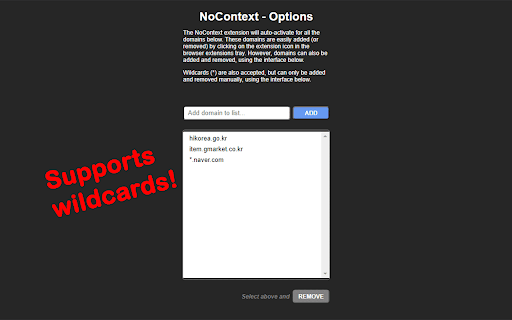
Bring back the right-click! Let me select text! Clicking on this extension will bring back your right-click context menu and ability to select text on websites that may have mangled its true purpose. When active for the current tab's domain, you'll see a red "!" badge on the corner of the icon. It will remember the domains you've activated previously and automatically activate when returning to those domains. (Some websites use multiple domains, so you may need to activate it for each of the subdomains, or use wildcards in the Options menu!) You can always click on the icon again to deactivate when visiting the current domain. Updates: 1.0.13 -- Better iframe handling. Settings now carry over into incognito/private tabs. 1.0.12 -- Convert past version domain lists to newer version. 1.0.11 -- Rollback due to missing back-compatible features. 1.0.10 -- Added advanced options to limit event overriding per domain. 1.0.9 -- Fixed issue with continued browsing on same tab. 1.0.8 -- Handles pages that lazy-load elements. 1.0.7 -- Domains list sorted. DOM body included in user-select restoration. 1.0.6 -- Some elements use CSS to disable user-select. This update re-enables them. 1.0.5 -- Updates to the Options page. 1.0.4 -- More functionality restored for websites using iframes. 1.0.3 -- Now works with web files from local files (URLs starting with "file://") and re-enables selection of text.

Enable Right Click
Enable right-click, text selection, and copy functionality on protected websites Enable Right Click - Restore Your Browser's Native Functionality Have you ever encountered websites that block right-click, text selection, or copy functionality? This extension is your solution to regain control of your browsing experience. Key Features: • Enable right-click context menu on protected websites • Allow text selection and copying on restricted pages • Simple one-click toggle to enable/disable • Works on all websites automatically • Keyboard shortcut support (Ctrl+Shift+R) • Clean and modern interface How It Works: 1. Install the extension 2. Click the extension icon to enable/disable 3. Right-click, select text, and copy as normal Perfect for: • Students researching and taking notes • Content creators gathering information • Professionals working with web content • Anyone who needs to copy text from websites Privacy & Security: • No data collection or tracking • Works entirely in your browser • No external servers or connections • Safe and secure to use Note: Some websites may require a page reload after enabling the extension. Simple, powerful, and free - take back control of your browsing experience today!

Enable Right Click
Prevents websites from disabling the default right click context menu.

Select like a Boss - Select all kinds of text by dragging ↔
With this extension, you can easily select link text just like regular text, making it easier to copy. Just Select like a Boss! ;) Select like a Boss is a browser extension that allows you to easily select link text just like regular text, making it easier to copy. With this extension, you can quickly select and copy link text without the hassle of selecting the surrounding elements. • when you want to select link or part of link ↔ just select it like a regular text. • when you want to drag link ↕ drag it up or down.

Enable Right Click +
Enable copying on websites with copy protection: enable right-click and restore context menu functionality. Tired of websites restricting your ability to right-click and use the context menu? Look no further! Introducing Enable Right Click+, the ultimate solution to regain control of your browsing experience. 🔓 Unlock Restricted Features: This powerful Chrome extension allows you to enable right-click functionality on any website, giving you the freedom to copy text, images, and other content without limitations. Say goodbye to frustrating restrictions and hello to effortless browsing. 🖱️ Effortless and Intuitive: Enable Right Click is designed with simplicity in mind. With just a click, you can unblock the right-click option, making it easy to interact with web pages, save images, and access other context menu features without any hassle. 🛡️ Security and Privacy: Rest assured, your security is our priority. Enable Right Click is secure to use and doesn’t compromise your privacy. It’s a reliable solution that ensures you have the tools you need without compromising your online safety. ⚙️ Customize Your Experience: Tailor the extension to your preferences. Enable Right Click offers customization options, allowing you to choose which websites you want to enable right-click on. Enjoy a personalized browsing experience that suits your needs. 🌟 Why Choose Enable Right Click? - **Seamless Functionality:** Effortlessly enable right-click functionality on any website. - User-Friendly: Intuitive interface, making it accessible for users of all levels. - Secure: Trustworthy and safe, ensuring your online security. - Customizable: Adapt the extension to work the way you want it to. Say goodbye to restrictions and hello to browsing freedom! Enable Right Click+ now and take back control of your online experience. It’s time to browse without boundaries! 🚀
