
mihpjneonbkpedkifcflpngcibgmoice
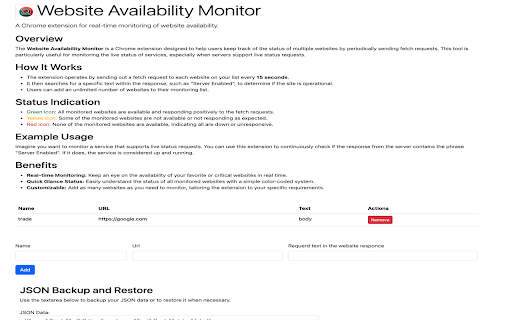

Check website availability and update icon color. Chrome Extension: Website Availability Monitor Overview The Website Availability Monitor is a Chrome extension designed to help users keep track of the status of multiple websites by periodically sending fetch requests. This tool is particularly useful for monitoring the live status of services, especially when servers support live status requests. How It Works The extension operates by sending out a fetch request to each website on your list every 30 seconds. It then searches for a specific text within the response, such as "Server Enabled", to determine if the site is operational. Users can add an unlimited number of websites to their monitoring list. Users can add an action URL, which will be opened by pressing on the action button. Status Indication Green Icon: All monitored websites are available and responding positively to the fetch requests. Yellow Icon: Some of the monitored websites are not available or not responding as expected. Red Icon: None of the monitored websites are available, indicating all are down or unresponsive. Example Usage Imagine you want to monitor a service that supports live status requests. You can use this extension to continuously check if the response from the server contains the phrase "Server Enabled". If it does, the service is considered up and running. Benefits Real-time Monitoring: Keep an eye on the availability of your favorite or critical websites in real time. Quick Glance Status: Easily understand the status of all monitored websites with a simple color-coded system. Customizable: Add as many websites as you need to monitor, tailoring the extension to your specific requirements. This Chrome extension is an essential tool for webmasters, IT professionals, and anyone who needs to ensure that their services are always up and running.

Meta-Press.es
Explore the press from your computer, with no middlemen between the newspapers and you. Discover millions of results within seconds, and explore the last ones in your browser via this WebExtension. Select your press review and export it in a few clicks.

Tab Cleaner Extension
Clean up tabs with specified domains Clicking on the extension will bring up an options page with the following features * Domain Registration (You can also register the domain of the current tab with the shortcut keys "Control (Command) + Shift + E") * Transition to a previously deleted page * Batch deletion of tabs belonging to the registered domain (Shortcut key "Control (Command) + E" can be used for batch deletion) * Activation of "New Tab" deletion. For information on how to allow execution in incognito mode. See `https://support.google.com/chrome/a/answer/13130396`. If the shortcut keys do not work, go to `chrome://extensions/shortcuts` and re-set the keys. Release Notes * v0.2.0 - 2023/07/25 Added the ability to delete individual "Target Domains". * v0.3.0 - 2023/07/31 Added the ability to set a maximum "Cleaned History" limit. * v0.4.0 - 2023/08/10 Added the ability to clear tabs that do not include "Target Domains" in the URL (pilot feature)

Input Ninja
Action flows to create Trello cards, Notion pages, GitHub & Jira Issues, use ChatGPT, templates, notes, todos etc with one key press Input Ninja allows you to create action flows that automate your routine operations such as creating Trello card, Notion pages and recrords, GitHub or Jira issue, using ChatGPT etc... and combining all of this in a different orders. You can also quickly search through your notes, templates or todos at any moment on any web page. You can then choose to simply view or paste the note directly into the place your cursor caret is at the current moment, which is extremely useful when you deal with emails or messaging on LinkedIn or other social platforms. You can also add a new note quickly right on spot by going to Context Menu -> Input Ninja -> Add New Note. For example: You can make it so that on a press of a button you will create a Trello card in specific board assigned for a specific team member with a screenshot attached. If you want to make your note to act like a template, just use a place holders with an identifier within square brackets. For example: Please let me know if you are interested in a position of [Position Name] in our company. In case of templates, when you select it in the search box, you will be prompted to fill the place holder fields with values which will be later put in place of place holders and paste into the field that is currently focused. For social media platforms like LinkedIn, the values for First Name and Last Name will be automatically filled where possible. You can mark your note as Sensitive in the settings, which will show * instead its content in the search box. This is useful for saving passwords, personal information etc... . * Share your notes within your team * If you are working in a team you can choose to have shared notes or templates, which makes it very convenient to have a central knowledge base accessible by every team member. 1. Sales. If you are working in Sales you are dealing with a lot of repetitive emailing containing product pitches, feature descriptions, customer onboarding info and so on. By putting all of your templates and notes into Input Ninja you will be able to have them at your fingerprints and access instantly at any moment. Which will drastically improve your productivity and decrease the annoyance of dealing with constant searching and context switching. 2. Recruiting. You can use Input Ninja to save your open positions info, as well as frequently used answers for the candidates engagement. This will allow you to have all these information at hand any moment. And by extension save a lot of time which you can use to reach out to even more candidates. 3. Personal Day to Day use. If you found yourself searching through your notes frequently to find some data needed when you are working in the browser, Input Ninja can be a huge time saver for you. You can use it to quickly access your payment information to fill-in when ordering online. Or just quickly view/edit your todo list for the day. You can also find it convenient to have a possibility to quickly add a note from a selection on the web page. Input Ninja gets you to the next productivity level.

PageTrail
This Extension tracks your daily surfing activity PageTrails is designed to enhance productivity by tracking time spent on various websites. It records active browsing time, aggregates it at the domain level, and provides a concise summary of web activity. This extension is ideal for users seeking to monitor their web usage patterns and optimize their online time.
