
lbechddallmndemekdkfkmfjcbloehco
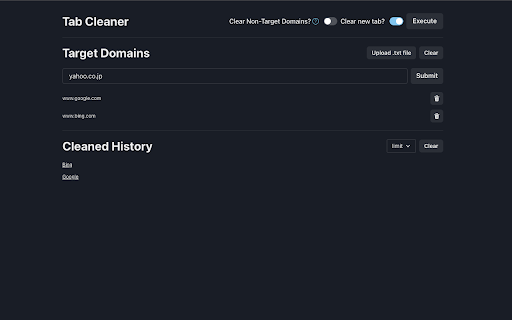
Clean up tabs with specified domains Clicking on the extension will bring up an options page with the following features * Domain Registration (You can also register the domain of the current tab with the shortcut keys "Control (Command) + Shift + E") * Transition to a previously deleted page * Batch deletion of tabs belonging to the registered domain (Shortcut key "Control (Command) + E" can be used for batch deletion) * Activation of "New Tab" deletion. For information on how to allow execution in incognito mode. See `https://support.google.com/chrome/a/answer/13130396`. If the shortcut keys do not work, go to `chrome://extensions/shortcuts` and re-set the keys. Release Notes * v0.2.0 - 2023/07/25 Added the ability to delete individual "Target Domains". * v0.3.0 - 2023/07/31 Added the ability to set a maximum "Cleaned History" limit. * v0.4.0 - 2023/08/10 Added the ability to clear tabs that do not include "Target Domains" in the URL (pilot feature)

Digest
Your internet companion. Read better, discover more. The Digest Reading Widget is a recommendation engine for high signal internet essays. Some of the top research today is taking place on personal Substacks and self-hosted blogs — written by niche, under-the-radar, indie researchers we help you find. Save essays to the widget to get recommended relevant content. For readers who love going down internet deep dives, and writers looking to explore niche research rabbitholes!

Tab Cleaner
Help keep your chrome tabs in control * Deduplicate your tabs (closes Chrome tabs that are duplicates in your browser window) * Remove tab windows that have not been opened since a time you specify. I created this to solve my own itch. I usually have too many tabs open and I never close my old tabs. This tool helps me keep my Chrome organized. Use cases: 1. If you have a ton of the same tabs open, like reddit.com, then it will remove all but one tab. 2. Close all tabs that have not been opened in 2 hours (or any time you specify). I hope you enjoy! If you have problems or feature request, feel free to reach out. I'm happy to help solve this problem for others! You can view the open source code here: https://github.com/jchiare/tab-manager

LinkedOut - Dislikes for LinkedIn™
Ever found yourself wanting anonymous dislikes? LinkedOut solves that problem! Just install LinkedOut and start disliking those awful posts, instead of risking your career prospects with an angry comment. NOTE: LinkedOut is in no way endorsed by, affiliated, or associated with LinkedIn™

Tab Resource Usage Dashboard
Monitor tab resource usage in real-time. Identify which tabs are slowing down Chrome with detailed memory and performance… Monitor tab resource usage in real-time. Identify which tabs are slowing down Chrome with detailed memory and performance metrics. Detailed Description: Tab Resource Usage Dashboard helps you understand why Chrome is running slowly by providing detailed insights into each tab's resource consumption. ✓ Real-time Performance Score - Instantly see which tabs consume the most resources ✓ Memory Analysis - Track JavaScript heap usage with percentage of browser limits ✓ Performance Monitoring - Detect long-running tasks that freeze your browser ✓ Resource Tracking - Identify large files and bandwidth usage per tab ✓ DOM Complexity - Monitor page complexity with node counts ✓ Active Components - Track timers, workers, and event listeners ✓ Auto-refresh - Updates every 5 seconds for live monitoring ✓ Detailed View - Click any tab for comprehensive breakdown WHAT'S MONITORED: • JavaScript memory usage and limits • DOM node count • Active timers (setTimeout/setInterval) • Long tasks blocking the browser • Web Workers • Large resources (>500KB) • Event listeners • Total bandwidth consumed PERFECT FOR: • Developers debugging performance issues • Power users managing many tabs • Anyone experiencing Chrome slowdowns • Web performance optimization The extension presents data in an intuitive dashboard with color-coded indicators and alerts for high resource usage, making it simple to identify problematic tabs at a glance.
