
mhimbdcbjofgbkmgnojlmkigajlgppon
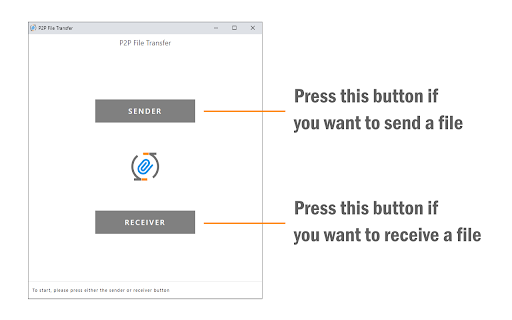


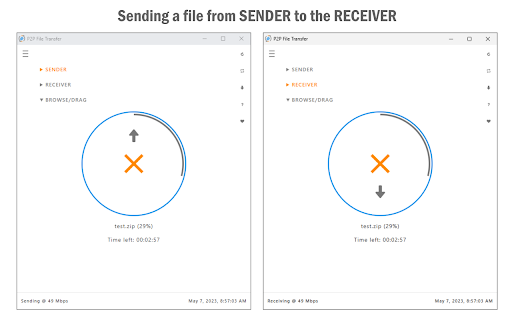
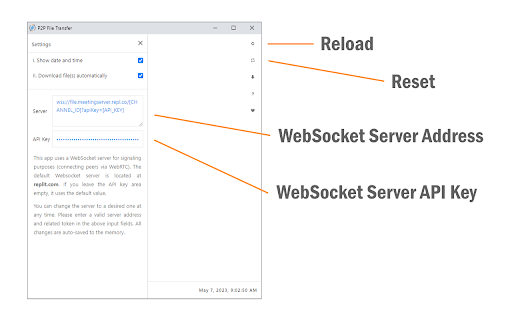
The P2P File Transfer extension enables you to easily and securely send and receive files between peers. To work with this app, please open it on at least two different machines (peers). Press the SENDER button on one machine, and the RECEIVER button on the other one. Enter the 6-digit token number from the sender machine to the receiver and then press the JOIN button. Once the app is ready and the connection is made, you can send files between these two peers. Please browse or drag a file to the blue circle area and wait for the file transfer to start. To cancel the file transfer, please press the orange cross-icon at any time. You can also reload the app to cancel the ongoing progress. This extension uses WebSocket and WebRTC technologies to make the initial connection and handshakes between peers. Once the initial setup is completed, a secure direct channel is established between peers, and third-party servers are not needed and used anymore. Note: this extension uses WebSocket and WebRTC servers for the initial connection and handshake operations between peers. Please read this (https://mybrowseraddon.com/privacy-policy/p2p-file-transfer.html) page to get more info. If you have a feature request or found a bug to report, please fill out the bug report form on the addon's homepage (https://mybrowseraddon.com/p2p-file-transfer.html).

SoqAlbum: Share iPhone/Android Files/Cameras
SoqAlbum directly links your smartphone(iPhone/Android) to chrome, allowing you to transfer and share files and photos via the link. (NEW) Added a simple chat feature. You can now exchange text messages between Chrome and your smartphone. (NEW) Added "Send Memo" and "Send Voice" tools to SoqTools. You can edit text or record audio on the fly, and send it directly to Chrome. SoqAlbum links your smartphone and chrome directly via P2P. The link is completed in just two easy steps: click on the extension icon to launch SoqAlbum, and then use your smartphone to read the QR code there. Using a simple tool on the smartphone app (SoqTools), you can easily transfer files from your smartphone to the chrome side. By selecting the camera tool, photos taken with a smartphone can be saved directly to the chrome side and viewed on the large screen display of the PC. It is also easy to send files from the chrome side to the smartphone. SoqAlbum provides advanced collaboration between smartphone and PC. Multiple smartphones can be linked to SoqAlbum at the same time. This allows you to transfer and share files across multiple devices, using chrome as a hub for file sharing. File exchange in SoqAlbum is done via P2P and does not go through the cloud, so there is no need to worry about file leaks from the cloud or censorship. We have offered "Adaptive Download Shelf" as an extension option, which allows you to disable the download shelf only when using SoqAlbum. This can make the full screen display of SoqAlbum more comfortable. SoqAlbum is a universal app supporting Win/Mac/Linux/ChromeOS/iPhone/Android. Even in situations where AirDrop or Nearby Share are not available, SoqAlbum can still transfer files. You can use this free app right now just in your browser, without creating an account. With this extension, enjoy the freedom of file sharing without the need to be aware of platform differences.

Fileshare
Secure file sharing extension with end-to-end encryption, password protection, and anonymous transfers for maximum privacy. Anonymous file sharing extension with end-to-end encryption and password protection. Share files via secure public links or transfer directly between devices without registration. Core Functionality: ▸ End-to-end encrypted file transfers ▸ Password-protected sharing links with captcha verification ▸ Anonymous file sharing without user accounts ▸ Direct device-to-device transfers ▸ Temporary file sharing with automatic expiration ▸ Cross-platform compatibility Sharing Methods: ⭐ Public Links: Generate password-protected URLs with captcha security ⭐ Direct Transfer: Send files between devices with encryption ⭐ No server storage - files transfer directly or expire automatically ⭐ Compatible with Windows, macOS, Linux, Android, iOS Security Features: 🔒 Military-grade AES-256 encryption 🔒 No permanent file storage on servers 🔒 Password and captcha protection for shared links 🔒 Anonymous usage - no registration required 🔒 Open-source security architecture User Interface: The user interface is intuitive and clean, designed for easy navigation. Upload file and share link to download in seconds while our system protects your content from bots and scammers through advanced verification methods. Technical Specifications: - Peer-to-peer connection technology - Progressive web application framework - Responsive design for all screen sizes - Regular security updates - Browser-based operation Advantages: • No file size restrictions for direct transfers • Independence from cloud storage services • Instant file sharing capabilities • Multi-platform support • Zero-cost solution Support: 💡 Documentation and user guides 💡 FAQ section 💡 Community forums 💡 Customer support 💡 Regular feature enhancements Secure, anonymous file sharing solution for modern digital collaboration needs.

Google Meet - File Transfer
This extension is to send files when in a google meet Enhance your Google Meet experience with seamless file sharing! File Transfer for Google Meet is an intuitive Chrome extension that allows participants to easily share documents, images, zip files, and other files up to 50 MB directly during your Google Meet sessions. Unlike the traditional in-call messaging feature, this extension is specifically designed for efficient and secure file transfer, making it perfect for collaborative work, educational purposes, or just sharing important files in real-time. Easy File Sharing: Share any type of file, including documents, images, and zip files, up to 50 MB in size. Integrated with Google Meet: Works seamlessly within your Google Meet calls, providing a smooth user experience. Secure and Private: Ensures your files are shared securely with meeting participants. User-Friendly Interface: Simple and intuitive interface for quick and hassle-free file transfers. Whether you need to share a presentation, collaborate on a document, or send important files during a meeting, File Transfer for Google Meet makes it easy and efficient.

AirForShare - Share Files & Text Instantly, No Signup & Limits!
Share text and files instantly across devices on the same Wi-Fi network, just like AirForShare. 🌐 AirForShare – Real-Time File and Text Sharing Over Wi-Fi (No Signup Required!) Tired of complicated file-sharing apps, sign-ups, or storage limits? AirForShare is a fast, free, and secure Wi-Fi file-sharing extension that lets you send text and files between any devices connected to the same Wi-Fi network — in real-time. No need to install anything or create an account! Whether you're collaborating in the office, sharing media at events, helping classmates, or just moving stuff from your phone to your PC — AirForShare makes it instant, private, and effortless. ✅ No Sign-Up Required – Just open the extension or website and start sharing instantly. ✅ No File Size Limits – Share videos, PDFs, presentations, or any large files without restrictions. ✅ Real-Time Transfer Over Wi-Fi – Send and receive files or text instantly across devices. ✅ Supports Files, Text & Links – Whether it’s a note, a video, or a web link, share it in seconds. ✅ Set Expiry Time – Choose how long shared files/text remain available: 30 mins to 2+ hours. ✅ Works on Any Device or Browser – PC, Mac, Android, iOS – if it has a browser, it works! ✅ Offline-Ready – Files stay accessible even if the sharer disconnects. ✅ One-Click File Removal – Manually delete shared items anytime for better privacy. ✅ Progress Bars – Know exactly how your uploads/downloads are progressing. ✅ Live User Indicator – See how many users are connected to your sharing space. ✅ Image/Video Preview – View shared media before downloading. ✅ Notifications – Instant alerts for uploads, deletions, and new content. Connect Devices to Same Wi-Fi – All devices must be on the same network. Open AirForShare.net or the Extension – No installation or login required. Upload Files or Text – Drag-and-drop or paste your content. Control Expiry or Delete – Set timer or remove files with one click. Perfect for classrooms – Share notes, slides, and documents instantly. Great for offices – Send files to teammates during meetings without email delays. Ideal for events – Upload and share media with groups without needing contact info. Efficient for developers & tech teams – Share logs, code, or config files quickly. ✔ Files are not stored on the cloud ✔ All transfers are local to your Wi-Fi ✔ Set auto-expiry or manually delete files anytime ✔ No account, no tracking, no third-party access Saved Text History – View shared notes with timestamps anytime. Multiple Devices Support – Unlimited users on the same Wi-Fi can join. Extension + Web Combo – Use the Chrome extension or head directly to AirForShare.net. 🌍 Who Is It For? Anyone who wants quick, local, real-time file and text transfers without the internet, app installs, or login frustration. 🆓 100% Free. Forever. No trials. No limits. No ads. Just a powerful free tool to connect and share—without friction. 📥 Ready to Try It? Install the AirForShare Chrome Extension now or visit https://airforshare.net to begin sharing in seconds. Perfect for office collaboration, school file sharing, or simple device-to-device transfers. Start sharing smarter, faster, and safer with AirForShare. → Download now and experience next-level file sharing!
