
mgmagaekfiflfamjkogchapgmhfbkmnh

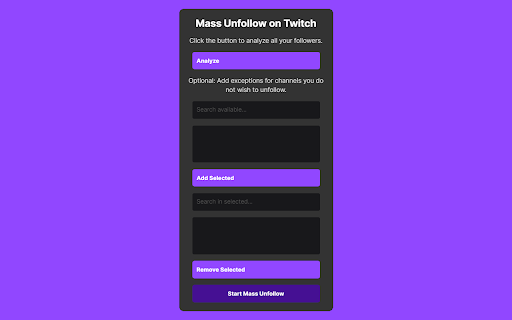
A Chrome extension to Mass Unfollow on Twitch. The Twitch Mass Unfollow Extension is a helpful tool for making it easy to stop following lots of Twitch channels all at once. It's like cleaning up your list of channels in just a few clicks. Why Choose the Updated Twitch Mass Unfollow Extension? - Effortless Unfollowing: Say goodbye to the tedious process of unfollowing Twitch channels one by one. Our extension enables you to declutter your following list quickly and efficiently, all with just a few clicks. - Customizable Experience: With our new optional feature, you can now safeguard your favorite channels from being unfollowed. Simply add exceptions for those you wish to keep and let the extension handle the rest. - Simplified User Interface: Navigate through the extension's features with ease, thanks to our improved design and layout. Whether you're analyzing your follower list or selecting exceptions, every step is intuitive and user-friendly. - Enhanced Performance: Experience faster load times and smoother operation, ensuring a hassle-free unfollowing process from start to finish. 1. Login & Analyze: Ensure you're logged into Twitch and click on the extension icon. You'll be guided to the channels you follow. 2. Automatic Analysis: Hit the 'Analyze' button, and the extension will scroll through your follower list to present all the channels you're currently following. 3. Customize Your List: Optionally, search for and add exceptions for any channels you wish to keep following. These selected channels will be saved to your 'safe list'. 4. Mass Unfollow: Once you've set your preferences, click 'Start Mass Unfollow' to clean up your follower list. If you haven't selected any exceptions, the extension will unfollow all channels. - An enhanced analysis tool to quickly identify all the channels you're following. - A flexible search function to easily find and select channels you want to exclude from unfollowing. - The ability to add or remove channels from your safe list before finalizing your unfollowing action. With the Twitch Mass Unfollow Extension, managing your Twitch following list has never been easier or more efficient. Download the latest version today and take the first step towards a more organized and personalized Twitch experience.

ChatGPT Bulk Delete
A Chrome extension to bulk delete ChatGPT conversations This Chrome extension is designed to help users quickly and efficiently delete conversations in the ChatGPT’s left sidebar. With the extension installed, users can add checkboxes to each conversation in the sidebar, select multiple conversations to delete or archive, and accomplish this with just a few clicks. Hold Shift and click to select multiple conversations for efficient bulk actions. This extension is particularly useful for users who frequently use ChatGPT and need to manage their conversations efficiently. Instead of deleting conversations one by one, users can remove multiple conversations at once, saving both time and effort. Additionally, this extension now offers a “bulk archive” feature for a one-time fee of $0.99 USD. This paid feature allows users to archive multiple conversations simultaneously, further enhancing the tool’s utility and convenience. The extension popup includes a small advertisement labeled “Ad” in the footer, linking to TubeVocab (https://www.tubevocab.com/), a third-party language-learning product. This ad helps support the continued development and free distribution of ChatGPT Bulk Delete. Clicking it is entirely optional and does not affect any of the extension’s core functionality.

Request Interceptor
Request Interceptor Extension for Chrome. Request Interceptor: Native HTTP/HTTPS Traffic Manager for Chrome Request Interceptor is a developer tool that allows you to seamlessly intercept, monitor, and route network traffic directly within your browser. Core Features: - Forward, drop, or pause incoming/outgoing requests. - Modify header values and POST payload data on the fly. - Add or delete custom request headers. - Filter interceptions by specific resource types. - Export request details as JSON and browse history. What is New in Version 3.0: - Bulk Actions: Instantly "Forward All" or "Drop All" intercepted requests with a single click. - Advanced Filtering: Isolate specific request types (GET, POST, PUT, DELETE) with interactive multi-select dropdowns. - Color-Coded UI: HTTP methods now feature color badges for faster visual scanning. - Improved UX: Added confirmation dialogs for deletions, "Select All" toggles, and one-click clear buttons for search inputs. - Stability: Fixed edge cases to prevent crashes while routing headless request payloads. What is New in Version 2.0: - Upgraded the extension to the modern Manifest V3 architecture. - Added a dedicated alert page and improved error messaging output. - Refined UI copy (e.g., changing to "Save as a JSON File"). - Added titles to the History and Settings pages for better navigation. - Extension windows now close automatically when you stop debugging. - Added full support for non-Latin characters.

Flow Chat for YouTube Live
Chrome Extension for Flow Chat Messages on YouTube Live. - Flow messages over the video. - Change color, size and speed for messages. - Show author and avatar on messages. - Show super chats and super stickers. - Filter banned words. - Add helper menu buttons on the chat list.

TikTok All Liked Videos Remover For Chrome
A Chrome extension to remove all liked videos on TikTok. 🌟 TikTok All Liked Videos Remover For Chrome 🌟 TikTok All Liked Videos Remover For Chrome is a powerful browser extension designed to simplify the way you manage your liked videos on TikTok. With just a few clicks, you can effortlessly remove all your liked videos, saving time and streamlining your experience ✨ Key Features 🔹 Remove all liked videos with one click No need to manually “unlike” videos one by one; the extension automates the entire process. 🔹 User-friendly interface Simple and intuitive design makes it easy for anyone to use without technical knowledge. 🔹 Fast and efficient operation Optimized for speed, allowing you to quickly clear your liked video history. 🔹 Safe and secure Your personal data remains private, and no information is stored or used outside the task. 🛠️ How to Use Install TikTok All Liked Videos Remover For Chrome from the Chrome Web Store. Log in to your TikTok account on the browser. Open the extension and click the Remove All Liked Videos button. Wait for the process to complete automatically. 🎯 Who Is It For? ✅ Users looking to clean up their TikTok liked videos quickly. ✅ Anyone who wants to manage their TikTok account more efficiently. 🚀 Download TikTok All Liked Videos Remover For Chrome today and experience a smarter, faster way to manage your liked videos! 🎥✨
