
mggllcnmlooiibikifmojaojepbolpem

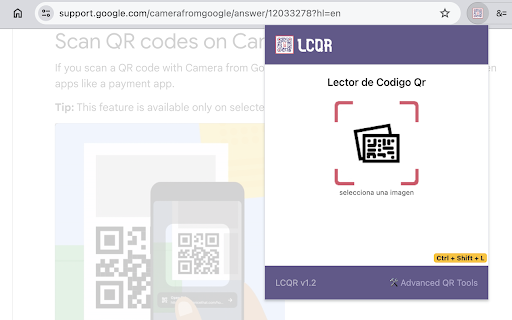


QR code reader, easily access a tool to decode images with QR code. Simply access the plugin, select the image with the QR code and see the result of the QR code decoding or access it with the keyboard shortcut Ctrl + Shift + L

QR Code (Generator and Reader)
Generate QR Code from the url of current page, link or selected text. And decode QR Code in image. The most advanced QR Code extension to generate various types of QR Code, Scan, History and Advanced Display. Support both Popup and Context-menu based functions. It has below distinctive features: - QR options and configurations - Support multiple QR native codes - Clean and elegant design and user interface - History for reusable QR codes - Formatting options, including colors, complexity, etc. - Highly secured QR codes It may display periodic notification about new QR code features, potential bugs and required configuration details. If you notice any issues or concern, pleas reaching using the Support link on the extension page.

The QR Code Generator
Create, scan, and edit QR codes instantly with one click. The QR Code Generator (TQRCG) Chrome Extension allows you to quickly generate static or dynamic QR codes for the current webpage and scan QR codes using your webcam. With a single click, it creates a QR code from the URL of the active tab, syncs it with your TQRCG dashboard, and displays it in a clean, compact pop-up. Key Features - Generate a QR code from the current tab with one click - Choose between static and dynamic QR Codes - Sync QR Codes created in the extension with your TQRCG dashboard - Scan QR codes using your webcam - Download or copy the generated QR Codes - No special permissions required - Fully offline QR code generation for maximum privacy - Minimalist popup interface for quick access - Lightweight and resource-efficient - Optional link to edit and customize the QR code on the website Trusted by over 700,000+ active users, and completely free for everyone. This extension is designed to be fast, lightweight, and privacy-friendly. It does not request access to your browser data, tabs, or history. It only runs when you click the extension icon, so it uses no memory or resources in the background. All QR Code generation happens entirely offline. The URL you visit is never sent over the internet unless you choose to open the "Edit QR Code" option, which redirects to www.the-qrcode-generator.com. This makes it a highly secure and private option for creating QR Codes directly in your browser. You can now choose to create static or dynamic QR Codes directly from the extension. If you are logged in, QR Codes created through the extension automatically sync with your TQRCG dashboard and show that they were created via the Chrome Extension. Where can you use TQRCG QR Codes? - Add QR codes to packaging or signage to direct customers to digital content. - Collect instant customer feedback in restaurants, retail, or service industries. - Link printed materials to websites, videos, or downloads without manual typing. - Share digital business cards at events using vCard QR codes. - Enable mobile app downloads or multi-language landing pages with one scan. - Track performance of offline marketing with detailed scan analytics. - Use dynamic QR codes for campaigns that require flexibility and updates. Updated on January 6, 2026: - Users can now choose between static and dynamic QR Codes when creating them from the extension. - QR Codes created in the extension now sync with your dashboard and clearly show they were created via the Chrome Extension. Updated on November 20, 2025: - Users can now access a full web dashboard from the extension to create and edit QR Codes with advanced customization. - A new sign-up flow lets you seamlessly connect your extension activity with your TQRCG dashboard. Updated on July 30, 2025: - Users can now download/copy the QR code that they created

QR Code Generator
A super handy QR Code Generator / Creator for you. Converts your current page into a QR Code with one quick click. Generates QR Codes from free text and URLs on the fly. The highest-rated QR Code Generator in the Chrome Web Store. ✓ Trusted by 800,000+ weekly active users. ✓ Privacy-friendly: no unnecessary permissions required. ✓ Adapts to your operating system’s Dark Mode to protect your eyes. ✓ Generate a QR Code for your current page with just one click. ✓ Free for everyone. ✓ Scan, analyze, decode, and read QR Codes. ✓ Scan QR Codes directly with your camera. ✓ Save and view your QR Code scan history. ✓ Create QR Codes in real time: Simply type to generate. ✓ Right-click to create a QR Code for your selection. ✓ Color and size customization. ✓ Option to download the QR Code as an image (PNG/SVG/SVG Code). ✓ “With Logo”: Customize your QR Code with a logo. ✓ Super fast and works offline. ✓ Supports hotkeys. Assign them at chrome://extensions/shortcuts ✓ Print your QR Code directly. ✓ Option to disable context menus available in Settings » Advanced. If you like this extension, please write a review and rate us five stars. I’m looking forward to reading your comments. - Added camera-based QR Code scanning. You can now scan QR Codes directly with your camera. - Added scan history. You can save and view all QR Codes you have scanned. - Thanks to our user Braden Wardle, we've fixed an issue where the print feature did not function correctly. - Fixed minor style issues. - Thanks to our user "E", we've fixed the 'Multiple Fixed Popups' feature malfunction in v.10.3.10 - Fixed uninstall URL typo. Updated on Oct 26, 2024: - Resolved text rendering problem in dark theme. - Corrected issues with auto-switching between light and dark themes. - Removed the donation link to improve the UI's appearance. If you want to support us, just rate us five stars! :) Updated on Mar 23, 2024: - Resolved a problem where the context menu was not functioning. - Significantly enhanced the reliability of our scanning feature – we're confident it's among the top online QR scanners now! - User Interface Enhancements. - Fixed the bug where customized color settings were not working. - Resolved the issue with QR codes containing Chinese, Japanese, or Korean characters not being scannable. - Corrected the transparent background bug. - Addressed the bug where the export size was incorrect. - Improved the success rate of scans. - Other minor fixes. Updated on Jan 18, 2024: - Now compatible with Manifest v3. - Improved QR-scanning feature significantly. - Added SVG export support (SVG or SVG Code). Updated on Feb 14, 2021: - Bug fixes. - Optimized code and resources. Updated on Feb 5, 2021: - Improved print feature. - Toggle between dark/light/auto modes as you wish. - Optimized code and resources (probably the fastest QR Code Generator in the Chrome Web Store). Updated on Jan 21, 2021: - Improved print feature. - Bug fixes. - Optimized code and resources. Updated on Jan 19, 2021: - Improved dark mode design. - Optimized code and resources. - Added a print button in the fixed popup window. Updated on Jan 10, 2021: - Automatically uses your OS's dark mode to protect your eyes. Updated on Jan 2, 2021: - Improved QR Code reader (decoder) when scanning a QR Code in an image. - Bug fixes and optimization. Updated on Nov 23, 2020: - Shortcut setting at chrome://extensions/shortcuts (we will add a link to this page in our next version). - Quick QR Code Generator is now rebranding to QR Code Generator. - Bug fixes and optimization. Updated on Nov 15, 2020: - Added the white frame (aka the “Quiet Zone”) around the generated QR Code. - Bug fixes. Updated on Jun 25, 2020: - Fixed a bug that would display the wrong UI on the options page. Updated on Oct 2, 2019: - Added “Open in a fixed window” feature. You can keep this QR Code on your screen without closing it. Updated on Aug 28, 2019: - Fixed a bug that would cause the Chrome Extension panel to show an error message. - New icon design. Updated on Aug 9, 2019: - Added Bulk QR Code Generator feature. You can generate more than one QR Code and download them in a “.ZIP” file. Updated on Aug 4, 2019: - Added “HD” / “With Logo” feature. Now you can generate your QR Code with a logo. - Bug fixes. Updated on Apr 5, 2019: - As requested, the downloaded image now has the size as a suffix. For instance: exported_qrcode_image_350.png. - Added “Runs offline” badge. - Fixed a bug where the QR Code scanner/reader was not showing up after restarting Chrome. - Added QR Scanner/Reader feature as you demanded. - Fixed the bug where the QR Code image size wrongly reset to 20px. - Added an option to turn off the context menus if you don’t like them. - Fixed a bug that may cause the size of your downloaded image to be unchangeable. - Added a Donation button. Thanks for supporting me. - Using “activeTab” to replace “tab” permission. There will be NO “read your browser history” warning any more :) - Able to copy the image directly (try to paste it anywhere else, like “Photoshop”). - Removed the “default hotkey” feature - now you can customize it on your own. Just one click from the “settings”. - Added ContextMenu feature - now you can “Quick QR” anything with two simple right clicks. - Focus the input zone after the popup shows up - so you can type whatever you want to turn into a QR Code. - Now, you can use ALT+Q to open the QR Popup. If you want to change your shortcut, please go to chrome://extensions/configureCommands - Fixed a bug where the popup window might get blocked when clicking on the icon. - Now, you can enter more than one line instead of a single line. - Fixed a bug where the “save image” feature did not work correctly after making modifications to the QR Code. - Instantly updates the QR Code when you are typing. - Access the options in the popup (get what you need on the fly). - Fixed a bug that created images that couldn’t be transparent. - Transparent background. - Customizable colors and size. - You can find them in the Options page (Right-click on the icon and click “Options” to access). - Redesigned the layout. - Fixed small bugs.

QR Code Reader
a multiple QR- and bar-code scanner that supports scanning from webcam and local images A powerful QR-code (Quick Response code) and barcode scanner supports scanning from the camera or local image files and keeps the history of the last 100 scans. It supports almost all known formats, including text, link, ISBN, coupon, and contact. Privacy: This extension does not rely on any external services to perform detection. There is no server-side interaction whatsoever. Features: 1. Read multiple QR-codes on a single image 2. Supports multiple protocols 3. Saves the history of scanned items 4. Drop local image files to the user interface 5. Uses both native method and ZBar library to maximize the detection power. This extension uses ZBar c-library, to extract multiple QR-codes and barcodes in a single image frame. What is a QR code? It is a type of matrix barcode that is a machine-readable optical label. A QR code contains information about the item to which it is attached. A QR code uses four standardized encoding modes (numeric, alphanumeric, byte/binary, and kanji) to store data efficiently. What is a barcode? It is a method of representing data in a visual, machine-readable form. Initially, barcodes represented data by varying the widths and spacings of parallel lines.
