
mgfjhemcdajioedmohajjeanpkdeilll

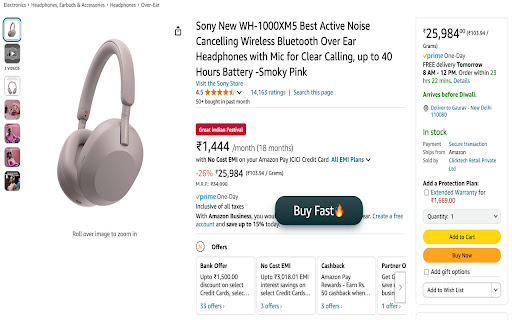


One Click Auto Checkout for Amazon & Flipkart + Extra features 🔰How use BuyFast extension in mobile ❓ 1️⃣ Install Quetta Browser and make it default browser in phone setting 2️⃣ Go to extension setting in Quetta, Search & Add Buyfast & user-agent-switcher both. 3️⃣ In user-agent-switcher extension, select chrome & microsoft option so it will open link in desktop mode everytime automatically. Amazon: Click the 🚀 “Buy Fast” button to skip cart reviews, address selections, and payment steps. Done in seconds! Flipkart: Toggle the 🔄 “Fast Switch” to auto-fill details and place orders instantly. 2. Auto-apply coupons and select the fastest delivery option by default. Get a confirmation pop-up with order summary before finalizing. 3. Compatibility: Works on browsers (Chrome, Edge, Brave, Arc) + Q Browser for Android/iOS & Lightweight design 🪶 – zero lag, even on slow connections. It works on Amazon, Flipkart, Myntra, AJIO & Shopsy. Save time and money while shopping online with us. Whether you're hunting for the latest tech gadgets, fashion must-haves, or everyday essentials, this Chrome extension ensures you never overpay again. Add us to your Browser and take control of your online shopping experience. Start making smarter purchases and enjoy incredible savings on all your favorite products. Happy shopping! Disclaimer : To support development, some links may earn us a small commission at no extra cost to you. Your privacy and trust remain our priority. 📥 Ready to Revolutionize Shopping? Install now and turn tedious checkouts into a one-click victory! 🏆 Leave Feeback at the end :)

Price History - Price Tracker & Alerts
Price History: The Universal Price Tracker 🛍️📉 Stop guessing, start saving! Price History is now the ultimate UNIVERSAL price tracker for India and beyond. We've expanded far beyond just Amazon & Flipkart. Now, you can automatically track prices, view price history graphs, and get drop alerts on thousands of your favorite e-commerce, D2C, and Shopify stores! Introducing the all-new Watchlist! Our 'Wishlist' has evolved. Now, when you add a product to your Watchlist from almost any store, we'll start actively tracking its price and building a price history graph just for you. Know the perfect time to buy, every time. 🌐 ► NEW! UNIVERSAL PRICE TRACKING Our extension now works on thousands of stores across India and the globe. If you can shop there, we can probably track it! Track prices on fashion, groceries, electronics, beauty, and more. 📝 ► NEW! INTELLIGENT WATCHLIST & TRACKER Add products from any supported store to your Watchlist. We'll automatically monitor their prices 24/7 and save the price history for you. Your dashboard shows real-time changes, highlighting price drops 🔻 and hikes 🔺 at a glance. 🤖 ► AI BUYING ASSISTANT (For Amazon & Flipkart) Our intelligent assistant analyzes deep price trends to give you a clear, data-driven recommendation. Get one of four simple suggestions: ✅ Buy Now: The price is at or near its lowest. Go for it! 👍 Good Deal: A solid discount is available. Consider buying. ⏳ Hold On: The price is higher than recent lows. It's better to wait. ❌ Skip for Now: The product is currently overpriced. Avoid purchasing. 📈 ► LOWEST PRICE SNAPSHOT (For Amazon India & Flipkart) Instantly see a product's lowest recorded price over the last 1, 2, or 3+ months right on the extension display. No more guessing if the current price is a true bargain! 📲 ► OFFICIAL TELEGRAM BOT ALERTS Get instant price drop notifications for your watched products sent directly to you via our Official Telegram Bot. Never miss a flash sale or limited-time offer again! 📊 ► COMPREHENSIVE PRICE HISTORY CHARTS Visualize a product's price journey. For Amazon & Flipkart, access years of historical data powered by PriceHistory.app. For all other stores, we build a new graph from the moment you add an item to your Watchlist. 🔄 ► AUTO-FIND BEST OFFERS Our extension automatically checks for lower prices from other sellers on the same product page, ensuring you don't miss out on a better deal. ━━━━━━━━━━━━━━━━━━ 🛒 New Supported Stores! 🛒 ━━━━━━━━━━━━━━━━━━ Apart from Amazon.in &Flipkart, we now added support for thousands stores and other Shopify and D2C brands! ━━━━━━━━━━━━━━━━━━ 🚀 WHY PRICE HISTORY IS YOUR ULTIMATE SHOPPING TOOL 🚀 ━━━━━━━━━━━━━━━━━━ 🧠 SHOP SMARTER, EVERYWHERE: Our tools remove the guesswork, helping you make money-saving decisions on virtually any store. 💸 NEVER OVERPAY: With detailed history charts and our new Watchlist, you'll know exactly what a good price looks like for any product. ⏳ SAVE TIME & EFFORT: Stop manually checking prices! We automate everything—tracking, alerts, and analysis—in one powerful tool. 📢 NEVER MISS A DEAL: With instant browser and Telegram alerts, you'll be the first to know when the price drops on a product you're watching. A Note on Tracking: Price history and advanced analytics for Amazon India and Flipkart are powered by the robust, long-term data from our core PriceHistory.app engine. For all other stores, the price tracking and history chart generation begin from the moment you add a product to your Watchlist. Usage & Benefits: E-commerce stores change prices constantly. Price History Extension tracks all these changes and provides you with meaningful data to make the best purchasing decisions. Why Choose Price History? Stop Overpaying 🚫💸: Get the best possible price on every purchase. Smarter Shopping 🧠🛍️: Make informed decisions with detailed price data and AI-powered insights. Time Saver ⏳: No more endless price-checking—Price History does it all for you! Never Miss a Deal 📢: Set price drop alerts and get notified instantly when prices fall. Important Information: - Links generated by the extension may be affiliate links 🔗. - Universal tracking feature is in beta mode 🚧. - Links Monetized by https://phapp.co - Contact Us: https://pricehistory.app/page/contact By using this extension, you agree to the Terms of Service (https://pricehistory.app/page/tnc), Privacy Policy (https://pricehistory.app/page/privacy), Disclaimer (https://pricehistory.app/page/disclaimer), and Extension Terms (https://pricehistory.app/page/extension-tnc).

Flash Kart - Amazon Price Tracker
Introducing All New Flash Kart, your ultimate shopping companion on Amazon! It is a feature-packed Chrome extension designed to empower you with real-time price tracking and insightful price history graphs, helping you shop smarter and save more on Amazon. ⚡ Price Tracking: It tirelessly monitors prices across Amazon's vast marketplace, ensuring you're always in the know about the latest deals and discounts. Say goodbye to overpaying for your favorite products! ⚡ Price History Graphs: Make informed purchase decisions with comprehensive price history graphs. See how prices have fluctuated over time, allowing you to identify the best time to strike for maximum savings. ⚡ User-Friendly Interface: Visit Any product page on Amazon.in, There you will see a price graph loaded and a button for price history. ⚡ Privacy and Security: Your privacy matters. It is designed with your security in mind and does not store or share any of your personal information. Say goodbye to the frustration of missing out on Amazon's incredible deals or paying more than you should. With This, you're in control of your Amazon shopping experience. Whether you're hunting for the latest tech gadgets, fashion essentials, or everyday items, this Chrome extension ensures you get the most bang for your buck. Install Us today and embark on a journey of smarter, more cost-effective shopping on Amazon. Take charge of your finances, make well-informed purchase decisions, and enjoy unprecedented savings. Happy shopping with Flash Kart! Hyperlinks are created and placed on product pages with Price Graph which are related to Important pages like support, reviews or official site. It also does price tracking on other ecommerce websites like Flipkart , myntra,ajio etc

Amazon Product Finder - AMZScout PRO Extension
Find a profitable product and start selling on Amazon quickly! Amazon product research made easy! See sales estimates and FBA fees. How to check sales data for any product: 1. Install the AMZScout PRO Chrome Extension. Begin your FREE trial by entering your details with a quick sign-up. 2. Access Amazon and search for any items you want to analyze. 3. Open the extension. 4. Review the product and niche information. You can review sales history for both the product and the niche, as well as estimated net margin, sales, and revenue. You can also use a built-in FBA calculator to help you identify profitable products, and much more! What can you use the AMZScout PRO Extension for? • Evaluate niche potential • Check niche and product trends • Calculate potential product profitability • Check product and niche sales, price, and rank history • Evaluate competition in the niche • Estimate FBA costs • Find reliable suppliers • Monitor your competitors' sales, pricing, and keywords ✅ More than 300,000 users already trust AMZScout’s product analysis tools, keyword search, and much more. AMZScout PRO is simple to use and navigate. Here are some hacks for anyone who’s interested in become a seller: [Quickly assess the potential of your niche and product] AMZScout Product Finder provides a niche score rating and a product score for both the private label and reselling business models. With this tool, you can immediately determine if the product is worth considering without having to look deeper into detailed product analytics. [Find the best supplier] Find things to sell on Amazon, or any other marketplaces, to scale your business. Save time by filtering suppliers according to country and price range. [Improve your ranking] Export niche and product keywords to improve product listings and use them in your PPC campaigns. Help your listing rank higher in organic searches and get more sales. This smart product research tool is often considered to be the most accurate tool by sellers. It helps you find unsaturated opportunities, get sourcing options, monitor your competitors, and even improve your keyword research. Base your product choice on concrete data to protect your investment. Find a product to launch with FBA that will bring you $5,000/month or more! The AMZScout Chrome Extension works in the United States in addition to these other Amazon marketplaces: the UK, Germany, France, Italy, Spain, Canada, Mexico, India, Japan, UAE, Saudi Arabia, Australia, and Brazil. You can research 15 niches for free with the trial version. No credit card information is required. Download the PRO Extension and give this fantastic software a try! Q: How are the estimated values calculated? A: These values are calculated using formula-based, top-level categories (for example, Home & Garden or Books) and rank in one of these categories. Q: What does the “LQS” column mean? A: “LQS” is Listing Quality Score. AMZScout analyzes a variety of product description criteria and computes a score for it. A higher score indicates a higher position in the search results. To see details, place your cursor on any LQS value. Q: What does the “RPR” column mean? A: “RPR” means Revenue Per Review. A higher RPR means a better selling opportunity. Q: Can I also get help with how to start selling on Amazon? A: Of course, the AMZScout team publishes useful articles and videos every month that you can find on our blog. You can also participate in an AMZScout Seller's Course and free webinars. Q: If I have any other questions or problems with AMZScout, where can I get support? A: The fastest way to get support is by emailing your question to support@amzscout.net.

Amazon Coupon Auto-Apply
Automatically apply coupon codes on Amazon and save effortlessly Amazon Coupon Auto-Apply is a Chrome extension that automatically detects and applies available coupon codes when you shop on Amazon. No more manual coupon hunting — let the extension save you time and money on every Amazon order. 💰⏳ Designed for Amazon shoppers who want effortless savings without browser clutter or manual promo code searches. 🌍 Global Amazon Support: Works seamlessly on Amazon storefronts in the US, UK, Canada, Australia, Germany, France, Italy, Spain, India, Japan, Mexico, and Brazil. 🌐 Multilingual Interface: Available in 14 languages — English, Deutsch, Español, Français, हिन्दी, Italiano, 日本語, Português, Português (Brasil), Nederlands, Polski, Svenska, Türkçe, and العربية. 🛍️ Quick-Access Amazon Deals: Jump straight to Today's Deals, Lightning Deals, and Gift Cards from the popup. 🔐 Smart Login Detection: Skips unnecessary login prompts for a smoother Amazon shopping experience. 🎨 Minimal & Clean UI: Simple, user-friendly design shows coupon status and tracks applied coupons. 🛡️ Privacy-Focused: Uses minimal permissions and collects no personal data — shop on Amazon with peace of mind. 1. 🛍️ Visit any Amazon product page 2. 🔍 The extension automatically scans for available coupon checkboxes 3. 🧾 Coupons are applied automatically — savings without effort Install Amazon Coupon Auto-Apply today and start saving on Amazon — in your language, in your country! • Regional storefronts: open an Amazon site that doesn't match your browser language (e.g. an amazon.com link from a German blog) and the extension offers a one-tap option to view the same product on your local Amazon (e.g. amazon.de). Dismissible, suggested once per storefront, never auto-redirects. • Faster detection: coupons are now found on Amazon search, category, and product pages that load without a full refresh. Affiliate Disclosure: Amazon Coupon Auto-Apply is free to use, supported in part by affiliate relationships. When you click links in the extension, retailers may pay us a small commission, at no extra cost to you. This is how we keep the extension free for shoppers worldwide.
