
mgfijldnaehpnoobkafgcamlifodcbca
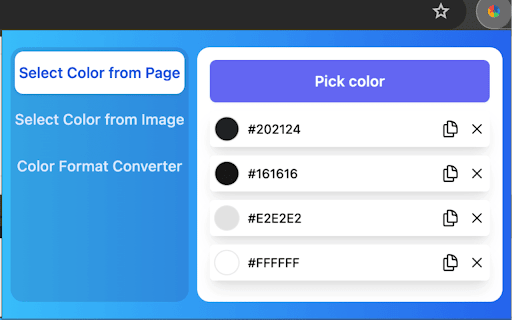

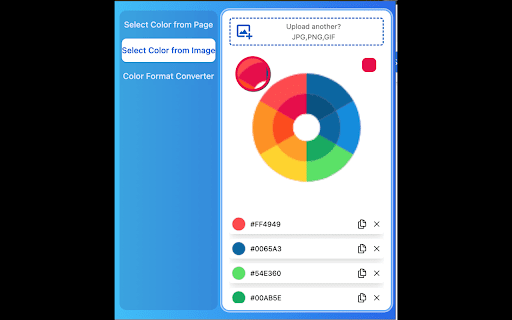
Free eyedropper tool for capturing website colors. Features live color picking, plus color history. Introducing our latest feature, the Color Picker - Web Development: A powerful addition to our Color Picker extension that enhances your web design workflow. The Color Picker - Web Development is a free eyedropper tool designed specifically for capturing website colors, offering live color picking and an innovative color history feature. With the Color Picker - Web Development extension, you not only have access to the precise eyedropper and color selection tool but also a dynamic way to visualize and manage your color choices. This new feature takes your color exploration to the next level by providing real-time color picking from web pages, complete with an intuitive interface and enhanced functionality. Key features of the Color Picker - Web Development include: Live Color Picking: Effortlessly capture colors from any site as you browse, ensuring accuracy and efficiency in your design process. Color History: Keep track of your recently selected colors, allowing you to revisit and reuse them seamlessly.

Color Picker for Chrome™
HEX, RGB Color picker, Advanched Eyedropper, Find color code on any page In 2026, the Color Picker extension Chrome is a powerful tool for Google Chrome that captures and recognizes colors on any website or webpage. Equipped with HEX and RGB color codes, an easy-to-use eyedropper for web pages tool, and an efficient layout, this tool lets designers, developers, and regular users easily capture color codes. That is, in addition to color, many design elements and customizable websites use HEX and RGB color codes – simply hover over the color and copy or use it at any time. Obtain easy and precise color selection for all web elements using this online color picker tool. Advanced Eyedropper Tool: How can one grab colors from websites so easily? This eyedropper for web pages allows users to capture colors from any pixel on a webpage with ease. HEX and RGB Support: Preview and transfer the color to your project in HEX and RGB color codes, making it suitable for different types of projects. Color History: Go back to the color palette you recently chose with the color history feature for easy access. User-Friendly Interface: Clean design that lets you select color and copy the color code identifier in just three clicks. Enhanced Color Palette: For more color choices beyond the webpage elements, use the integrated palette of this advanced color picker for designers. How to Use the Color Picker Extension Click the link from the Chrome Web Store to install the extension. Open a Webpage: The colors can be captured from any webpage whenever the user wants with the HEX color code picker. Enable the Color Picker: By clicking on the extension icon, the eyedropper tool will launch. Pick a Color: Power Tip: To capture the color of any element, move the mouse cursor over the screen and right-click: you'll see the RGB color grabber and HEX and RGB color codes formats. Copy the Code: Instantly copy the color code and paste it wherever you need it. 1. Can I see the color codes in both HEX and RGB? Yes, the Color Picker provides both HEX and RGB formats for each color. Yes, the extension keeps a history of your recently picked colors for easy access. 3. Does this extension work on all websites? Yes, it works on all websites and web elements, allowing color selection on any visible part of a page.

Web Color Picker - online color grabber
Grab colors from web pages. Color picker, color history. Live smart color picker tool in HEX, RGBA. Eyedropper colorpick for free Web Color Picker revolution tool for designers. Now you can easily pick any from any website with our new extension. Eyedropper tool will get color palette from any webpage you need. It`s pretty useful tool for web developers or web designers. This extension is pretty simple to use and it has simple and user-friendly interface. We provide you and amazing and useful eyedropper tool so you can get RGB colors from any webpage. Extract palette from web pages while you're browsing the web. There are three color formats available: RGB, CSS, and HSL. It`s also pretty simple to use – just click on extension icon in the upper right and star working. - Identifying the RGB HEX CMYK - Saving pallets - Editing them into beautiful palette combinations is a quick and simple job. Color Picker features are: * Different formats: HEX, RGB, HSV * Detect most used color on the page * Color list of recently picked colors * Red-Green-Blue (RGB) wheel to adjust selected and lot of others

ColorPickster – One-Click Color Picker & Eyedropper Tool
ColorPickster lets you quickly pick colors from any site or image. Simple color picker and eyedropper tool – no extra setup. Discover ColorPickster – your smooth and efficient color picker tool made for everyday use. Whether you're browsing a site, exploring visual content, or working on creative projects, ColorPickster helps you grab and reuse any color you see on the screen. This smart color picker combines a precise eyedropper tool, a handy color dropper, and quick copy functionality – all in one lightweight interface. It’s built for professionals and casual users alike, making it easy to pick colors without using complex design software. With one simple click, you can hover over any element, preview its color in real time, and copy the exact HEX, RGB, or HSL value to your clipboard. ColorPickster turns color discovery into a seamless part of your daily browsing. 🧲 Eyedropper Tool Preview – Hover your mouse to preview and select with pixel-level accuracy. 📋 Auto-Copy to Clipboard – The moment you click, the color code is ready to paste. 📂 Color History – Easily access your recently picked colors for reuse. ColorPickster is your go-to color picker tool for web design, branding, presentations, and daily creative tasks. Whether you're selecting brand colors, grabbing design references, or building digital content – it fits right into your workflow. ✅ Fast and simple to use ✅ No setup or login required ✅ Works on all websites and web apps ✨ Add ColorPickster to Chrome and turn every page into a color palette. Your color picker and eyedropper tool – exactly when and where you need it.

Color Picker Online - Eyedropper Tool
Find color code on any pages, HEX, RGB Color picker and eyedropper tool. Gradient generator, color palette and color history. Color Picker is the ultimate tool for people working on world web design! It gives you the ability to choose accurate colors for your work, and give you the exact color number you can use in any design software that allows you to use it. Pick colors from websites, save colors & gradients, get matching shades and tints and create beautiful gradients. Site Pallete allows you to get all the colors of a page instantly. We quickly screenshot each section and allow you to add any of the colors you like, directly to your saved colors. With our gradient builder, every gradient is beautifully composed and generated. Add as many stops as you want, use your saved colors to make something beautiful, choose whether linear or radial and most importantly, save them so you can use them whenever you want. Gradient comes with a generated palette. Whether you are creating your own gradients, choose one of our gradients, color palettes help you find the perfect blend-able color. Copy the colors just by clicking and start using them in your designs. We hope you find our tool useful! We are waiting for your feedback and ratings! If you’re experiencing problems or isn't working on, please contact us.
