
mgbemjlfcilhenjiodddmdekdggjhhpg

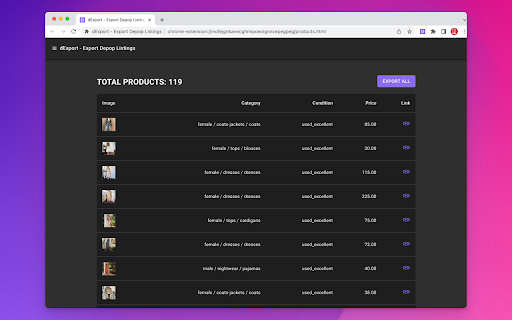
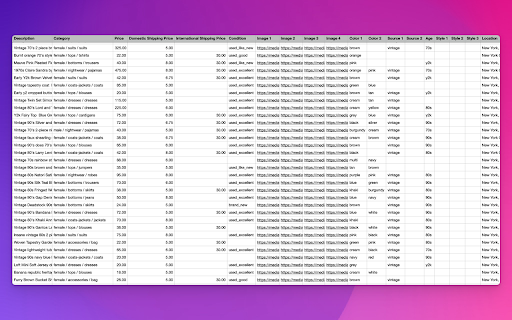
The best export tool for your Depop listings. Just click a button and save all your Depop listings to a CSV file. # CHANGE LOGS * 1.0.1 [Enhancement] Remove tabs permission. * 1.0.0 [Feature] Release the first version.

Export Followers free
This is an export follower tool, one click to export followers to CSV, and export following to CSV. It is a powerful Follower Export Tool that simplifies the process of exporting followers and following lists. With just one click, you can easily export your followers' and following users' data to a CSV file, making it convenient for further analysis or management. This tool is designed to enhance your INS experience and provide a seamless way to export valuable follower and following information. 【How it works?】 1. Sign in ins and open the extension. 2. Click the export button for followers or following list 【Data Privacy】 1. All data is processed in your local computer, it is never passing through our web server, no one knows what you exported. 2. There is a certain risk that the account will be deactivated or blocked by IG when using the extension, you should control the frequency of use by yourself at your own risk. 【Statement】 INSTAGRAM is a trademark of Instagram, LLC. IGExport is not affiliated with, endorsed, sponsored, or otherwise related to INSTAGRAM, Inc. or any of its affiliates or subsidiaries.

Ye Scraper: Business Leads Extractor
One click to extract Local Business Data from Yelp and export leads to CSV files. Overview: This tool helps you easily extract local business leads from yellow page websites like Yelp, including phone numbers, Email, social media links, websites, and addresses. With just one search on Yelp, the scraper automatically extracts the business data you need. You can even export the results to a CSV or Excel file with a single click. Features: ✅ Extracts business name, email, phone, website, and address from search results page ✅ Automatically extracts from all search result pages ✅ Collects local leads when you search ✅ Find phone numbers from profile page (if available) ✅ Auto find Email, social media links like instagram, facebook etc. ✅ Export results to CSV/XLSX Is it free? - Yes, it's free! You can access basic functionalities or upgrade for more features. Feedback and support: - If you have any questions or need support, please contact us here: https://forms.gle/K5jmbN1yQ6jvKcNv7 Privacy and security: - We take your privacy seriously. All data scraped are processed locally and will never be transmitted to our servers. We do not keep your data. Disclaimer This extension is an independent, third-party tool and is not affiliated with, endorsed by, or associated with Yelp or its parent company in any way.

Zillow Data Exporter
Instantly export Zillow property listings into clean CSV or Excel (XLSX) files, right from your browser. Zillow Data Exporter is the ultimate tool for real estate professionals, investors, and data analysts. Capture detailed property data from Zillow in a single click, saving you hours of manual work. You can easily export four types of listings: - Properties For Sale - Properties For Rent - Sold Properties - Your Saved/Favorite Properties A free Property Data Labs account is required to use the extension. Signing up is quick, free, and no credit card is needed. Get started at https://www.propertydatalabs.com. ❓ What do I get with the Free plan? Our free plan is designed to be generous and genuinely useful. It includes: - 50 exports per month. - Up to 40 listings per export, totalling 2,000 listings monthly. - Data saved in CSV format. Note: On the free plan, you export one page of results at a time. Our paid plans unlock powerful automation and data features designed for serious professionals. Basic Plan - Supercharge Your Exports: - 300 exports per month - Multi-Page Exports: Capture up to 800 listings across many pages in a single click. - Custom Columns: Choose exactly what data you want to export. - Time Filters: Automatically avoid exporting duplicate listings you've already seen. - Rich Data: Export over 35 data points per listing and all image URLs. - Building Units: Export all sub-listings for rent (e.g., all units in an apartment building). Pro Plan - The Ultimate Data Toolkit: - Includes all Basic plan features. - Unlimited Exports: No monthly limits. - Google Sheets Integration: Automatically send your exported data directly to Google Sheets. - Cloud Features: Save your export history and use our Cloud Importer and Monitor tools. - Custom Templates: Create and save export settings for different projects. - Parquet File Exports: For advanced data analysis workflows. Yes. Your privacy is a priority. All data is processed and stored locally in your browser. We do not have access to your exported files. If you uninstall the extension, your data is automatically deleted. We'd love to hear from you! For help, bug reports, or suggestions, please email us at support@propertydatalabs.com or use the contact form on our website. If you find the extension useful, please consider leaving a five-star rating. It helps us immensely! Zillow Data Exporter is an independent tool developed by Property Data Labs and is not affiliated with, endorsed by, or in any way officially connected with Zillow, Inc. For more information, please visit our disclaimer page at https://www.propertydatalabs.com/legal/disclaimer.

Bookmarks Exporter
Browser can export bookmarks as HTML file and there are extensions that can export bookmarks as JSON file, but their export files keep folder structure/hierarchy. Sometimes, the flat file structure (without folder hierarchy) is easier to read and import into other program. For instance, flat JSON and CSV files can be easily imported into database or tools like Notion, Excel. To keep folder structure info, this extension exports folder(s) as tags, it's easy to tell what folder(s) a particular bookmark item was in by looking at tags.
