
mgakiomdaaebpebkmjleifhehclodgel

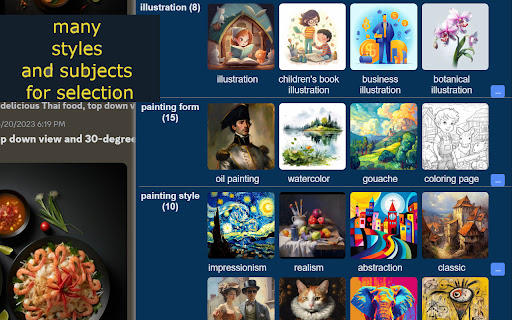
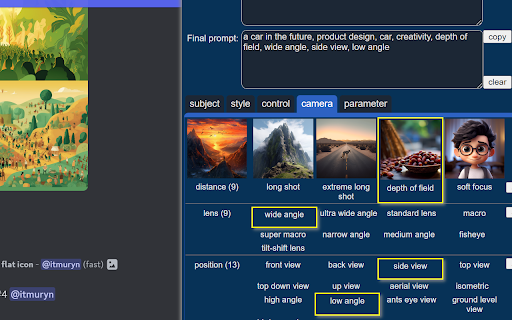
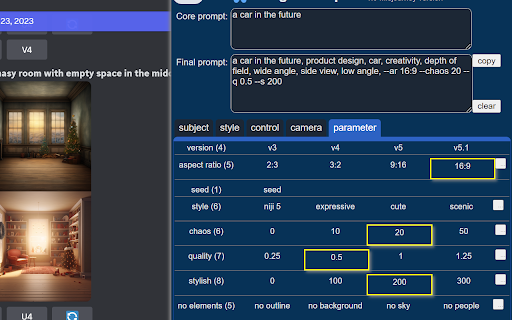
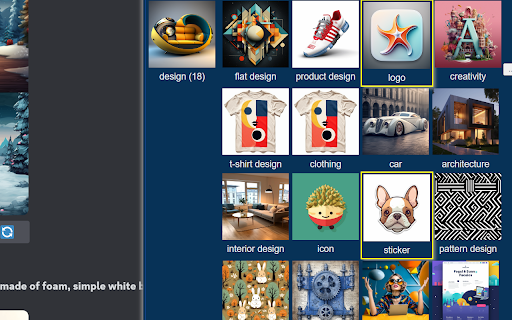
An easier AI image prompting tool for Midjourney and more Visual prompting for Midjourney and more. Generate prompt by clicking without memerizing. 1 Features: 1) Generate prompt by clicking Generate prompt by sample image clicking without memorizing. Fasten your prompt engineering efficiently. 2) Categorized prompts for AI drawing Categorized preset prompts including Subject, Style and Parameter. Much easier to select. 3) Lots of preset prompts 100+ preset most commonly used prompts for AI drawing. More will be added. 2. Quick Guide Final prompt = Input + Select + Copy 1)Installing Image Prompter extension Now Edge add-on is available from Mirosoft Edge store 2). Open Midjourney Open Midjourney workspace. official website: https://www.midjourney.com on dicord - https://discord.com on slack - https://app.slack.com 3). Open Image prompter ( see picture above ) Image Prompter will be shown automatically by clicking the show handle on the up-right corner of this page. 4). Input Core Prompt Think about what to draw first, then input it in the Core Prompt area, e.g. "a cat in the garden". 5). Select prompt by clicking Subject, Style, Parameter sample picture. The final prompt will be added by your selection. Click the "..." button on the right of each feature line to show more features. 6). Copy final prompt Click the copy button of Final Prompt, then paste it into Midjourney workspace to generate your image. 3. Concepts Feature The text prompt controlling how the image is generated. It's divided into three basic categories: Subject , Style , Parameter. 1) Subject It defines what to draw, i.e. the content of the image. First, you need think about your idea. The core subject prompt is up to you to input. Such as a boy, a spaceship, a cat running away. While as for the other supplement subject prompt , Image Prompter has provided many preset options to select, such as as for figure, portrait , profile, , headshot, selfie, full body shot ... ( see the picture above ) as for design , flat design , product design, logo , architecture ... ( see the picture above ) 2)Style It controls how to draw the image. Such as photography, cartoon, painting form , painting style etc. For example: - Painting form : oil painting , watercolor, - realistic or impressionistic Style is the key element of AI Imaging when you work on Prompt Engineering. Image Prompter provides a large amount of preset style options for you. See Style List for details. 3)Parameter It controls how to draw by the render engine, such as - Midjourney version - aspect ratio: 2:3, 3:2, 16:9, 9:16 ... - quality - chaos - stylish - seed There are 7 style categories with 50 commonly used styles in version 1.0. More styles will be updated continuously. 1) Photo (6+): real, photography, cimematic, retro ... 2) New image style (8+): fantasy, science fiction, cyperpunk ... 3) Cartoon (8+): 2d cartoon, commic, disney, anime ... 4) Illustration (6+): children illustration, digital illustration ... 5) Painting form (9+): oil painting, watercolor, coloring page ... 6) Painting style (6+): realistic, impressionism, classic,pop art, ... 7) Artist (6+): Van Gogh, Michelangelo, Peaky Blinders ... 5. Parameter Parameter is used to control the render engine how to work. The main paramters include : - 1) engine version - 2) aspect ratio - 3) chaos - 4) quality - 5) seed 6. Future Version Plan - More styles for your selection. - More parameters for your selection. 7. Feadback and requirement Website - https://www.luupine.com/ Feedback on Twitter - https://twitter.com/raykkncc - Bug or suggestion - More style prompt requirement

Prompt Tool - Midjourney Prompt Helper
Midjourney's prompt generation assistant saves the learning cost of AI drawing creators and improves drawing efficiency. Midjourney's prompt generation assistant saves the learning cost of AI drawing creators and improves drawing efficiency. Midjourney is an AI drawing tool that has revolutionized the way we approach digital art. However, for many creators, the learning curve can be steep. It takes time and effort to master the tool's various features and functions, which can be frustrating for those who just want to focus on creating. That's where the Midjourney Prompt Helper comes in. With this plugin, creators can save time and energy by generating prompts that help guide their drawing process. Whether you're a beginner or a seasoned pro, these prompts can help inspire new ideas and push your creativity to new heights. The Midjourney Prompt Helper is easy to use and can be customized to suit your specific needs. Simply select the type of prompt you want to generate - whether it's a character, a scene, or a specific theme - and let the plugin do the rest. You'll be presented with a range of options that can help jumpstart your creative process and get you on your way to creating amazing artwork. One of the key benefits of the Midjourney Prompt Helper is that it helps eliminate the need for extensive research and learning. Rather than spending hours trying to come up with ideas or trying to figure out how to use a particular feature in Midjourney, you can rely on the plugin to provide you with the guidance you need. This frees up more time for you to focus on actually creating and perfecting your art. Another benefit of the Midjourney Prompt Helper is that it can help improve the accuracy and quality of your artwork. By providing you with prompts that are tailored to your preferences, the plugin can help guide you towards creating artwork that truly represents your vision and style. This can help you stand out from other artists and establish your own unique brand. In conclusion, the Midjourney Prompt Helper is an invaluable tool for anyone looking to improve their drawing skills and streamline their creative process. By generating prompts that are tailored to your preferences, the plugin can help you save time, increase efficiency, and create stunning artwork that truly represents your vision. So why wait? Try the Midjourney Prompt Helper today and take your art to the next level!

MyPrompts
Easily save, manage, and share your artificial intelligence prompts from any website with MyPrompts. How It Works: - Right click on any image you want to save and choose "Save my Prompt" - Your image, prompt and all the settings will be saved. - Open the extension popup in order to see all of your assets What's New: - Allowing you to save any image online and connect prompts to it. - See all your saved settings to replicate the asset What's nexts: - Save you history for 24 hours in case you forgot to save - Get access from any device to your saved assets. - Add collections to organise multiple assets under one subject - Filter and sort your assets - Allow saving not only images but all AI generated assets For more information or feature requests, join our Discord channel: https://discord.gg/SEVHwZ4n

Prompt2Notion
Just click to save the Prompt, Image, Author, etc. from Midjourney to your Notion database 1. Add a "Save2Notion" button on Midjourney's artwork page. 2. Click the button to send the prompt, property, author, image, and web URL to your own Notion Database. 3. Optional translation of the prompt sentence by sentence. With this Chrome extension, you can quickly save important information from Midjourney's artwork page to your Notion Database. The "Save2Notion" button allows you to easily transfer the prompt, property, author, image, and web URL to your database with just one click. You also have the option to translate the prompt sentence by sentence to make it easier to understand. Streamline your workflow and keep all your important information organized with this handy tool. So now you need to upload the image to imgur to get the new url, so that the image can be displayed properly in Notion.

Midjourney Grid Splitter - Image Splitter
Use the MJ Grid Splitter to split your Midjourney Grid into single images. one click to download and save them into your computer. If you have any questions, please keep in touch via help@extensionsfox.com. MJ Grid Splitter is not affiliated with Midjourney.
