
ehipedkelpmohgomcemdocikjffheicf
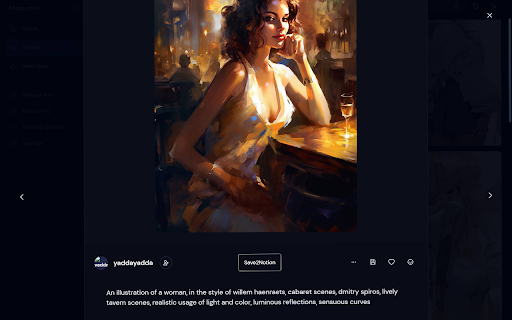
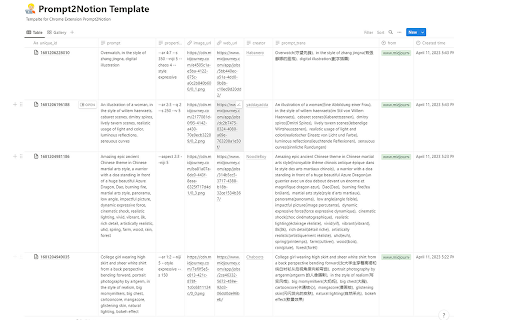
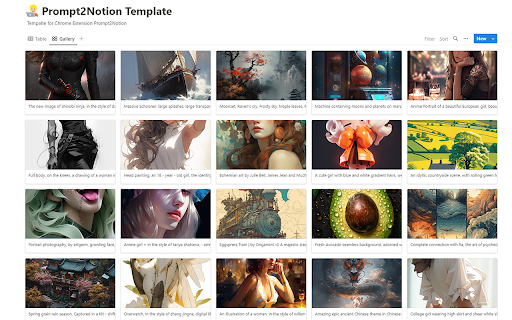
Just click to save the Prompt, Image, Author, etc. from Midjourney to your Notion database 1. Add a "Save2Notion" button on Midjourney's artwork page. 2. Click the button to send the prompt, property, author, image, and web URL to your own Notion Database. 3. Optional translation of the prompt sentence by sentence. With this Chrome extension, you can quickly save important information from Midjourney's artwork page to your Notion Database. The "Save2Notion" button allows you to easily transfer the prompt, property, author, image, and web URL to your database with just one click. You also have the option to translate the prompt sentence by sentence to make it easier to understand. Streamline your workflow and keep all your important information organized with this handy tool. So now you need to upload the image to imgur to get the new url, so that the image can be displayed properly in Notion.

ChatGPT Prompt List
A Chrome extension that allows you to create a list of prompts to feed to ChatGPT. Time saving extension where you can leave you computer and the prompts will still be asked. Go to the https://chatgpt.com/?model=gpt-4. Click on the icon C to open up the extension popup. Insert the prompt in the input field and click enter or add prompt button. Insert as many prompts as you need. Make the hhttps://chatgpt.com/?model=gpt-4 as the active window and click start in the extension popup. Wait for it to finish all the prompts. When it finishes the prompts click the button clear all prompts to start with new ones. (OPTIONAL) Switch between light and dark mode.

跨境产品管家
一键收藏国内外电商平台产品数据信息,并可导出上架到各大国内外电商平台 一键收藏国内外电商平台产品数据信息,并可导出上架到各大国内外电商平台

PromptPal
The ultimate idea generator for your Midjourney photos! Introducing PromptPal, the ultimate idea generator for your Midjourney photos! PromptPal can be used to train your image prompt writing skills. By extracting descriptions that were used to train Midjourney's text-to-image model, you can gain valuable insights into the process of creating vivid and compelling descriptions that evoke specific images in the mind of the reader. 👉 Step 1: Install the PromptPal extension from the Chrome Web Store. 👉 Step 2: Once installed, activate the extension by clicking on the PromptPal icon in your Chrome toolbar. 👉 Step 3: This will open the PromptPal panel, where you can browse through the collection of images. 👉 Step 4: Browse through the collection of images until you find one that you like. 👉 Step 5: Click on the image to copy the description to your clipboard. 👉 Step 6: Now, head over to Midjourney and start generating photos based on the description you copied from PromptPal. 📷🎨🌅 👉 Step 7: PromptPal is a great tool for anyone who needs inspiration or a little push to get started with Midjourney. 💡✨🚀 👉 Step 8: So, whether you're a photographer or just someone who enjoys generating photos, give PromptPal a try and see how it can help you come up with new and exciting ideas for your Midjourney projects. 📝📸💭 With PromptPal, upgrading your prompt writing skills has never been easier. Not only can you extracting descriptions that were used to train Midjourney's text-to-image model, but you can also use these descriptions as a guide to improve your own writing. By analyzing the language and structure of the descriptions, you can gain a deeper understanding of what makes a compelling and effective writing prompt. Whether you're a professional writer or just looking to hone your skills, PromptPal is the perfect tool to take your writing to the next level. 💪🏼👨🏻💻👩🏼💻

Power Prompt For ChatGPT & OpenAi
Power Prompt is a Chrome Extension for ChatGPT/OpenAi Power Users is a cutting-edge Chrome extension that takes your Ai interaction to the next level. With this extension, you can maximize the potential of the state-of-the-art language model and experience a seamless and efficient conversation. The Power Prompt v1 beta allows you to choose from different models, load and save prompt templates, set temperature and prompt length and tokens. Source code and instructions available at https://github.com/ruvnet/powerprompt
