
mfpmbjjgeklnhjmpahigldafhcdoaona
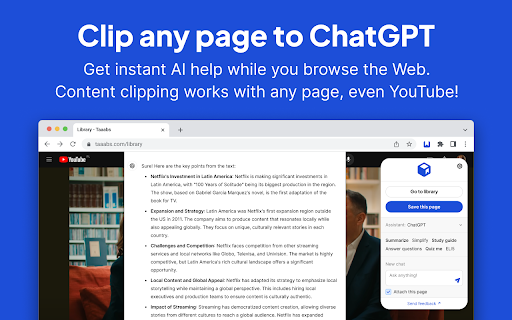


Unleash the joy of your web research. Save bookmarks to your personal library. Assist browsing with AI. Perfect for students, professionals and curious minds. - Free and open-source. No user tracking & no ads. - Integrates your browser with all popular AI assistants. - Sends locally parsed web content to AI: generic articles, YouTube transcripts, X posts, Gmail emails, AI conversations, and more. - You can sign up and build personal library with unlimited bookmarks. - Private bookmarks are encrypted End-to-End with AES-CBC 256-bit, encryption key is derived with Argon2id, a combination considered unbreakable. - Publish selected bookmarks to your public profile and connect with like-minded people. Add Taaabs to your browser and unlock the joy of your web research! Does Taaabs Web Clipper collect any data? One of the main reasons for creating Taaabs is privacy. When using AI assistants, pages are parsed 100% locally and sent directly to supported assistants like ChatGPT using browser built-in communication channels. When you sign in to the service and start building your personal library of bookmarks, all data is secured through the use of end-to-end encryption locally your browser, no data ever leaves your computer unencrypted. We cannot know what you saved until you explicitly publish something to your public profile. Is it free? Thanks to local page parsing and using browser built-in communication channels, using AI features is totally free. All basic bookmarking features are free, including unlimited saves.

Local LLM Helper
Interact with your local LLM server directly from your browser. Local LLM Helper: Your Browser's Gateway to Private AI Unlock the power of large language models right from your browser, with complete privacy and control. Local LLM Helper is a Chrome extension that seamlessly connects your browsing experience to your personal AI server, allowing you to harness advanced language processing capabilities without relying on cloud-based services. 1. Private and Secure: - Connect to your own local LLM server, ensuring your data never leaves your control. - Perfect for handling sensitive information or maintaining strict data privacy. 2. Versatile Text Processing: - Summarize lengthy articles or documents with a single click. - Transform casual text into professional-grade content. - Generate actionable items from meeting notes or project descriptions. - Generate Twitter threads or hot takes. - Craft custom prompts for specialized tasks. 3. Seamless Integration: - Works on MOST webpages, allowing you to process text without leaving your current tab. - Simple select-and-click interface for effortless use. 4. Customizable: - Compatible with various local LLM servers, including Ollama and LM Studio. - Easily switch between different AI models to suit your specific needs. 5. Resource-Efficient: - Leverage your local hardware, making it ideal for users with powerful GPUs or specialized AI hardware. 1. Select text on any webpage. 2. Choose a processing option (summarize, professionalize, generate action items, or custom prompt). 3. Click "Transform" and watch as your local AI processes the text. 4. View the results directly in your browser, formatted for easy reading. Setup and Compatibility: - Requires a local LLM server (e.g., Ollama, LM Studio) running on your machine or local network. - Easy configuration through the extension's options page. - Compatible with a wide range of LLM models, depending on your local setup. Privacy and Security: Local LLM Helper is designed with privacy as a top priority. Unlike cloud-based AI services, all processing occurs on your local machine or network. This means: - No data is sent to external servers. - Complete control over which models and data are used. - Ideal for businesses and individuals handling sensitive or confidential information. 1. Researchers and Students: - Quickly summarize academic papers or lengthy articles. - Generate study notes or key points from textbooks. 3. Content Creators: - Generate ideas or outlines from existing content. - Refine and polish draft content. Customization and Flexibility: Local LLM Helper is designed to be highly adaptable to your specific needs: - Custom Prompts: Create your own prompts for specialized tasks unique to your field or requirements. - Model Selection: Switch between different AI models to optimize for speed, accuracy, or specific domain knowledge. - Server Configuration: Easily update server settings to connect to different local LLM setups. Performance and Efficiency: By leveraging your local hardware, Local LLM Helper can offer: - Faster processing times, especially for users with powerful GPUs. - Ability to work offline, perfect for travel or areas with limited internet connectivity. - No usage limits or API costs associated with cloud-based services. 1. Install the Local LLM Helper extension from the Chrome Web Store. 2. Set up a local LLM server (like Ollama or LM Studio) on your machine or local network. 3. Configure the extension with your server's address and preferred model. 4. Start transforming text on any webpage with the power of AI! Troubleshooting and Support: The extension includes a comprehensive FAQ section covering common setup issues and best practices, including: - Configuring CORS settings for your local server. - Optimizing performance for different hardware setups. - Troubleshooting connection issues. For additional support, visit our GitHub repository for documentation, issue tracking, and community discussions. - Support for more local LLM server types. - Additional text processing options. - Integration with local vector databases for enhanced context-aware processing. - Collaborative features for team environments. Embrace the future of private, powerful, and personalized AI assistance with Local LLM Helper. Transform your browsing experience while keeping your data under your control. Download now and unlock the potential of your personal AI right in your browser!

OneClickPrompts
One Click Prompts for AI chat interfaces Tired of typing the same instructions into AI chats? OneClickPrompts adds a simple menu of your custom prompts right inside the chat window. Create a button for any prompt you use often—like "respond in a markdown table" or "act as a senior developer"—and just click it instead of typing. Convenient menu for editing prompts. You can see how it works on video. Has multi-profile prompt library functionality and tries to count tokens! FREE | Open Source Works in All Major AI Chats: This extension works on the most popular AI chat websites: ChatGPT, Claude, Gemini, and others! (Store policy prevents listing them here, but the full, updated list of supported sites is on the GitHub page.) 🔥Now with token counter for ChatGPT and most sites! (Well, it 𝘢𝘱𝘱𝘳𝘰𝘹𝘪𝘮𝘢𝘵𝘦𝘴 tokens, so it is not precise, but with better precision than other extensions I tried. Enable counter in modules and it will work. Settings allow you to select one of FIVE prediction models with calibration, or just turn it on and forget about it! You can also count tokens for what you write and for what is already in chat thread separately) What It Actually Does: ✅ Custom Prompt Buttons Create buttons for any text you want. Use an emoji or a few characters for the label so you can find it quickly and click. Click the button to put the text in the input box. Or press hotkey. ✅ Floating Panel & Prompt Queue Click the '🔼' button to open a floating panel you can drag anywhere on the screen. Inside, you'll find the Prompt Queue. This lets you: Add multiple prompts to a list. Send them one by one with a delay you can set. Useful for tasks that require several steps, like get news updates once an hour or something like that - and each prompt is controlled by you. ✅ Profiles Organize your buttons into different sets using profiles. Create one for coding, one for writing, one for a specific project, etc. Switch between them with a dropdown. ✅ Keyboard Shortcuts If you want, you can enable shortcuts (Alt + 1-9) to trigger your first nine buttons without using the mouse. ✅ More Customization: Auto-Send: Each button can be set to automatically submit after inserting the text. Holding Shift reverses this behavior. | Separators: Add visual lines between buttons to keep them organized. Backup/Restore: Save your entire setup (profiles and buttons) to a JSON file and load it back later or on another computer. Modules: Modules: 🛜Cross chat prompt sharing: Want to send a message to all chats you have opened? Just type your prompt, and then, either click on the button ⬆️ that will send prompt to ALL open tabs (Each tab can block incoming messages via Shift-click!) or use the store and paste prompt buttons: can be better than copy-pasting as does not clutters clipboard. To use you will have to activate it in settings under "Modules", and you choose either broadcast option or store-send option. 🔢Token approximator: like best effort token counter, displays token usage in chat on a webpage. For Tinkerers: Edit CSS Selectors: If a site update breaks the button placement, you can go into the advanced settings and edit the CSS selectors yourself to fix it.... or place in other place you want. The Important Stuff: 🔒 Private: Your prompts and settings never leave your computer. They are stored locally in your browser. There is no tracking, no accounts, and no data sent to any server. 🌐 Open-Source: The code is public on GitHub. You can check it yourself to see how it works. ⚡ Simple: while this extension has a lot of settings, you don't have to use them. You can only use what you need and leave other settings untouched. ⁉️How to Use: Install the extension. Click the icon in your toolbar to open settings. Create a button. It will show up in your next chat session. Support & Feedback If something doesn't work, try reloading the page. If it's still broken, please open an issue on GitHub. I appreciate bug reports and suggestions. GitHub: https://github.com/MaxITService/OneClickPrompts

BrowseWiz: AI Assistant That Browses for You
Increase your productivity: learn, research, write and work faster with powerful AI in side panel. BrowseWiz is an AI copilot that can browse web pages for you, gather data and write it to a Google Spreadsheet. Stop copy-pasting across 20 tabs. Give BrowseWiz a goal and it can: ✔️ Open and manage its own isolated tab group to browse in parallel (while you stay on your tabs) ✔️ Navigate pages, follow links, and gather data across multiple sources ✔️ Extract the exact fields you need and produce a spreadsheet-ready dataset 💡Use cases ✔️ Lead generation (people + companies + contacts) ✔️ Competitor research (features, pricing, positioning) ✔️ Product pricing checks and catalog comparisons ✔️ Company research and news tracking turned into structured rows ✔️ ...or finding the best brownie recipe and filling your basket with the ingredients in an online grocery store 💡Still a powerful side-panel copilot BrowseWiz lives in your sidebar and can use browsing context such as: ✔️ Active page content (current tab) ✔️ Selected text ✔️ File attachments ✔️ Page screenshots ✔️ Summaries and Q&A for a web page, PDF, DOC, DOCX and other files 💡Build real data assets (not just chat answers) BrowseWiz includes 3 toolsets designed for agent workflows: ✔️ Browser Agent: autonomous browsing in an isolated tab group ✔️ Spreadsheet tool: create a spreadsheet, define columns, and let AI write rows (perfect for leads, products, pricing, research results) ✔️ Calendar tool: schedule events and automate follow-ups based on your research 💡Customizable for power users ✔️ Promptbook: save, organize, and launch prompts from templates ✔️ Bring Your Own Key (BYOK) for compatible AI providers/models ✔️ Custom tools and MCP servers ✔️ Local chat history

Easy Extensions Manager
Simplify extension management. Enable, disable, and uninstall with ease. ⭐ Support us by giving a 5-star rating if you like Easy Extensions Manager! Your feedback matters to us, and we're eager to hear your thoughts. Feel free to share your ideas, and we'll do our best to implement them as soon as possible. Introducing Easy Extensions Manager: The Ultimate Extension Manager for Chrome Easy Extensions Manager is a powerful yet lightweight tool designed to help you take complete control over your browser's extensions. With a file size of only a few kilobytes, it's a nimble and efficient addition to your Chrome experience. 🌐 Features: - Manage with Ease: Easily enable, disable, or delete extensions with just one click. Say goodbye to clutter and make your browser light as a feather. - Search & Find: Quickly locate the extensions you need with our intuitive search feature. - One-Click Disable All: Want to disable everything at once? Use the 'Disable All' feature and don't worry about losing track. When you recall, only the extensions that were disabled using this feature will be re-enabled. - Performance Boost: Keep your computer running smoothly by turning off unnecessary extensions, preventing lags, and enhancing your browsing experience. - 100% Free: Enjoy all these features without any subscriptions or hidden fees. 🚀 Why Easy Extensions Manager? - Lightweight: Made with minimalism in mind, Easy Extensions Manager itself is lightweight, ensuring that your browser remains agile. - Time Saver: Managing extensions has never been quicker. With Easy Extensions Manager, time-consuming tasks are reduced to simple clicks. - Performance-Focused: Enhance your browser's performance by disabling or deleting extensions that are no longer needed. - User-Centric: We listen to your feedback and are committed to continuous improvements to make your experience even better. Easy Extensions Manager is more than just an extension manager; it's a must-have tool for anyone looking to keep their browser optimized and their computer's performance at its peak. Download now and discover the seamless browsing experience you deserve!
