
mfgcmmfakhajkaoeejceadlddfoikmap
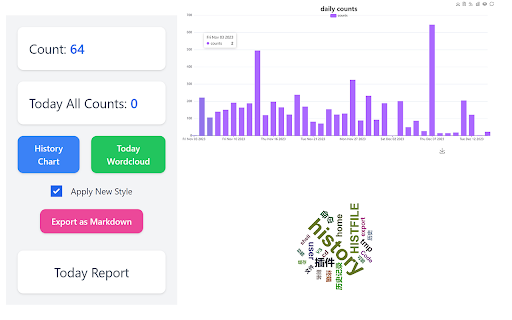
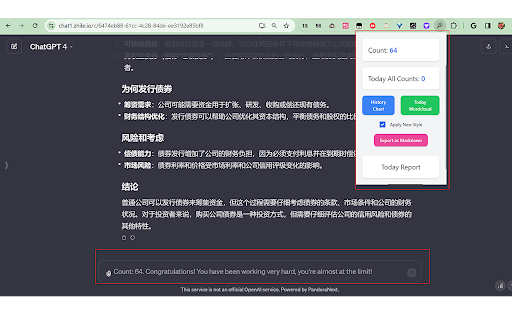
keeping track of the number of ChatGPT questions asked and showing how much time is left until the end of the three-hour period. The effect of the plug-in to replace the placeholder information in the input box, showing the number of questions sent, click on the plug-in icon will also display the same content. It also contains every message's talk time, history chart, word cloud, exporting today chat content and generating today report. It's totally open source: https://github.com/14790897/GPT4-Requests-Counter Automatic Export: The system now automatically exports the chat logs of the previous day at the start of the first chat of the current day. This ensures that users always have up-to-date records without needing to manually export them. Added a setting to enable or disable daily chat log export, giving users control over whether their chat logs are exported automatically. 2024.2.7 - Updated: Added a button to clear remaining time : We've listened to user feedback and added a handy new feature to the latest version that allows users to clear remaining time with the click of a simple button. This makes managing time much more flexible and convenient. Works on some websites that mimic the official UI : To improve user experience, we have extended the plugin to work not only on the official website but also on all websites that mimic the official UI. This ensures that our plugin provides a consistent experience and functionality no matter which similar website you visit.

ChatGPT PromptCounter
Do you ever feel like you aren't using AI to its full potential? ChatGPT PromptCounter is the simplest way to make sure you're using AI to learn more, be more productive, and elevate your life 🚀 This extension runs automatically in the background to count every prompt that you make to ChatGPT each day. Don't waste time trying to solve problems that can be solved in a simple prompt. We stick a smart button to the bottom right corner of your screen that links to ChatGPT from any page with the context of that page so that the full power of the world's strongest AI is integrated into your browsing experience Are you stuck on a complex problem, seeking innovative solutions, or simply looking for answers? ChatGPT is your AI partner in problem-solving. Use it to brainstorm ideas, receive expert advice, and explore creative solutions. Knowledge is power, and ChatGPT is your gateway to endless information. Use ChatGPT to expand your horizons, learn about new topics, and deepen your understanding. Whether it's science, history, technology, or any subject, ChatGPT has you covered. 📈Prompt Tracking and Analytics : Ever wondered how many prompts you've used in a day? ChatGPT PromptCounter keeps track of your interactions, providing you with insightful analytics. Monitor your daily usage and stay informed about your AI engagement. ChatGPT is not just an AI – it's a productivity booster. Use it to draft emails, explore an unfamiliar concept, generate content, write code, and automate repetitive tasks. ChatGPT is your virtual assistant, helping you save time and achieve more. 💭 Inspiration and Ideas: Creativity knows no bounds with ChatGPT. Whether you're a writer, artist, or entrepreneur, ChatGPT can spark your creativity, generate ideas, and provide valuable insights to fuel your projects. ChatGPT PromptCounter is designed for your convenience. Its elegant interface and easy navigation make it a pleasure to use. Say goodbye to cumbersome processes and hello to efficiency. Harness the power of AI, supercharge your problem-solving skills, and make learning a daily habit. With ChatGPT PromptCounter, you have everything you need to stay productive, informed, and creative in one smart extension. Download ChatGPT PromptCounter today and experience AI like never before. It's more than a counter; it's your AI companion. 🤖📊 Note: ChatGPT PromptCounter is not affiliated with OpenAI and is an independent extension created for the convenience of ChatGPT users. 🚀🤝

YouTube Chatbot extension by Audio2Doc
A chatbot for YouTube videos by Audio2Doc.com This extension is a chatbot that allows you to ask questions about videos on YouTube. Updates: - (05/16/2023) Added ability to save chat history to database. Also, a small bug fix. - (05/15/2023) Fixed a bug. Also, users don't need to refresh a page after signing in. - (05/12/2023) Added login functionality, no need to generate API secret key anymore.

ChatGPT Prompt Counter
Counts the number of prompts sent to ChatGPT within a 3-hour period. This Chrome extension provides a prompt counter and timer for OpenAI's ChatGPT-4 model. It's especially useful for users who need to track the number of prompts sent to the model and the remaining time for the current session. The current maximum limit for regular ChatGPT Plus users is 40 prompts per 3 hours. (**its suspect by the developer that the new limit may be silently 20 prompts per 3 hours...) The new Open AI Teams plan has 100 prompt/3 hour limit per user with a minimum of 2 users per team. - Counts the number of prompts sent to the ChatGPT-4 model - Displays the remaining time for the current 3-hour session - Allows resetting the count and timer - Displays data in an easy-to-access popup The extension listens for HTTP POST requests sent to OpenAI's ChatGPT backend API. Each prompt sent to the model is counted and the time is tracked. The data is updated every second and is displayed in a popup that can be accessed by clicking the extension icon in the Chrome toolbar. The estimated time remaining is a rolling estimate made to match Open AIs token limits. This extension does not collect, store, or transmit any personal data or browsing activity. It solely functions to count prompts and track session time for you only. Rest assured, your prompts remains completely private. *URLs changed to align with OpenAI domain change *OpenAI rolls out Team Plans with prompt limit of 100 per 3 hours per use

Agency Toolchest
The Agency Toolchest Chrome Extension is used to send information to the AgencyToolChest Web Application. The AgencyToolChest Chrome Extension is used to send information to the AgencyToolChest Web Application. Our tool allows you to easily input quote or policy information such as premium, quote type, and other fields from any page and at a click of a button, send this information to our web application and track your reports and visualize them with beautiful charts.
