
mffappoadhfalhjgmfaoecjbdjfdfhdj
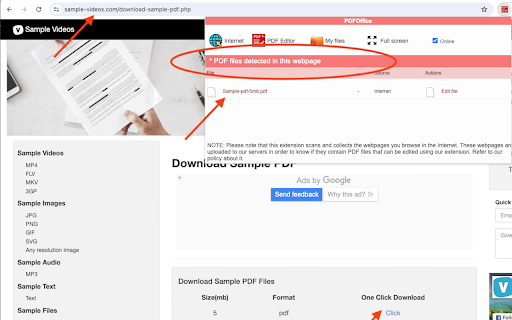


PDFOffice, a PDF editor to create and edit any PDF file using a web browser. PDFOffice is a PDF Editor online from which you can perform editing operations over PDF files but using your web browser. Moreover, it scans and collects the webpages you browse in the Internet. These webpages are uploaded to our servers in order to know if they contain PDF files that can be edited using our extension integrated with our online app. - Create a new document or open an existing one. - Insert texts with different font color. - Insert texts with different font size. - Use some different font style in your inserted text. - Move the inserted text in any part of the document. - Insert images - Download your modified PDF

Web to PDF
Use Web to PDF converter to save a web page as a pdf and download it instantly. Perfect for offline reading and sharing. 📃 Looking for a quick and reliable way to save a web page as pdf? This chrome extension is a web to pdf converter, perfect for anyone who needs to download content for offline access, sharing, or archiving. With just a single click, convert a web page to pdf without hassle: ✅ Preserve Styles and Links: Keeps original styles and clickable links. ✅ Flexible Layouts: Choose page breaks or a single-page format. ✅ High Quality: Uses Chrome’s PDF tool for fast, clear results. ✅ Secure: Saves directly to your device, protecting privacy. If you’re looking to save a web document to pdf, this tool makes it easy with smooth, intuitive functionality. All images, links, and formatting remain intact, giving you a faithful reproduction of the web content in one file. 💡 How to Use Web Page to PDF Converter 1️⃣ Open the web page you want to save. 2️⃣ Click on the Web to PDF extension icon. 3️⃣ Select Format to set the view size. 4️⃣ Choose Layout for page breaks or a single page. 5️⃣ Download your PDF — your file is ready in seconds! 📄 Tips for Best Conversions 1. Ensure the page loads fully before converting. 2. Adjust format and layout settings for optimal page fit. 3. Avoid pop-ups or overlays, as they may appear in the PDF. 4. Refresh the page if the first conversion doesn’t capture everything accurately. 💡 Why Save Internet Page to PDF? ◆ Access files offline anytime ◆ Share content without needing internet access ◆ Archive page for future reference ◆ Print web content easily in a structured format Web to pdf extension is the easiest way to convert web page to pdf quickly, ensuring you don’t lose valuable content or formatting. Almost anyone! This tool is ideal for: 1) Students who need to reference articles and papers 2) Professionals who want to save web data for reports 3) Researchers who need offline access to resources 4) Bloggers and writers who save content inspiration Imagine the convenience of accessing all your important web content as pdf files. You no longer need to bookmark endless links or worry about pages disappearing. Just convert the webpage to pdf and keep everything organized and secure. ❓ How to save a page as a PDF? 👉 Open the page, click the extension icon, choose settings, and save webpage as pdf. ❓ Will the file look like the original webpage? 👉 Yes, we ensure that your document retain the look and feel of the original. ❓ Does this extension work offline? 👉 Once a web document is saved, you can access it offline If you see a notice about the developer console, don’t worry — it’s simply due to Web to PDF using Chrome’s own PDF-printing system. Chrome provides an optimized, high-quality conversion method that outperforms other PDF tools in quality and speed. This message is a standard notification for Chrome extensions that use advanced browser functions. While screenshots capture images, PDFs provide a more functional and versatile way to save web pages. Here’s why this extension is the superior choice: ➤ Selectable Text: Easily select, copy, and highlight text. ➤ Clickable Links: Keep all links active for quick access. ➤ Accurate Layouts: Preserve the page’s original look and feel. ➤ Custom Page Options: Choose page breaks or single-page view. ➤ High Quality: PDFs retain clarity and detail better than screenshots. ✳️ News Articles: Save important news articles before they get archived or moved behind a paywall. ✳️ Legal Documents: Keep copies of terms and conditions, privacy policies, or legal agreements. ✳️ Receipts and Confirmations: Save confirmation pages after online transactions for your records. ✳️ Recipes: Save cooking recipes with all the links and notes intact for your culinary adventures. ✳️ Event Information: Capture details of events, schedules, or tickets for easy access. Whether you need a web page to pdf converter for work, school, or personal use, this extension is here to help. Get started today and discover the easiest way to download a web page as a PDF whenever you need it.

Online PDF Editor (pdf2go.com)
Edit and convert PDF files. Compress and convert your PDF files and pages. The official extension from pdf2go.com. An extension to work easily with PDF files. Integrates in Gmail. Speed up your productivity by adding pdf2go.com to Chrome! ★ The tool adds an icon in your extension toolbar and lets you compress and convert PDF files there without the need to visit our webpage. ★ The PDF converter extension contains the following tools: - Compress PDF - Convert PDF to Word - Convert PDF to Excel - Convert PDF to JPG - Edit PDF - Merge PDF ★ The integration with Gmail is called when you compose a message and click on the small colored icon within the compose window. By installing the extension, you agree to the pdf2go.com Privacy and Terms (www.pdf2go.com/terms)

PDF Viewer
Display any PDF files in the Chrome browser with HTML5. Online editor, viewer and PDF converter tool. PDF Viewer for Chrome is a free and very useful tool that allows you to view and edit files directly in your browser. To see the file with this Reader simply hit the icon installed in the browser's toolbar or just click the Chrome's context menu and select "Open with PDF Viewer". Reader is the industry-leading solution. Use this tools right in Google Chrome to get the best viewing experience and get more done while browsing. You can add comments to file, including sticky notes, text, and highlights—all for free. What’s NEW: • Dark and light mode. • Read your document aloud • View file offline Other functions: • Displays both signed and unsigned PDF signatures. • Opens PDF files through drag-and-drop functionality. • Allows insertion of text and images into the document. • Includes drawing tools, making it possible to sign PDFs with a pen or mouse. To operate with this extension, please right-click on any link and then click on - Open and Download with Viewer - item from the context menu. The files will first be "downloaded" and then "opened" in a default viewer (the one which is set on the options page). Please note that the file will be downloaded in the "default" download folder on your machine. Leave feedback and ask questions about our product Viewer! We are developing new features and always listen to feedback.

Image to PDF Converter : Save as Pdf
Save the current web page as a PDF file, view local PDFs, and convert image formats offline. All-in-One PDF Converter & Image Tools – Secure Offline Chrome Extension This Chrome extension is a powerful PDF converter extension and image tool that lets you save webpages as PDF, convert documents and images on the fly, and quickly access advanced PDF utilities – all offline on your device. With one click, you can convert the current web page to a high-quality PDF file, or use the built-in image converter to transform PNG, JPEG, and WebP files. The popup menu clearly shows “Webpage to PDF”, “View Local PDF”, “Quick Image Converter”, and “More PDF Tools”, highlighting its rich functionality. Webpage to PDF (One-Click): Instantly save any web page as a PDF with a single button. Just open the page you want, click “Convert Current Page to PDF”, and the extension uses Chrome’s built-in PDF engine to generate a faithful, well-formatted PDF. Styles, links and images are preserved, so the result looks just like the original page. This one-click PDF download makes it easy to archive articles, reports, or any online content for offline reading and sharing. View Local PDF Files: The “View Local PDF” feature lets you open and read PDF documents directly in your browser. Simply choose a PDF file from your computer and click “View PDF in Browser”. The file is displayed instantly with no extra software needed, making it a convenient PDF viewer built into Chrome. Quick Image Converter: Convert images between formats in a snap. Choose a PNG, JPEG, or WebP file and pick an output format (to PNG, JPEG, or WebP). With no file upload required, the image is processed entirely offline and downloaded immediately. (While this tool is focused on image formats, you can also open images in Chrome and Print to PDF to get a PDF version of your image.) Additional PDF Tools: In the “More PDF Tools” section, you get one-click links to advanced online utilities. Instantly jump to Compress PDF, Split PDF, PDF to Word, Word to PDF, Merge PDF, and more. These links open ConverterWordtoPDF.com tools in a new tab, so you have fast access to all PDF conversions and editing features. For example, converting Word documents to PDF or extracting images from PDFs is just a click away via Word-to-PDF and PDF-to-Word links. Offline & Secure Processing: All conversions happen on your device; no files are ever uploaded to the internet. This offline operation guarantees maximum privacy and security. Your documents stay local, so sensitive data is never exposed. In fact, the extension does not collect or send any data. It’s a truly private Chrome PDF tool – ideal for confidential documents. Fast & Lightweight: By leveraging Chrome’s built-in PDF engine, conversions are blazing fast and CPU-efficient. You don’t need heavy desktop software or internet bandwidth. The one-click PDF generation means your file is ready in seconds. This keeps the extension lightweight on system resources and very responsive. Easy One-Click Workflow: The user interface is streamlined and self-explanatory. Large buttons and clear labels (e.g. “Convert Current Page to PDF” and “Convert & Download”) make it straightforward for anyone to use – no technical skills required. Just click and go – one-click PDF download, image conversion, or local file viewing. All-in-One Convenience: Instead of juggling multiple apps or websites, you have a single Chrome extension for PDF tasks. Webpage saving, local PDF viewing, image conversion, and links to compress/split/merge tools are all in one popup menu. This centralizes your workflow and improves productivity. Privacy and Security We prioritize your privacy. This extension functions entirely offline on your computer, ensuring no data ever leaves your machine. Unlike online converters, there is no file upload or third-party server processing. Additionally, the developer has explicitly stated that the extension does not collect or use your data. Everything from PDF creation to image conversion happens securely in-browser, giving you peace of mind that your documents and personal information remain safe. No File Upload / Offline PDF Converter: Because it runs locally, this extension is a true offline PDF converter. You can convert and save documents anywhere, even without internet access. (Of course, the external “More PDF Tools” links require internet to reach those online pages.) Secure Chrome PDF Tool: By not connecting to external services, the tool eliminates risks like data leaks or malware. It simply uses Chrome’s native capabilities. Archive Web Content: Save news articles, research papers, or blog posts as PDF files for future reference. The saved PDF retains the original layout and clickable links, making it perfect for offline reading or sharing with colleagues. Business & Reports: Download receipts, invoices, confirmation pages, or legal documents (terms of service, privacy policies) as PDFs and keep them organized on your computer. You no longer need to print or screenshot – just save to PDF in one step. Academic & Study: Students and researchers can quickly convert webpages or slides to PDF for notes and study materials. The one-click conversion helps compile sources into clean, printable PDFs. You can also upload and view lecture notes or articles in PDF form directly via View PDF in Browser. Image Conversion Needs: Easily convert design mockups, photographs, or screenshots between formats (e.g. PNG to JPEG or WebP) without uploading to a site. Though this tool focuses on image formats, you can also print any image to PDF using Chrome. Enhanced PDF Editing (via Linked Tools): When you need more than just conversion, jump straight to specialized tools. For example, if you have a DOCX file, use the Word to PDF link; to reduce file size or split pages, use Compress PDF or Split PDF. This makes the extension valuable even when handling complex documents. In summary, this Chrome extension for PDF conversion is your all-in-one solution: it’s fast, secure, and extremely easy to use. Whether you want to convert Word to PDF, create PDFs from webpages, transform images, or simply view local PDFs, it’s all built into one lightweight, offline tool. Install now to simplify your PDF and image workflow – with no file uploads and complete privacy guaranteed.
