
nacepffoagohneignhnpcapjandkcelh

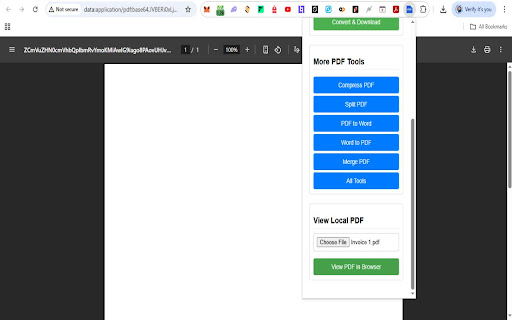


Save the current web page as a PDF file, view local PDFs, and convert image formats offline. All-in-One PDF Converter & Image Tools – Secure Offline Chrome Extension This Chrome extension is a powerful PDF converter extension and image tool that lets you save webpages as PDF, convert documents and images on the fly, and quickly access advanced PDF utilities – all offline on your device. With one click, you can convert the current web page to a high-quality PDF file, or use the built-in image converter to transform PNG, JPEG, and WebP files. The popup menu clearly shows “Webpage to PDF”, “View Local PDF”, “Quick Image Converter”, and “More PDF Tools”, highlighting its rich functionality. Webpage to PDF (One-Click): Instantly save any web page as a PDF with a single button. Just open the page you want, click “Convert Current Page to PDF”, and the extension uses Chrome’s built-in PDF engine to generate a faithful, well-formatted PDF. Styles, links and images are preserved, so the result looks just like the original page. This one-click PDF download makes it easy to archive articles, reports, or any online content for offline reading and sharing. View Local PDF Files: The “View Local PDF” feature lets you open and read PDF documents directly in your browser. Simply choose a PDF file from your computer and click “View PDF in Browser”. The file is displayed instantly with no extra software needed, making it a convenient PDF viewer built into Chrome. Quick Image Converter: Convert images between formats in a snap. Choose a PNG, JPEG, or WebP file and pick an output format (to PNG, JPEG, or WebP). With no file upload required, the image is processed entirely offline and downloaded immediately. (While this tool is focused on image formats, you can also open images in Chrome and Print to PDF to get a PDF version of your image.) Additional PDF Tools: In the “More PDF Tools” section, you get one-click links to advanced online utilities. Instantly jump to Compress PDF, Split PDF, PDF to Word, Word to PDF, Merge PDF, and more. These links open ConverterWordtoPDF.com tools in a new tab, so you have fast access to all PDF conversions and editing features. For example, converting Word documents to PDF or extracting images from PDFs is just a click away via Word-to-PDF and PDF-to-Word links. Offline & Secure Processing: All conversions happen on your device; no files are ever uploaded to the internet. This offline operation guarantees maximum privacy and security. Your documents stay local, so sensitive data is never exposed. In fact, the extension does not collect or send any data. It’s a truly private Chrome PDF tool – ideal for confidential documents. Fast & Lightweight: By leveraging Chrome’s built-in PDF engine, conversions are blazing fast and CPU-efficient. You don’t need heavy desktop software or internet bandwidth. The one-click PDF generation means your file is ready in seconds. This keeps the extension lightweight on system resources and very responsive. Easy One-Click Workflow: The user interface is streamlined and self-explanatory. Large buttons and clear labels (e.g. “Convert Current Page to PDF” and “Convert & Download”) make it straightforward for anyone to use – no technical skills required. Just click and go – one-click PDF download, image conversion, or local file viewing. All-in-One Convenience: Instead of juggling multiple apps or websites, you have a single Chrome extension for PDF tasks. Webpage saving, local PDF viewing, image conversion, and links to compress/split/merge tools are all in one popup menu. This centralizes your workflow and improves productivity. Privacy and Security We prioritize your privacy. This extension functions entirely offline on your computer, ensuring no data ever leaves your machine. Unlike online converters, there is no file upload or third-party server processing. Additionally, the developer has explicitly stated that the extension does not collect or use your data. Everything from PDF creation to image conversion happens securely in-browser, giving you peace of mind that your documents and personal information remain safe. No File Upload / Offline PDF Converter: Because it runs locally, this extension is a true offline PDF converter. You can convert and save documents anywhere, even without internet access. (Of course, the external “More PDF Tools” links require internet to reach those online pages.) Secure Chrome PDF Tool: By not connecting to external services, the tool eliminates risks like data leaks or malware. It simply uses Chrome’s native capabilities. Archive Web Content: Save news articles, research papers, or blog posts as PDF files for future reference. The saved PDF retains the original layout and clickable links, making it perfect for offline reading or sharing with colleagues. Business & Reports: Download receipts, invoices, confirmation pages, or legal documents (terms of service, privacy policies) as PDFs and keep them organized on your computer. You no longer need to print or screenshot – just save to PDF in one step. Academic & Study: Students and researchers can quickly convert webpages or slides to PDF for notes and study materials. The one-click conversion helps compile sources into clean, printable PDFs. You can also upload and view lecture notes or articles in PDF form directly via View PDF in Browser. Image Conversion Needs: Easily convert design mockups, photographs, or screenshots between formats (e.g. PNG to JPEG or WebP) without uploading to a site. Though this tool focuses on image formats, you can also print any image to PDF using Chrome. Enhanced PDF Editing (via Linked Tools): When you need more than just conversion, jump straight to specialized tools. For example, if you have a DOCX file, use the Word to PDF link; to reduce file size or split pages, use Compress PDF or Split PDF. This makes the extension valuable even when handling complex documents. In summary, this Chrome extension for PDF conversion is your all-in-one solution: it’s fast, secure, and extremely easy to use. Whether you want to convert Word to PDF, create PDFs from webpages, transform images, or simply view local PDFs, it’s all built into one lightweight, offline tool. Install now to simplify your PDF and image workflow – with no file uploads and complete privacy guaranteed.

Pooch PDF — Web Page to PDF & Drive
Convert any web page to a clean PDF. Strips ads and clutter. One-click Drive save. Selectable text, not screenshots. 100% local. Convert any web page to a clean, readable PDF — one click, no junk. The best free web page to PDF converter for Chrome. Pooch PDF extracts the article from any web page — strips ads, cookie banners, navbars, sidebars, pop-ups, and clutter — and generates a properly formatted PDF with selectable, searchable text (not a screenshot). Save to Google Drive in one click. Works on news articles, blogs, Wikipedia, academic papers, Substack, Medium, and documentation sites. Everything runs 100% locally in your browser. No uploads. No servers. No tracking. Your content never leaves your machine. v2.5: Emoji reactions. Freehand drawing. Collaborative annotations — share a link with colleagues and annotate the same page together. Shared annotations are end-to-end encrypted. Local-only by default. ━━━━━━━━━━━━━━━━━━━━━━━━━━━━ THREE WAYS TO SAVE Quick PDF — Scrolls the page to load all lazy content, then saves the entire page as a PDF. What you see is what you get — fast and faithful. Clean PDF — Extracts the article using reader mode. Strips ads, sidebars, pop-ups, and clutter. Generates a vector PDF with selectable, searchable text — not a rasterized screenshot. Professional typography with Charter/Georgia serif body, Helvetica Neue headings, teal accents, and styled tables, code blocks, and blockquotes. AI-powered formatting generates a tailored stylesheet for each document. Mechanical cleanup removes web artifacts like [edit] links and citation numbers. ~10x smaller files than rasterized PDFs. Region Select (Experimental) — Don't need the whole page? Toggle Region Select in the popup to activate a visual overlay showing content "islands" on the page. Hover to see AI summaries of each section, zoom in/out to navigate DOM depth, and click to select. Captures the selected region as a pixel-perfect rasterized PDF via a scroll-capture-stitch pipeline. A post-capture modal lets you edit the title and summary, then save to disk or Google Drive. Annotate — Highlight text, strikethrough deletions, insert suggested text, add comments, and draw (pen, arrow, rectangle) directly on any web page. Each tool remembers its own color. Your annotations are saved automatically and persist across page refreshes and browser restarts. Share a session key with colleagues to annotate the same page collaboratively — changes sync in real time. When you export to PDF, annotations become native PDF objects (not screenshots) — interactive highlights, sticky notes, and ink strokes that appear in any PDF viewer's annotation panel. ━━━━━━━━━━━━━━━━━━━━━━━━━━━━ WHAT'S NEW IN v2.5.1 - Improved shared viewer — Shared annotation links now open full-page for better readability, with an "Add to Chrome" bar for recipients who don't have the extension yet. - Smarter annotation alignment — Annotations in shared links now track their correct position more reliably across different devices, screen sizes, and text rendering. Highlights re-anchor to the exact text. Drawings and emoji annotations scale with the page layout. - Fixed: Emoji picker now only opens when the emoji tool is selected. - Fixed: Joining a shared session via a link now correctly activates the collaborative session when you start annotating. ━━━━━━━━━━━━━━━━━━━━━━━━━━━━ WHAT'S NEW IN v2.5.0 - Emoji reactions — Place emoji annotations anywhere on a page. Scalable with the scroll wheel. - Smarter annotation anchoring — Annotations survive page reflows more accurately. SimHash-based paragraph matching locates the right text block even after significant layout changes. ━━━━━━━━━━━━━━━━━━━━━━━━━━━━ WHAT'S NEW IN v2.3 - Strikethrough — Select text and mark it as deleted. Exports as a native PDF annotation. - Insert — Click anywhere in text to place a caret marker with suggested insertion text. - Collaborative Annotations — Click Share in the toolbar to create a session key. Share it with colleagues — everyone with the key sees and adds annotations on the same page in real time. Local-only by default; sync is opt-in. No accounts required. ━━━━━━━━━━━━━━━━━━━━━━━━━━━━ WHAT'S NEW IN v2.2 - Persistent Annotations — Highlight, comment, and draw on any page. Annotations are saved to your browser's local storage and restored automatically when you revisit. Undo works across sessions. - Smart Anchoring — Highlights anchor to the actual text content, not pixel positions. When a page reflows (different window size, ads load differently), your highlights snap back to the correct text. Comments and drawings anchor to nearby page elements. - Native PDF Annotations — Exported PDFs contain real annotation objects. View them in any PDF reader's annotation panel. Highlights show the selected text in popups. Comments appear as sticky notes. Drawings are vector ink strokes — not rasterized screenshots. ━━━━━━━━━━━━━━━━━━━━━━━━━━━━ WHAT'S NEW IN v2.0 - Vector PDF Engine — Clean PDF now generates vector PDFs with selectable, searchable text. ~10x smaller files. Professional typography: Charter/Georgia serif body, Helvetica Neue headings, teal accents, styled tables/code/blockquotes. - AI-Powered Formatting — On-device AI generates tailored stylesheets for each document. Mechanical cleanup removes web artifacts ([edit] links, citation numbers). Content is never changed — only styling. - Region Select (Experimental) — Visual island-based region selector. Toggle in popup activates an overlay showing content "islands." Hover for AI summaries, zoom to navigate DOM depth, click to select. Captures as a pixel-perfect rasterized PDF. - Simplified Interface — Two-view popup: main actions (Quick PDF, Clean PDF, Region Select) on the front, settings behind a gear icon. Save to Drive accessible via post-capture modal. - Page Progress Bar — Real-time visual feedback on the page during all PDF flows (scrolling, extracting, generating). - FlateDecode Compression — All PDFs now use zlib compression for 10-30% smaller files. ━━━━━━━━━━━━━━━━━━━━━━━━━━━━ WHAT POOCH REMOVES Sticky headers and footers repeated on every page Ads, pop-ups, and cookie banners in the article body Sidebar widgets, related articles, comment sections Images that break across page boundaries Lazy-loaded images that appear as blank boxes JavaScript-rendered content that other tools miss [edit] links, citation numbers, and other web artifacts (Clean PDF) ━━━━━━━━━━━━━━━━━━━━━━━━━━━━ FEATURES - Vector PDF Engine Selectable, searchable text. Professional typography with Charter/Georgia serif, Helvetica Neue headings, and teal accents. Styled tables, code blocks, and blockquotes. ~10x smaller files than rasterized PDFs. - AI-Powered Formatting On-device AI generates a tailored stylesheet for each document. Mechanical cleanup removes web artifacts. Your content is never changed — only the styling. - Annotate & Persist Highlight, strikethrough, insert, comment, and draw (pen, arrow, rectangle) on any page. Each tool tracks its own color. Annotations save automatically and survive page refreshes, browser restarts, and revisits days later. Smart anchoring ties highlights to the actual text — not pixel positions — so they survive reflows. Undo works across sessions. Export produces native PDF annotation objects that are interactive in any PDF reader. - Collaborative Annotations Share a link with colleagues to annotate the same page together. Click Share in the toolbar to create or join a session. Changes sync automatically — end-to-end encrypted, server cannot read your annotations. Your annotations are local by default and never leave your machine unless you choose to share. No accounts required. Recipients without the extension can view shared annotations in a full-page viewer directly from the link. - Table of Contents Auto-generated from the article's headings. Appears on its own page for easy navigation. - AI Abstract Uses your browser's on-device summarizer to generate a concise abstract for every article. Falls back to the article's meta description if unavailable. The abstract is embedded as searchable PDF metadata — find any saved article later with Google Drive search. - Google Drive Integration One-click upload via the post-capture modal. Files land in a dedicated "Pooch PDF" folder. Pro users get smart filename templates with dates, authors, and source sites — your Drive stays organized even at hundreds of saved articles. - Shareable Links (Pro) After saving to Drive, get a short link (poochpdf.com/s/abc123) with Open Graph meta tags. Paste it into Slack, Teams, email, or any messaging app — your colleagues see the title, abstract, and thumbnail before they click. - Smart Filename Templates Free: "Title" and "Title — Site". Pro: nine templates including date-prefixed, author-title, and automatic monthly subfolders. No more manual renaming. - Request History Every PDF action is logged locally in your browser — URL, title, type, summary, keywords, and timestamp. View your full history from the popup, with clickable links to original pages and saved Drive files. Toggle tracking on or off anytime. All data stays on your device and is never sent to our servers. - Region Select (Experimental) Visual island-based selector. Toggle in popup to see content "islands" overlaid on the page. Hover for AI summaries, zoom in/out to navigate DOM depth, click to capture. Post-capture modal lets you edit title/summary and save to disk or Google Drive. - Page Progress Bar Real-time visual feedback during all PDF flows — scrolling, extracting, generating. No more wondering if the extension is still working. - Paper Size Options Single Page (one continuous PDF with no page breaks — the default), A4, Letter, or Legal. Your choice is remembered. - Works Everywhere Tested on news sites, blogs, Wikipedia, Substack, Medium, academic papers, and documentation sites. Unlimited Drive saves 9 filename templates (dates, authors, subfolders) Shareable links with rich previews No watermark on Clean PDFs $3 every 60 days, or $15/year The free tier is genuinely useful on its own. Pro is for heavy savers who want better organization and sharing. ━━━━━━━━━━━━━━━━━━━━━━━━━━━━ PRIVACY All PDF generation happens locally in your browser. No page content ever leaves your machine. Google Drive uses the drive.file scope — the narrowest available. We can only see files Pooch PDF created. We cannot access your other Drive files. No analytics, no tracking, no telemetry. The only network calls: Google Drive upload (when you choose it) and share link creation (Pro only — sends title and abstract, never article content). Full policy: https://poochpdf.com/privacy.html Scrolls the page to trigger lazy-loaded images and infinite scroll content Removes sticky/fixed elements that repeat on printed pages For Clean PDF: extracts the article using reader mode, applies AI-generated styling, renders a vector PDF with selectable text For Quick PDF: captures the page as-is For Region Select: overlays content islands, captures the selected region Generates a PDF locally — no print dialog, no server For Drive: uploads the PDF, captures a thumbnail, and creates a short share URL activeTab — read the current page when you click the extension icon scripting — inject content extraction and scroll scripts storage — save your preferences (paper size, filename template) identity — Google OAuth for Drive upload (only triggered when you click "Save to Drive") googleapis.com — upload PDFs to your Google Drive ━━━━━━━━━━━━━━━━━━━━━━━━━━━━ SUPPORT Questions? support@poochpdf.com or https://poochpdf.com ━━━━━━━━━━━━━━━━━━━━━━━━━━━━ VERSION HISTORY 2.5.1 — Improved shared annotation viewer, smarter alignment across devices, bug fixes 2.5.0 — Emoji annotations, freehand drawing SDK, smarter annotation anchoring 2.4.0 — New features and improvements 2.3.0 — Strikethrough and insert annotations for document review, collaborative annotations with shared session keys 2.2.0 — Persistent annotations with smart text anchoring, native PDF annotation objects 2.0.3 — Bug fixes 2.0.2 — Bug fixes 2.0.1 — Bug fixes 2.0.0 — Vector PDF engine with selectable text, AI-powered formatting, visual Region Select, simplified two-view interface, page progress bar, FlateDecode compression 1.5.0 — New features and improvements 1.4.0 — Region Select: hover, click, and save any section of a page as a PDF 1.3.2 — Bug fixes 1.3.1 — Bug fixes 1.3.0 — Add request history 1.2.5 — Quick PDF: silent download without print dialog, searchable text metadata 1.2.4 — Configurable PDF image format, quality, and resolution settings 1.2.3 — Bug fixes 1.2.2 — Bug fixes 1.2.1 — Bug fixes 1.2.0 — Request history: track all PDF actions locally with a browsable history page 1.1.7 — Bug fixes 1.1.6 — Bug fixes 1.1.5 — Localized progress messages, error messages, and Clean PDF preview bar (DE/JA/ZH) 1.1.4 — Bug fixes and print reliability improvements 1.1.3 — Bug fixes 1.1.2 — Bug fixes 1.1.1 — Quick/Clean PDF mode selector for Save to Drive; Drive and other bug fixes 1.1.0 — PDF mode selector, Quick PDF Save to Drive support 1.0.2 — Bug fixes 1.0.0 — Initial release: Quick PDF, Clean PDF, Save to Drive, AI abstracts, shareable links, smart filename templates

Web to PDF
Use Web to PDF converter to save a web page as a pdf and download it instantly. Perfect for offline reading and sharing. 📃 Looking for a quick and reliable way to save a web page as pdf? This chrome extension is a web to pdf converter, perfect for anyone who needs to download content for offline access, sharing, or archiving. With just a single click, convert a web page to pdf without hassle: ✅ Preserve Styles and Links: Keeps original styles and clickable links. ✅ Flexible Layouts: Choose page breaks or a single-page format. ✅ High Quality: Uses Chrome’s PDF tool for fast, clear results. ✅ Secure: Saves directly to your device, protecting privacy. If you’re looking to save a web document to pdf, this tool makes it easy with smooth, intuitive functionality. All images, links, and formatting remain intact, giving you a faithful reproduction of the web content in one file. 💡 How to Use Web Page to PDF Converter 1️⃣ Open the web page you want to save. 2️⃣ Click on the Web to PDF extension icon. 3️⃣ Select Format to set the view size. 4️⃣ Choose Layout for page breaks or a single page. 5️⃣ Download your PDF — your file is ready in seconds! 📄 Tips for Best Conversions 1. Ensure the page loads fully before converting. 2. Adjust format and layout settings for optimal page fit. 3. Avoid pop-ups or overlays, as they may appear in the PDF. 4. Refresh the page if the first conversion doesn’t capture everything accurately. 💡 Why Save Internet Page to PDF? ◆ Access files offline anytime ◆ Share content without needing internet access ◆ Archive page for future reference ◆ Print web content easily in a structured format Web to pdf extension is the easiest way to convert web page to pdf quickly, ensuring you don’t lose valuable content or formatting. Almost anyone! This tool is ideal for: 1) Students who need to reference articles and papers 2) Professionals who want to save web data for reports 3) Researchers who need offline access to resources 4) Bloggers and writers who save content inspiration Imagine the convenience of accessing all your important web content as pdf files. You no longer need to bookmark endless links or worry about pages disappearing. Just convert the webpage to pdf and keep everything organized and secure. ❓ How to save a page as a PDF? 👉 Open the page, click the extension icon, choose settings, and save webpage as pdf. ❓ Will the file look like the original webpage? 👉 Yes, we ensure that your document retain the look and feel of the original. ❓ Does this extension work offline? 👉 Once a web document is saved, you can access it offline If you see a notice about the developer console, don’t worry — it’s simply due to Web to PDF using Chrome’s own PDF-printing system. Chrome provides an optimized, high-quality conversion method that outperforms other PDF tools in quality and speed. This message is a standard notification for Chrome extensions that use advanced browser functions. While screenshots capture images, PDFs provide a more functional and versatile way to save web pages. Here’s why this extension is the superior choice: ➤ Selectable Text: Easily select, copy, and highlight text. ➤ Clickable Links: Keep all links active for quick access. ➤ Accurate Layouts: Preserve the page’s original look and feel. ➤ Custom Page Options: Choose page breaks or single-page view. ➤ High Quality: PDFs retain clarity and detail better than screenshots. ✳️ News Articles: Save important news articles before they get archived or moved behind a paywall. ✳️ Legal Documents: Keep copies of terms and conditions, privacy policies, or legal agreements. ✳️ Receipts and Confirmations: Save confirmation pages after online transactions for your records. ✳️ Recipes: Save cooking recipes with all the links and notes intact for your culinary adventures. ✳️ Event Information: Capture details of events, schedules, or tickets for easy access. Whether you need a web page to pdf converter for work, school, or personal use, this extension is here to help. Get started today and discover the easiest way to download a web page as a PDF whenever you need it.

Image ↔ PDF Converter – Free Offline Tool (JPG, PNG, PDF)
Convert images to PDF, PDF to images, and between image formats - all offline! Easily convert between Image ↔ PDF and even Image ↔ Image formats with just one click. No more complicated tools – everything you need is built right into this Chrome extension. 📑 PDF to Image Converter – Extract and save PDF pages as JPG/PNG images. 🔄 Image to Image Converter – Convert between JPG, PNG, and other formats instantly. ⚡ Fast & Secure – Works offline, your files stay safe on your computer. 🔍 Perfect for: Anyone looking for a free, lightweight PDF & image tool inside Chrome. 💡 Save time with the easiest Image & PDF Converter – right in your browser.

Convert: Web to PDF — Save Any Webpage as PDF
Convert any webpage into a clean, high-quality PDF — right from your browser. No servers. No uploads. No data collection. Every conversion runs entirely on your device using Chrome’s built-in rendering engine, so your data never leaves your machine. Unlike most web-to-PDF tools, this generates real PDFs — not screenshots. That means selectable text, working links, proper formatting, and consistent layout across pages. Most extensions fall into one of three traps: • They generate low-quality, screenshot-based PDFs • They send your page data to external servers • They hide basic features behind a paywall You get fast, high-fidelity PDFs with full control — completely free and fully local. • One-click conversion — click the icon or press Ctrl+Shift+P • 7 page sizes — A3, A4, A5, Letter, Legal, Tabloid, Ledger • Portrait or Landscape orientation • Adjustable margins — None, Minimal, Normal, Wide • Scale from 25% to 200% • Include or exclude background graphics • Optional headers & footers (title, URL, page numbers) 🧹 CLEAN UP BEFORE YOU CONVERT • Remove Elements — click anything to remove ads, popups, or clutter • Undo changes instantly (Ctrl+Z) • Article Mode — extract only the main content (no navigation, no noise) • Hide Sticky Elements — remove floating headers and banners • Load All Images — ensures lazy-loaded images appear in your PDF 👀 PREVIEW BEFORE YOU SAVE ⚡ BUILT FOR SPEED • Right-click → Convert page, selection, or link • Keyboard shortcuts: - Ctrl+Shift+P → Convert page - Ctrl+Shift+S → Article mode 🔒 YOUR DATA STAYS ON YOUR DEVICE This matters — many popular tools send your page content to external servers. If you're converting sensitive data (financial reports, internal dashboards, legal documents), local processing isn’t optional. It’s essential. 👥 WHO THIS IS FOR • Students saving research and notes • Professionals exporting reports and dashboards • Legal teams preserving web evidence • Researchers archiving papers • Journalists saving pages before they change • Anyone who wants clean PDFs without paying monthly Convert unlimited pages with full customization — completely free.
