
mfbkflchflhebjcnnbckpelgidjooiae
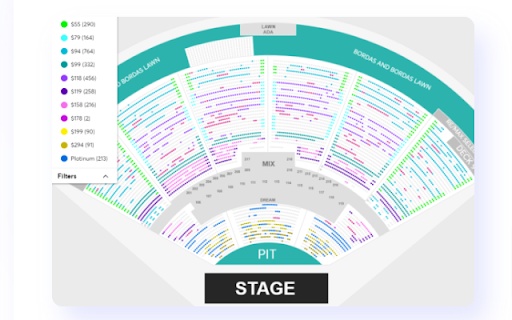
Get instant insights into available seats and their prices, with color-coding and ticket type filtering. This extension enhances your ability to spot price breaks using color-coded visualization. Get instant insights into available seats and their prices for Ticketmaster and LiveNation shows with our extension, which color-codes seats for easy price comparison and can also filter by ticket type

Ticketmetric - Event Data and Analytics Extension
The most advanced tool offering data and analytics for Primary and Secondary Ticket Marketplaces. Chrome extension for Ticketmetric members. The extension is an advanced tool offering data and analytics for Primary and Secondary Ticket Marketplaces.

EventikSaver: Event Ticket Price Comparison
Compare ticket prices on Ticketmaster and StubHub to save up to 50% on event purchases. Use our tool to find cheaper tickets. Save on purchasing tickets for concerts, sports, theater, and other events with EventikSaver. Compare ticket prices between Ticketmaster and Stubhub, and choose the best seats at the most affordable prices. You probably know that the price for a ticket to the same seat can be sold at different prices on different ticket platforms. That is why we created this extension, so that you could easily compare ticket prices on different platforms, in particular, for now, we have implemented comparison for the 2 most popular platforms in the USA: Ticketmaster and Stubhub. 💛 Instructions for using the extension (there is also a video in the description above) 1) Open the extension on the event page (Ticketmaster or Stubhub) that you want to attend. 2) Click on the "compare with Stubhub" or "compare with Ticketmaster" button. 3) Open the page of the found event. 4) Click on the extension on this page and choose the most optimal price and seat for you. 💚 How is the extension useful for you? You will definitely save your money. If it is a popular event, the savings can reach hundreds of dollars. You will see the entire range of prices across all sections. This will simplify the choice of your seat. Ease of use. Just 4 clicks and you have saved your budget. ❤️ We will be glad if our extension is useful to you.

ParamPilot: Automatic URL & Query Parameter Appender
Automatically append custom parameters or text to URLs based on user-defined rules. Simple, fast, and fully customizable. ParamPilot is a lightweight and powerful Chrome extension that lets you automatically append text or parameters to any URL based on flexible rules. Whether you're a developer, tester, or power user, ParamPilot gives you full control over URL behavior by letting you define pattern-based rules and apply changes in real time. 🔧 Key Features Automatically append query parameters or text to matching URLs Define multiple rules with AND/OR conditions Live URL updates without reloading pages Simple, clean, and intuitive UI Toggle extension functionality on/off instantly Case-insensitive matching supported 🛠️ Use Cases Add tracking parameters (e.g., ?utm_source=test) Simulate A/B tests or feature toggles QA/testing environments with dynamic URLs Debugging tools that require query flags ⚙️ Built With Chrome Manifest V3 Vanilla JavaScript 🔐 Privacy ParamPilot does not track, store, or transmit any user data. All operations happen locally in your browser.

BP Proxy Switcher
Change your proxies with one click With our Chrome proxy addon, you can easily load your proxy list from the clipboard or a URL and switch between them with a single click. Display the country for each proxy.Clear the cache before switching to a new proxy. Automatically reload the current tab when changing proxies. Rotate proxies automatically at intervals you specify. Exclude certain URLs from using the proxy. Block specific URLs from loading. Note: Due to Chrome's limitations, it's not possible to set a different proxy for each tab. The proxy will be applied across the entire Chrome profile.
