
meonopfejondoahgndhocmaenpcebkhb


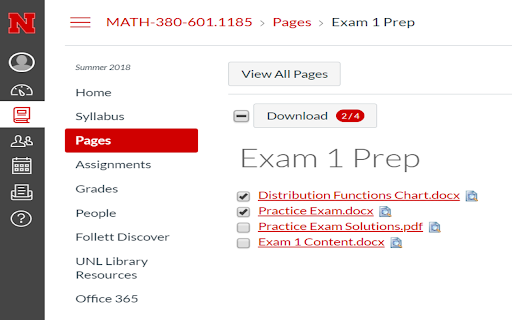

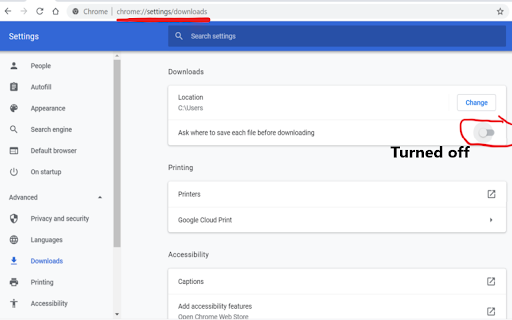
Download all available course attachments from Canvas or Instructure in Module, assignments, and Pages/Wiki tab or path 🤦🏻♂️ The purpose of creating Canvas Files Downloader extension is to facilitate the process of downloading files especially in the modules path/tab; because currently in order for students to download a file, they have to make multiple clicks to do so. 🎯 This extension allows students to either download all attachments/files by selecting all or download only the selected ones in modules, pages, assignments, and wiki (tab/path). If there is only one attachment in any of these paths, users will get the download button with number of files that you could download ( as in fi) 💡 ( Turn off / disable ) the "Ask where to save each file before downloading" option on chrome://settings/downloads ,so that you download the selected files immediately without getting the popup dialog. 🥳 This extension works for all schools that use Canvas Learning Management System (LMS) / Instructure

Canvas Quick Student View
Adds the Student View link to all pages in Canvas. Look for the spectacles icon at the top right. Install to add the Student View link – visible as a "spectacles" icon – on every page at the top right (in the "crumbs" navigation pane) in the Canvas LMS. Enables quick toggling between Student View and regular view without extra navigation. NOTE: as of its December 19, 2020 release, Canvas implements its own built-in Student View link on most pages. This extension now is preset to become hidden on pages where the built-in link is shown, but other options can be selected (see Options page for more info). This extension ONLY works with Canvas URLs of the following types: For other URL formats, use Canvas Quick Student View (any host), link: https://chrome.google.com/webstore/detail/canvas-quick-student-view/hlhfhggndbcoolimgcohdegdfpcbphhj Please find the complete manual at https://drive.google.com/drive/folders/1ZKHJh4_61pG4fbn743XW4qTAUCr41xaI?usp=sharing Please join https://groups.google.com/d/forum/canvas-quick-student-view for questions, bug reports etc.

CanvasCape
A suite of tools that enhance the Canvas LMS. Each tool is simple and designed with students and teaching teams in mind. This extension adds a suite of useful tools to the Canvas LMS. After you *install* and *pin* this extension in Chrome, all you have to do is visit a Canvas course or account and click the red cape icon in your browser (see the screenshots). Found a bug? Have ideas? Email canvascape@gabeabrams.com. We'd love to get your feedback! Your security and privacy are paramount and that's why CanvasCape operates entirely in your browser: all processing and visualization, happens on your machine. We don't host any databases. This tool doesn't even have servers. CanvasCape is not endorsed by or associated with Canvas, Instructure, Harvard University. By using this add-on, you agree to our terms & conditions: • Use CanvasCape at your own risk. • The software is provided 'as is', without warranty of any kind, express or implied, including but not limited to the warranties of merchantability, fitness for a particular purpose, title and non-infringement. In no event shall the copyright holders or anyone distributing the software be liable for any damages or other liability, whether in contract, tort, or otherwise, arising from, out of or in connection with the software or the use of other dealings in the software. • In no event shall the copyright holders or anyone distributing the software be liable for users' violation of any law, policy, or regulation, including but not limited to FERPA and GDPR.

Canvas – Video Downloader, Transcriber & Summarizer
Download, summarize, and transcribe videos from any website. Including popular LMS: Canvas, Blackboard, and Moodle. The All-in-One Video Downloader, Summarizer, and Transcriber for the Modern Web Canvas makes it easy to download, convert, summarize, and transcribe videos from across the web. Whether you’re watching a tutorial, webinar, lecture, or online course, Canvas helps you capture, understand, and organize content — quickly and securely. Built for anyone who values learning, productivity, and knowledge — from professionals and researchers to everyday learners. 🎥 Universal Video Downloading Download videos from a wide range of websites, including educational platforms like Canvas, Blackboard, and Moodle. Keep your videos stored locally for offline viewing. 🧠 AI-Powered Summaries & Transcriptions Generate concise summaries and accurate transcriptions from any video or audio. Perfect for note-taking, review, or accessibility. 🔒 Private and Secure All processing happens locally on your device. Your downloads, transcriptions, and summaries remain private — never uploaded or shared externally. Why You’ll Love It: - Download and store videos for offline access - Review long content faster with AI summaries - Convert and search transcripts easily - Works across most websites and LMS platforms - Keeps your data completely private Perfect For: - Learners & Educators: Ideal for studying or teaching from Canvas, Blackboard, and Moodle. - Professionals: Save and summarize webinars, training, and meetings. - Researchers: Transcribe and analyze academic or recorded materials. - Lifelong Learners: Capture and organize tutorials and online talks. By combining downloading, transcription, and AI-powered summarization, it helps anyone save time, learn faster, and stay organized across the web. What’s New (v2.2.0): - Added functionality to the popup and content interface - Added support for processing MP4 and HLS videos on any website - Improved performance and overall stability Download. Summarize. Transcribe. Learn more efficiently — with Canvas!

Canvas Modules Organiser
• Compression:Based on the indentation level formatting of individual Module items on the Canvas LMS Modules page, this extension allows for collapsing more indented items "below" those of less indented items in a hierarchical fashion. This facilitates better and more concise overview of the Module contents. Collapsing can be done at item, module or page level using different controls. Modules can also be "tagged" with a short text defined and styled by the user. • As of version 1.0, module items as well as entire modules can be tagged, and tags can be stored for re-use. • As of version 1.0, contextual menus can be used as an alternative to hovering over extension icons to bring forward the extension menus. • The extension can also group modules in "boxes" or "tabs" (in v 0.9 +)for even better overview, and users can add their own text tags to modules • As of v 0.6 custom indentation is supported. Please visit https://www.youtube.com/playlist?list=PLP3asN9BirNAnaGPVgQGSviop-G_L-GhN for instructive videos on this extension. NOTE that Canvas Modules Organiser only works with Canvas platforms hosted on domains with the names or name types listed below. Requests for inclusion of other domains can be made to oldpikesoftware@gmail.com .
