
eohlnkgmgakcdngcommoblmjlbbnpejc
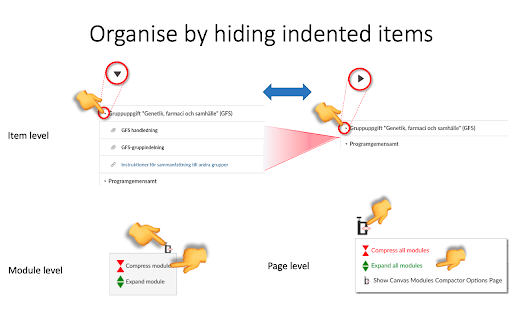
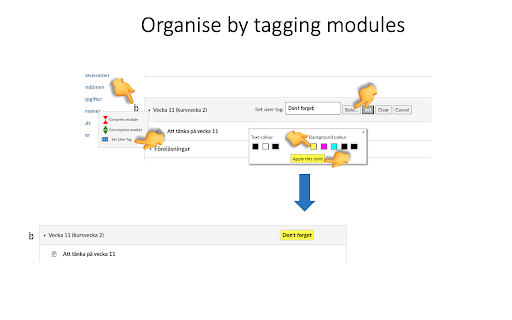
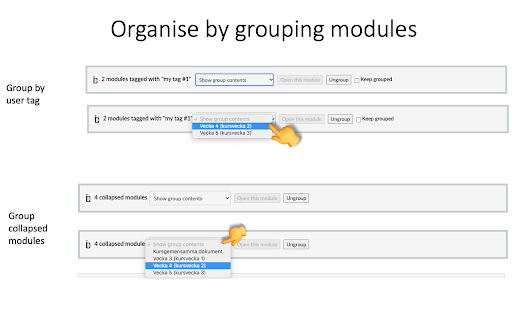

• Compression:Based on the indentation level formatting of individual Module items on the Canvas LMS Modules page, this extension allows for collapsing more indented items "below" those of less indented items in a hierarchical fashion. This facilitates better and more concise overview of the Module contents. Collapsing can be done at item, module or page level using different controls. Modules can also be "tagged" with a short text defined and styled by the user. • As of version 1.0, module items as well as entire modules can be tagged, and tags can be stored for re-use. • As of version 1.0, contextual menus can be used as an alternative to hovering over extension icons to bring forward the extension menus. • The extension can also group modules in "boxes" or "tabs" (in v 0.9 +)for even better overview, and users can add their own text tags to modules • As of v 0.6 custom indentation is supported. Please visit https://www.youtube.com/playlist?list=PLP3asN9BirNAnaGPVgQGSviop-G_L-GhN for instructive videos on this extension. NOTE that Canvas Modules Organiser only works with Canvas platforms hosted on domains with the names or name types listed below. Requests for inclusion of other domains can be made to oldpikesoftware@gmail.com .

Canvas Betterizer
Quality-of-life improvements for Canvas by Instructure UPDATED FOR CANVAS CHANGES, JAN 2026 If you're a teacher spending time grading and working in Canvas, you know how much time it can take! Canvas Betterizer is meant to make your time spent in Canvas by Instructure more efficient by adding small quality-of-life improvements, especially in SpeedGrader: -Automatically focuses and selects the student grade -Hit enter to submit grade and move on to the next student -Hit enter when typing a comment to submit it Canvas Betterizer collects no information about you or your students. Privacy policy found at http://robertnoorda.com/portfolio/canvas-betterizer/#privacy

Super Canvas
Supercharge Your Canvas LMS Experience SuperCanvas Chrome Extension For Canvas LMS Tired of searching through files in canvas slowly and inefficiently? Or having your tasks deadline all over the place? Super Canvas is for you! v1.2.1 New Changes: ✅ Updated preview screen (Bigger and better preview of files now!) ✅ Hover over file to view full hidden overflow text 🚀 v1.1.0 Features: ⭐️Fast File Navigation and Search ⭐️Instant Search Querying & Folder Filter ⭐️Supports Fuzzy Search Algorithm (Powered by Fuse.js) ⭐️Tasks Deadline Card Display with Countdown (Indicates number of days/hours/mins left) How to use: 1. Install chrome extension 2. Navigate to canvas website (For your school) 3. You should see a magnifying glass icon on the dashboard cards where you can access all of your course files. For deadlines, it will display all your assignments/quizzes with due date. In the event the search icon/deadlines cannot be seen on the dashboard page, please try refreshing the page OR disable adblock on your canvas website (If you have one) For bug report/ideas, kindly send me a message at me@pohwp.dev! I'll love to hear from you!

Canvas Quiz Loader
Are you tired of opening two windows just so that you can see what you've answered in the previous quiz attempt? Well, I understand. It gets even worse when you have multiple submissions that need to be combined into one. Canvas Quiz Loader has been built to solve this common problem. It scans your previous submissions, picks out correct answers, and automatically applies them to the current attempt. ============================================== We support ALL question types * * If formula or variables within the formula change, the answer might have to be changed as well. * Fill in multiple blank question type does not auto-populate, but you will still see your previous and best submission results ============================================== For questions, suggestions, and bug reports, engage with us on Discord https://discord.gg/npNySzNZ

Canvas Wrapped
Spotify Wrapped: "Spotify Wrapped is a viral marketing campaign by Spotify. Released annually in early December since 2016, the campaign allows Spotify users to view a compilation of data about their activity on the platform over the past year and invites them to share it on social media." Canvas LMS: "Canvas is a web-based learning management system, or LMS. It is used by learning institutions, educators, and students to access and manage online course learning materials and communicate about skill development and learning achievement." Q: But, what is Canvas LMS Wrapped? A: Similar to Spotify Wrapped, Canvas Wrapped is a tool designed for students whose schools use Canvas as an LMS. The tool enables students to view their assignment activity, including metrics such as the number of completed assignments, the number of missing assignments, the number of assignments submitted after the due date, the teachers who gave the most assignments and more. It provides a personalized and engaging experience for students, similar to how users view their music activity on Spotify. So let's get started! Using Canvas Wrapped is as easy as using Spotify Wrapped, please follow the steps below. 1) Install the Canvas LMS Wrapped extension. 2) Log in to your institution's Canvas LMS page 3) While on the Canvas LMS page, open the Canvas LMS Wrapped extension and click the "See Your Wrapped" button. You will be redirected to "wsspaper.com" where your data will be ready for you in a few minutes. Developer's Note: Canvas LMS Wrapped is a free to use tool that is developed for fun, and it does not seek any profit. Therefore user's data is NEITHER stored nor sold. Extension, Developer: Muhammed Cikmaz Designer: William Cheng
