
mekmhcnicomfjdcmpgeeihnaaidmllib
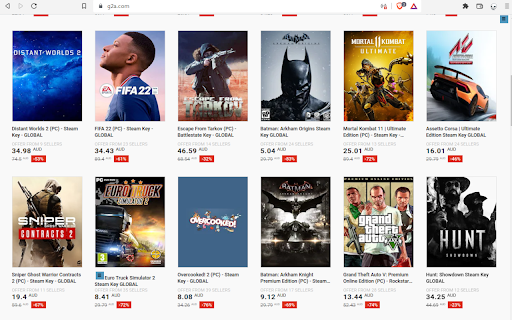
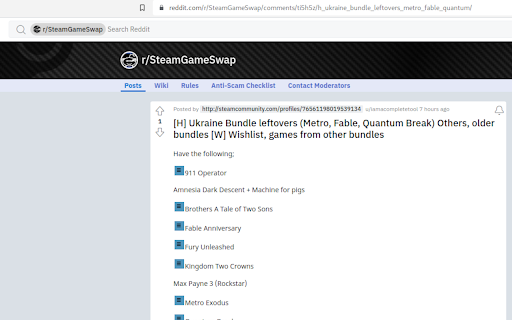
Checks if you own a game on Steam on various websites Checks if you already have a game in Steam, Epic, GOG library, itch.io, Fanatical Works on many websites. You can run it manually via the extension icon on any website. https://alexa.weezeewig.com/SteamOwned/SupportedWebsites.html This extension only looks at your list of games and wishlists. This information is kept on your computer and not sent anywhere. You can see which sites it has access to in "settings" > "extensions" > "details" Go to one of the supported websites. Click on the "library" icon on the top right of the browser. Epic Games needs a separate login. The normal one doesn't work. A tab will be opened for you to login. If something goes wrong, click on the "puzzle" on the browser -> "steam owned" -> "clear cached games" Tell me if you want any other sites added. Warning: It will be incorrect if the game name is different than the same game in the store. ie. "Train simulator" on Steam is "Train simulator 2016" on humblebundle. "ABZÛ" on Steam is ABZU on humblebundle. etc... 2026-05-18: Better results display. Fix Epic wishlist 2026-04-08: Fixed crash when gog wasn't logged in. Opens a tab to login to Epic. 2025-12-03: Steam changed their website. Updated for this. 2025-09-23: Grab multiple pages from GOG if there are any. 2025-08-28: Changed the login page for steam to get wishlist, sometimes you need to login separately to get the wishlist. 2025-06-14: Stopped using the steam API because it was getting an error on over usage. 2025-05-10: Fixed getting stuck if we're not logged into Fanatical. Added timeouts if a website is down. 2025-02-05: Fix getting Steam wishlist 2024-08-20: Added fanatical support 2023-08-06: Fixed EPIC games support

Steam Free Game Alert
Get notified about free Steam games and DLCs directly on the Steam homepage ⚡Steam Free Game Alerts shows notifications on the Steam homepage whenever there is a free game or DLC offer available. Key Features: - In-Page Notifications: Get alerts for new free Steam games or DLCs directly while browsing the Steam homepage - Direct Game Page Links: Instantly visit the game's Steam page by clicking the notification - Additional Game Info: See platform compatibility, release date, and user review ratings and more details in each alert - Customizable Settings: Optionally store dismissed games to avoid repeat alerts and whether alerts should appear on all Steam pages or just on the homepage - NEW in v1.3 - Browser Notifications: Optionally receive browser notifications on Windows, macOS, or Linux whenever a new free game becomes available - NEW in v1.4 - Free Games Overview: Check all current game offers with just one click in the settings menu of the extension 🎯 Ideal for anyone who doesn’t want to miss out on free Steam deals and want a clear, instant way to discover them. 🚀 Actively developed and regularly updated with new features, improvements, and performance updates coming soon! For questions, feedback, or bug reports, feel free to reach out at: pixelforge.tools@gmail.com

Open in Steam
An extension to open a Steam website page directly in the Steam client via a simple button Tired of having to login on the Steam website all the time? This is where OIS can help you! The ability to open Steam web pages pages in the Steam desktop client isn't as easy as it could be, so here's to an easier way. A simple button will appear on most Steam webpages which when clicked will reopen that exact page, just in the Steam desktop client. I'm just a guy who loves to write code. I'm only human, so there will likely be bugs somewhere. If you find any bugs, please report them to me (preferably on this project's Github issues page) with details of it and the page you were on at the time if relevant: https://github.com/PurplProto/OIS/issues

Steam Web Integration
Integrate your personal Steam information on the web, at your convenience!. Features - Checks web pages for links or images of steam games or DLC - Displays informative icons next to the link or image - Shows tooltips with additional information (on icon hover) - Information includes: - Type (game, DLC or package) - Ownership on Steam - Wishlisted on Steam - Followed on Steam - Ignored on Steam - Delisted/removed from Steam - Limited on Steam (low confidence metric) - Steam Trading Cards - Game bundle history - Caching of data - Support for dynamically changing web content - Context menu options - Highly configurable - Toolbar with filters and other options FAQ Why does it not work? Make sure you are logged in to steam with your account in your web browser. If that does not work, try factory reset. Why does it still not work? Try factory reset. Otherwise, be sure to contact me and provide me the log/error from the extension, if there is any. Can I suggest a feature, or ask a question? Yes, absolutely! Post it on the GitHub page: https://github.com/Revadike/SteamWebIntegration/

Steam tags for Humble Bundle
Show your library and wishlist games from Steam on Humble Bundle pages. Display "On wishlist" and "In library" tags next to games on various Humble Bundle pages based on your Steam account wishlist and library. There are 2 ways of using this extension: - Login to Steam website at https://store.steampowered.com/ - Enter your SteamId or CustomUrl in the extension settings - Fixed issue with fetching info about profiles with too many games - Improved tag matching and logging - Removed tag mapping suggestions - Updated Saved data and About sections - Replacement of removed steam APIs - Major refactor of the codebase - Updated dependencies to fix new Chrome extension policy issue - The website will remain responsive while the tags are loading - Improved logging and error handling - Switched to a new database - Fixed humble site max-width being affected by this extension - Fixed suggestion form - Fixed permissions check to not handle extra permission from previous version as a warning - Improved cache handling so outdated cache from previous version won't break the extension - Tags that were found in your library/wishlist/ignore now link directly to steam store page of the game - Merge both store and steamId info when available - Properly update version number in About section - Fixed wishlist for steam account login - Handle coupons - Fix some css issues on humble pages - Fixed problem with steam store data returning empty cached value - Fixed adding of tags to new items not present on first page load - Added tags to store product detail page - Added report missing tag form - Migrated to manifest v3 - Replaced broken heroku backend with vercel edge functions - Refactored to vite + typescript + react + tailwind - Polished interface - Updated to work on new /membership pages of humble choice - Added option to log out and choose whether to log in with steam id or through store.steampowered.com - Added indicator that user is logged in through store.steampowered.com - Fixed error with loading library info by user steam id/url - Fixed saved data info not updating in extension settings immediately after refresh - Fixed a bug where cached ignored games would get reset - Created a Firefox version of this extension - Removed unnecessary activeTab permission - DLCs will show up correctly (only if logged in on Steam website) - Added Ignored tag that also lowers opacity of given item just like on Steam (only if logged in on Steam website) - Game info is automatically retrieved after you change extension settings - SteamId and CustomUrl input now also accepts the full profile url - Added tags to Library and Keys & Entitlements pages - Improved game name matching (to better match items with suffixes like (Steam) or XYZ edition)) - Added link to steam store with hover effect for tags
