
fcinjfniedmmfaalakcallcbjepfiabi

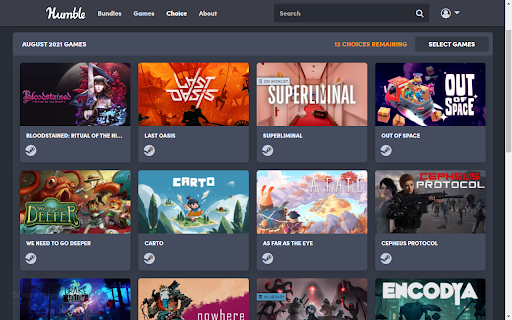


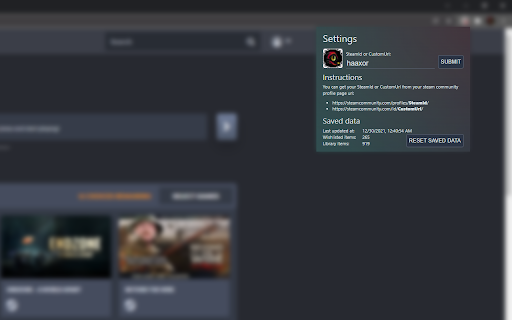
Show your library and wishlist games from Steam on Humble Bundle pages. Display "On wishlist" and "In library" tags next to games on various Humble Bundle pages based on your Steam account wishlist and library. There are 2 ways of using this extension: - Login to Steam website at https://store.steampowered.com/ - Enter your SteamId or CustomUrl in the extension settings - Fixed issue with fetching info about profiles with too many games - Improved tag matching and logging - Removed tag mapping suggestions - Updated Saved data and About sections - Replacement of removed steam APIs - Major refactor of the codebase - Updated dependencies to fix new Chrome extension policy issue - The website will remain responsive while the tags are loading - Improved logging and error handling - Switched to a new database - Fixed humble site max-width being affected by this extension - Fixed suggestion form - Fixed permissions check to not handle extra permission from previous version as a warning - Improved cache handling so outdated cache from previous version won't break the extension - Tags that were found in your library/wishlist/ignore now link directly to steam store page of the game - Merge both store and steamId info when available - Properly update version number in About section - Fixed wishlist for steam account login - Handle coupons - Fix some css issues on humble pages - Fixed problem with steam store data returning empty cached value - Fixed adding of tags to new items not present on first page load - Added tags to store product detail page - Added report missing tag form - Migrated to manifest v3 - Replaced broken heroku backend with vercel edge functions - Refactored to vite + typescript + react + tailwind - Polished interface - Updated to work on new /membership pages of humble choice - Added option to log out and choose whether to log in with steam id or through store.steampowered.com - Added indicator that user is logged in through store.steampowered.com - Fixed error with loading library info by user steam id/url - Fixed saved data info not updating in extension settings immediately after refresh - Fixed a bug where cached ignored games would get reset - Created a Firefox version of this extension - Removed unnecessary activeTab permission - DLCs will show up correctly (only if logged in on Steam website) - Added Ignored tag that also lowers opacity of given item just like on Steam (only if logged in on Steam website) - Game info is automatically retrieved after you change extension settings - SteamId and CustomUrl input now also accepts the full profile url - Added tags to Library and Keys & Entitlements pages - Improved game name matching (to better match items with suffixes like (Steam) or XYZ edition)) - Added link to steam store with hover effect for tags

Humble Bundle Choice Steam Links
Adds links to the Steam games available for choice members This extension works on pages where member choice games are available for redeem: https://www.humblebundle.com/membership/*. The extension works without sending any outgoing requests to the steam api. It wraps the steam icon under the game details with a link to it's store page.

Steamify Humble Bundle
Changes the appearance of Humble Bundle's game bundle pages into a cleaner, Steam Store-inspired layout for easier browsing. ⚡Steamify Humble Bundle transforms the appearance of game bundles on humblebundle.com into a clean, familiar layout inspired by the Steam Store. Key Features: - Clean, Steam-style layout for game bundles and Humble Choice - View total and per-game discounts, original prices, and price per game - Sync your Steam wishlist and owned games, to display relevant tags next to each title - Click any game to expand for more details, including developer, platforms, and ratings - Direct links to each game’s Steam page by clicking on game image - Shows games and calculates statistics based on selected pricing tier 🎯 Ideal for anyone who wants a better overview of what’s in a bundle - what you're saving and what it's worth. 🚀 Actively developed and regularly updated with new features, improvements, and performance updates coming soon! For questions, feedback, or bug reports, feel free to reach out at: pixelforge.tools@gmail.com

HumbleBundle Keys Clipboard
Save your Humble Bundle entitlements & keys data Quickly copy a list of your Humble Bundle entitlements, save all your Humble Bundle data or filter it! While viewing your Humble Bundle keys & entitlements page, simply click the button and wait for your file to save or for an alert letting you know that it has copied to your clipboard! The API call option can gather more information. This information can contain: keys, download links, steam app ID, expiration, country restrictions and more! Please feel free to reach out I would love to hear some feedback. Discord: https://discord.gg/tgP8Mqh or via contact on store page. Changed over to manifest V3 to get back onto the chrome store. Firefox will still use manifest V2 and will not need an update.

Show Great on Deck on Steam
See what Games are verified for the Steam Deck and which Medal they have on ProtonDB in the Steam Store. The Steam Store does not display the Steam Deck Verification Status on every page. This extension adds this status to a lot of pages, so you can see at a glance which games are compatible with the Deck. Furthermore the Verification Status is often not up-to-date. To solve this issue, the extension adds a medal from ProtonDB to the search results, front and app page. For more info, head over to the ReadMe on Github: https://github.com/cptpiepmatz/great-on-deck-search/tree/main#readme
