
mdjbgnpehbhpibonmjjjbjaoechnlcaf
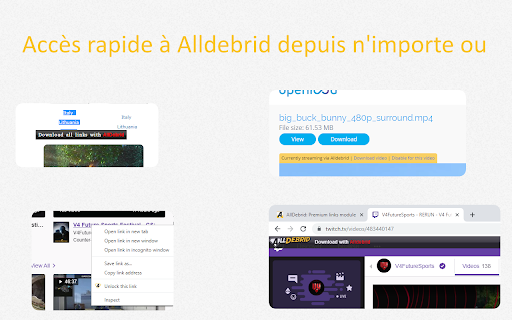
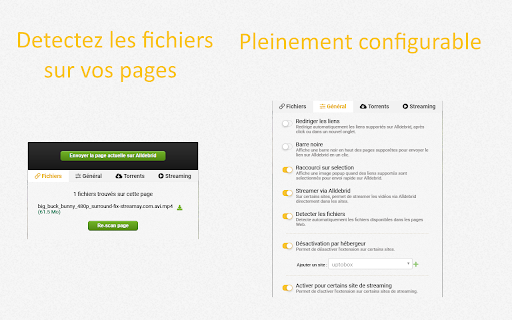

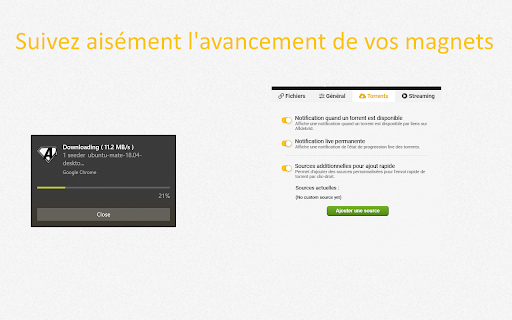
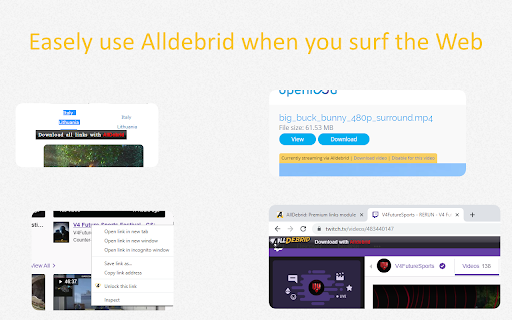
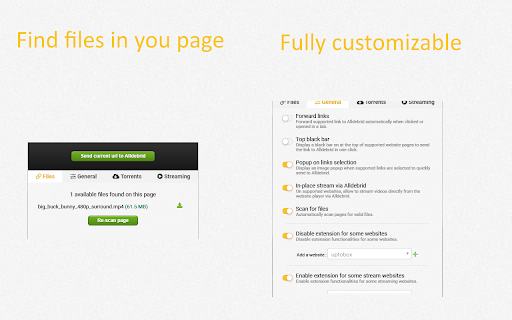
Extension to easely use Alldebrid in your day to day browsing Use this extension to integrate Alldebrid services in your daily navigation. - Intercept all hosters links and redirect to Alldebrid - Quick unlocking of your links with the right-click menu - Display a top bar on hoster pages to unrestrain link in one-click - Display a popup on selection to quickly send them to Alldebrid - One-click local streaming of video links, player configurable - On-the-fly source unlocking for some streaming websites - Automatically scan Web-page for valid files by validating them on the Alldebrid service - Highly configurable, enable and disable features or supported websites as you wish - Quick process of magnet links and similar v12.0.0 - Feat: new sidebar panel with tabbed interface (Scanner, Queue, Magnets, Downloads) - Feat: page scanner with multi-page file tracking across tabs - Feat: link queue manager with status tracking and batch actions - Feat: real-time magnet/torrent transfer monitoring in sidebar - Feat: integrated download manager to track browser downloads - Feat: theme toggle (System/Light/Dark) in sidebar header - Feat: option to use sidebar instead of popup when clicking extension icon - Fix: download status not updating when starting downloads from magnet tab - Fix: delay when loading magnet data on sidebar open v11.0.3 - Fix: temporarily broken popup in installation and upgrade v11.0.2 - Feat : migrated to new Manifest v3 - Feat : improved Privacy Policy page with language selection - Fix: incorrect files found by the Scan Page feature v10.8.3 - Fix : broken sending of files with right-click on some websites v10.8.2 - Fix : use browser credentials for api auth to avoid duplicate auth token v10.8.1 - Fix : disabled some notifications when not usefull - Fix : lighter hosts updates, could benefit mobile use - Fix : URL to French help page in Streaming section v10.8.0 - Feat : base lang data for smooth bootstrap - Fix : broken link listing on scan page in some cases - Fix : better flow in privacy setting page - Fix: some externals link to help pages v.10.7.3 - Fix : quick icons sometime displayed incorrectly - Fix : better folder / redirector handling with increase timeout on the unlocking process - Fix : progression on magnet processing stage when this stage is not instant in live popup v.10.7.1 - Feat : Force privacy policies review on extension first startup, as per Google request - Feat : Completly disable extension functionnalities until privacy policies are reviewed, as per Google request - Feat : New separated Privacy Policies page for better reading v.10.7.0 - Bugfix : Quick icons were not display on some webiste with relative URL - Bugfix : Right-click and hoover link actions are now working on textarea and inputs - Cleanup : removed some debugging message remaining in the code v.10.6.3 - Bugfix : quick download action via in-page icon could sometime trigguer multiple downloads - Bugfix : some privacy settings / user options misbehaviors when tweaking settings - Bugfix: hide some dev debug messages that were visible v.10.6.0 - Feat : Language forcing option - Feat : Pricavy policy and options - Bugfix : login issue on country change - Bugfix : page scan options - Bugfix : stream help link fix - Bugfix : dupe magnet completion notification fix v.10.4.1 - Bugfix : Quick icons display is now also behind the scan whitelist, as requested - Bugfix : download button above video have better placement, can be hidden and auto-hide on fullscreen - Bugfix : Quick DL icon now trigguer the download in the same tab, avoiding to have empty tab after a successfull download v10.4.0 - Feature : added quick action icons next to supported links (direct Dl, stream, open on Alldebrid) - Feature : when file scan is enable, quick icons display link status and add stream icon if file is streamable - Feature : added button above video to quickly send to Alldebrid - Feature : added a whitelist option for the file scan feature - Feature : added direct DL links and "Download all" button to the Files tab - Buxfix : magnet notification work again - Bugfix: magnet notification click on Firefox now open the links on Alldebrid

CocoLeech
Premium Link Generator and Premium Download Manager with VPN Support Cocoleech is a premium link generator and debrid service that removes wait times and delivers fast, hassle-free downloads. Cocoleech simplifies and accelerates your downloads. - Right-click & go: Choose any supported link, then select “Download with Cocoleech.” - One-click generation: Create premium links directly from the extension. - Know your status: Quickly view your account details and usage. - Instant VPN: Switch to optimized locations in seconds for smoother access.

Download Station (client for Synology NAS)
A basic synology download station client chrome extension Chrome extension which facilitate sending, monitoring and deleting tasks from a synology nas using download station. It includes a dropdown interface with filtered tabs for displaying and managing download task, as well as a contentscript for allowing quick actions from magnet url links. The popup support the following functionalities - Tabbed download tasks display and filtering - Task pause, play, seed, delete, destination edit - Task creation through rich form (destination, url, ftp, zip password) - Http, Https, 2FA login over local network - Context menu creation (with custom destination) - Quick action menu creation (with custom destination) - Local download managment (play, pause, resum, retry, open, etc..) The content script supports the following functionalities: - One click download on magnet links - Quick menu dropdown if more than one exist - Rich task creation modal on quick action or context menu - In-page notification for task creation The service worker supports the following functionalities: - Periodic task polling - Custom badge number and text display for filtered tasks (by tabs, status, destination) - Browser notifications on task completion/error (conditional on polling behavior and extensions permissions) Support the developpment at : https://paypal.me/dvcol/5

NZBDonkey
The ultimate NZB file download tool! Add-on to automatically download NZB files or send them to NZBGet, SABnzbd, Synology DownloadStation, JDwonloader or to the premiumize.me or torbox.app download service. - Works either with NZBLNK links or with header, password and title information provided as plain text. - Searches sequentially or simultaneously in different NZB search engines - Provides the ability to intercept and process NZB file downloads from any website - Highly configurable - Multiple target applications can be configured for the NZB file: - Download to the download folder of the browser - Send directly to SABnzbd, NZBGet, Synology DownloadStation, JDownloader or premiumize.me Downloader - Support for categories (if supported by the target application) - The categories can be freely configured for each target application with various options: - Automatic setting of a category based on the title or file name of the NZB file (with fallback option) - Set a default category for all NZB files - Manual selection of the category from the categories of the target application - Enable/disable the NZB file completeness check with separate thresholds for file and segment completeness - NZB search engines can be set up from existing templates or completely freely - and more...

LinkSnappy Elite
Power of LinkSnappy Elite at your fingertips You can use our extension use our LinkSnappy elite services for your daily downloading needs. Features: Detect and Download all the One-click host links through LinkSnappy Quick Link Generation with the Right-click Menu Auto Web Scraping to detect and download known providers Highly configurable with Desktop Grade File Management system integrated to help you manage the files stored on our Cloud. Quick download solution for your .Torrent Files & Magnet link. Real-time status of the supported hosts and networks.
