
ebbdkledlkjpgbbmmopgbnnjmklnkcef
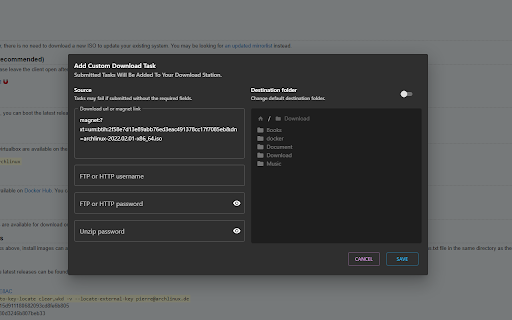


A basic synology download station client chrome extension Chrome extension which facilitate sending, monitoring and deleting tasks from a synology nas using download station. It includes a dropdown interface with filtered tabs for displaying and managing download task, as well as a contentscript for allowing quick actions from magnet url links. The popup support the following functionalities - Tabbed download tasks display and filtering - Task pause, play, seed, delete, destination edit - Task creation through rich form (destination, url, ftp, zip password) - Http, Https, 2FA login over local network - Context menu creation (with custom destination) - Quick action menu creation (with custom destination) - Local download managment (play, pause, resum, retry, open, etc..) The content script supports the following functionalities: - One click download on magnet links - Quick menu dropdown if more than one exist - Rich task creation modal on quick action or context menu - In-page notification for task creation The service worker supports the following functionalities: - Periodic task polling - Custom badge number and text display for filtered tasks (by tabs, status, destination) - Browser notifications on task completion/error (conditional on polling behavior and extensions permissions) Support the developpment at : https://paypal.me/dvcol/5

Control for Transmission
A concise, lightweight and high-performance Transmission Manager and Web Extension. Overview A concise, lightweight and high-performance Transmission Manager and Web Extension. It supports managing multiple remote or local Transmission at the same time, as well as adding magnet links from BitTorrent websites. Features: 1. Concise, lightweight and high-performance: Removed some not commonly used functions; The installation package size is small; Fast page loading, low CPU and memory usage. 2. Support simultaneous management of download tasks in multiple remote Transmissions. 3. Support adding download tasks by right-clicking on magnet links in Web pages. 4. This extension doesn't require "Read and change all your data on all websites" permission. Config Transmission: In the option page, you can configure one or more remote or local Transmissions. Add download tasks from web pages: Right-click a magnet link (or select a text that is a magnet link and right-click it), then add it from the context menu. Transmission Web Console: 1. Support filtering and searching. 2. Add a torrent: select a .torrent file or enter a magnet link. 3. Single torrent management: start, stop, delete. 4. Batch torrent management: select one or multiple torrents by mouse and keyboard shortcuts. 5. View and manage torrent files: double click a torrent. 6. In the settings, you can adjust sorting, update frequency, and other options. 7. Clicking the extension icon supports two behaviors: open in popup or a browser tab. Note: This extension is developed and implemented by the extension author based on the RPC API provided by Transmission. It's not a transmissionbt project.

Synology Image Assistant Extension
View HEIC photos and HEVC videos and more formats via Synology Image Assistant Extension and its desktop app. Synology Image Assistant Extension enhances your browsing experience. It supports displaying mainstream formats, including HEIC and HEVC. With this extension, image previews and compressed videos are automatically generated when files are uploaded or viewed across browsers. Synology Image Assistant Extension needs to be used in conjunction with its desktop app. Find it under our Download Center (https://www.synology.com/support/download) > select your model > Desktop Utilities. Join our Synology Community and share your feedback: https://community.synology.com/enu

QNAP Download Station Manager
QNAP Download Station Manager allows you to add links to QNAP download station Right click on an URL or a text selection for sending it to QNAP download station. Configure your QNAP connection settings as well as destination folder and QNAP user login and password. Extension also provides possibility to see list of active downloads.

C2 Password
A highly secure password management solution to store, sync, and safeguard your credentials. A highly secure and free password management solution for protecting your passwords and personal information. C2 Password lets you sync your credentials across an unlimited number of devices and access them from anywhere via the web portal, app, and browser extension. All the data you upload is encrypted before leaving your device, so you can rest assured that no one but you can access your data. This extension is useful in many ways: ✍️ Autofill logins - Automatically fill in usernames and passwords when signing in to websites. 💾 Auto-save passwords - Automatically save new passwords, usernames, and updates to saved passwords when signing in or creating new online accounts. 🆕 Generate unique passwords - Create a strong and random password for every website to increase account security. 📝 Autofill form data - Click payment and personal information in the extension to fill them in when shopping online. Save time while keeping your data safe. Get started with C2 Password today! 🔥 Get the most out of your extension: https://kb.synology.com/C2/tutorial/Get_started_with_C2_Password_extension ℹ️ For more information: https://c2.synology.com/password/overview 🔒 Privacy Policy: https://www.synology.com/company/legal/privacy 💬 Feel free to post any questions you have in Synology Community: https://community.synology.com/enu/forum/4
