
mdfhnhpmiflejbjjjcmeabeejabegdce
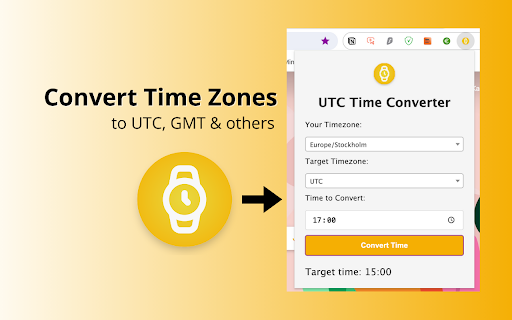
Use our UTC Time Converter tool to check London time, world clock and as your time zone converter. Introducing the Remarkable utc time converter extension for Chrome! 🌎⏲ Effortlessly master global scheduling with your ultimate companion for seamlessly converting your local time to any another across the globe. 🌟 🧭 Maximize Your Experience: · Click “Add to Chrome” to install the extension. · Open it for swift access. · Select your current local time and the destination time zone. · Instantly view the result. 1. Efficient UTC Time Transformation: Embrace global connections seamlessly, your indispensable tool for transforming local time into global world clocks, international time, or pinpointing time in London with unparalleled precision. 2. Comprehensive time zone Conversion: Whether you're switching between time zones, transitioning to military time converter, or seeking a GMT adjustment, your convenient hepler offers a complete solution. 3. Prime Global Time Adjustment Tool: Perfect for travelers and professionals, this feature empowers you to easily adjust to utc time, ensuring perfect alignment with globals. 4. Trusted time conversion Functions: Effortlessly coordinate international engagements or check the time in Paris with the user-friendly interface of the extension. 5. Flexible Adjustment Features: Go beyond standard borders with this extension, serving as your personalized UTC time zone adjuster alongside a range of other functionalities. 🔥 Transform Your Global Interactions: Leveraging cutting-edge technology, the utc time zone converter extension for Chrome ensures accuracy and ease of use, serving as your dependable partner in navigating time zone conversion tasks. Just a few clicks and you're ready to plan your global engagements without confusion. Navigate international schedules without leaving browser. Whether you're planning a virtual meeting or embarking on a journey, UTC Converter Time ensures you're always punctual, everywhere. 🕒 Streamline Your Global Planning: ·This tool is ideal for digital nomads, world watchers, and anyone who works with travel, business trips, and international collaborations. It plans life planning, ensuring that not a single moment is missed. · This utility is specially designed for people who regularly manage various projects that require synchronization with other cities, changes, and sometimes continents. The assistant turns complexity into simplicity and productivity. · Easy to install and use: add it to browse, select a time and let Extend work its magic, instantly converting any time zone. 🚀 Upgrade your time zone management: · With us you're doing more than just keeping an eye on London time or performing GMT time convert; you're unlocking a world of timely opportunities, ensuring you stay in sync with global clocks. 📚 Master your international schedule: · This extension isn't just about converting time; it's about enhancing your global engagement, making every international interaction effortless and accurate. · Fast and accurate, providing efficient control. · Simplify planning and save resources. ·Synchronization with planning applications 💻 Key features to expand your global engagement: 💡 Easy time conversion: Seamlessly convert local time to global time with exceptional accuracy. 💡 Wide coverage of time zones: a huge range of convert time zones around the world, offering all the possibilities to suit your personalized desires. Stay tuned for exciting updates that will further refine your time conversion experience and introduce expanded features for even smoother global scheduling. 💡 It is a user-friendly Chrome extension designed to simplify the process of converting your local time to various global time zones, facilitating seamless scheduling and planning across regions and countries. 📌 Does it support conversions for all time zones worldwide? 💡 Of course, we have worked through all the features and can offer you accurate and up-to-date converters. 📌 Is the extension secure and privacy-friendly? 💡 Rest assured, your privacy is paramount, and the extension operates securely within your browser environment. 📌Are updates and support for your project planned? 💡 Of course, we are always in touch and ready to answer all your questions. Our team is also actively working on new ideas and making time UTC convert an easy process. 📪 Connect with Us: For any questions or feedback, feel free to reach out to us at devbycores@gmail.com 💌 Our team is here to assist you further and enhance your experience with the UTC Time Converter.

Time Zone Converter - Savvy Time
Time zone and local time converter. Compare and convert time between many locations at a time. Time zone and city time converter between multiple locations worldwide. Converter allows find, add and compare over 100,000 cities and about 300 time zones. Converts times instantly as you type, in both direction. To help us improve, we would love to hear your feedback and any suggestions for future updates.

UTC Time & World Clock
See UTC time at a glance on the extension icon, and switch to any time zone when needed Your time, always in sight. See the current UTC time or any selected world clock directly on your Browser extension icon. No extra tabs. No searching. No friction. Built for people who work, travel, plan, and communicate across time zones, this extension gives you a faster way to stay in sync with the world. 📍 Live time on the extension badge Keep the time you need visible прямо on the extension icon. 🌍 UTC or any world time zone Track the time that matters most to you. 🌗 Day/night indicator See at a glance whether it is day or night in the selected location. 🗓️ Locale-based date and time display Use a format that feels familiar and natural. 🗣️ Multiple language support Choose the language you prefer. 🎨 Light and dark theme friendly Comfortable and readable in different browsing conditions. ⚡ Always one glance away The time is already there when you open Browser. From global teamwork to everyday planning, this extension keeps the time you need exactly where you need it: inside Browser, always in view. Install it and stop wasting clicks on checking the time.

Timestamp to Date
Use Timestamp to Date app to convert epoch to time and view the current UTC time or the current date. 🚀 Timestamp to Date is a fast, local-first tool for engineers who work with raw time values in logs, APIs, and CSVs. Open the popup, paste a value, switch units, and copy precise results in one click. It also works in reverse when you need to convert time to epoch. 🧭 Quick Start Tips 1. Add to Chrome from the store page 2. Click the toolbar icon to open the popup to convert epoch to time 3. Paste a unixtimestamp or ISO 8601 format string, or press Now to auto-fill inputs with live values for quick checks 4. Choose whether to interpret the input as UTC or Local to convert to unix timestamp to avoid accidental shifts 5. Switch units between seconds and ms, then copy the exact field you need using the inline buttons 6. Compare results against the current date and the relative label to understand how far the event is from it. ⚙️ What it does? ➤ Convert epoch to time in both local and UTC views ➤ Convert time to unix timestamp in both seconds and milliseconds formats ➤ Provides current utc timestamp and current date with Now buttons ➤ Provides convenient Copy buttons for all output values to be copied as ISO strings ➤ Right click menu to convert selected text without opening a new tab or switching to an external tool 🧪 Modes for precision ▸ Quick mode parses ISO 8601 strings with or without Timezones ▸ Validation of the input date format witch the clear message ▸ Manual mode when user can specify all values individually with validation on an each field to catch typos early ▸ Per-field errors explain what to fix ▸ The app remembers state for 10 minutes, so reopening restores your last work 🧰 Output designed for ops • Local time and UTC side by side with a utc time converter toggle • Relative label shows how far the value is from the current date • Buttons near each line copy results to the clipboard • Supports both seconds and milliseconds in a single view 🖱️ Context menu workflow 1️⃣ Highlight a number or date anywhere on the web page. 2️⃣ Open the Timestamp to Date item in the right-click menu. 3️⃣ Choose Convert Timestamp to convert epoch to time 4️⃣ Choose Convert Date to convert time to unix timestamp 5️⃣ The popup opens with the value prefilled and converted, ready for copying. 📋 Clipboard and context ➤ Paste button inserts numbers or strings from your clipboard ➤ Copy icons for Local, UTC, Epoch s, and Epoch ms ➤ Context menu actions to convert from unix timestamp on any page ➤ Works with time stamp fragments inside text selections 🔒 Privacy and performance ▸ No remote scripts, everything runs in the browser ▸ Lightweight UI opens instantly ▸ Validation prevents mixed-unit mistakes ▸ Works offline after installation 👨💻 Who benefits • Backend and SRE teams tracing outages • Data analysts cleaning exports with a unix timestamp column • QA teams verifying API payloads and time zone logic • Security analysts correlating alerts across systems • Any specialist who are seeking for unix timestamp converter ❓ Frequently asked 📌 Does this epoch time converter support strings? 💡 Absolutely! Quick mode accepts ISO 8601 format strings. 📌 Can I choose how input is interpreted 💡 Sure! Interpret it as UTC or Local before conversion. 📌 How do I switch between seconds and milliseconds? 💡 Use the unit toggle. Labels update immediately and all outputs are recalculated, preventing off-by-1000 mistakes. 📌 Is my data private? 💡 That's for sure. All work is local. 📌 Will it restore my last input? 💡 The extension stores state for ten minutes after closing. 📌 How this epoch converter differs from others? 💡 It's very simple, convenient, and can convert epoch to time and time to epoch. 📌 How are time zones handled? 💡 Local uses your system time zone with DST rules; UTC is a fixed baseline. Choose interpretation before converting to avoid shifts. 📌 Can I see the current epoch time? 💡 Yes! You can use Now buttons in both tabs 🚀 This extension gives a dependable workflow to translate between machine time and human time, whether you handle audits, incident response, ETL, or daily development.

UTC Time Now
Get the current time now in UTC time zone (Coordinated Universal Time).
