
mdcpdmcogdgkpbekadapocipbilcimdb
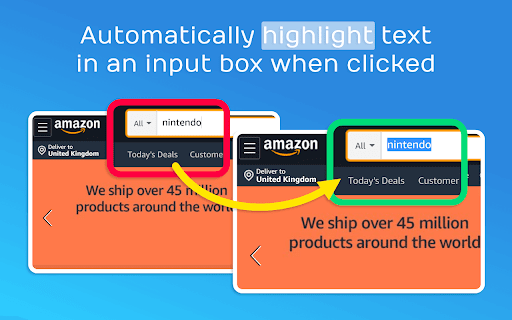
When you come across a pre-populated input box and go to click it, chances are your intention is to delete the entire content and replace it with your own. This extension will save you the step of manually highlighting all of the text once the input field gains focus. The content of the input will auto-highlight so you can easily delete or begin typing over the existing content. Sample Use Case Amazon search results will show what you searched in the textbox at the top screen. To perform another search, you have to first manually highlight the contents in the textbox to remove it.

Search It All
Search across multiple search engines with one click - no retyping needed ## 🔍 Search It All - The Ultimate Multi-Search Chrome Extension **Transform your search experience!** Search across 10+ popular search engines with one click. No more retyping queries or opening multiple tabs. 🚀 **Multi-Engine Search** - Instantly search across 10+ popular search engines ⚡ **One-Click Switching** - Switch between search engines without retyping ⌨️ **Keyboard Shortcuts** - Quick access with Ctrl+Shift+S (Cmd+Shift+S on Mac) 🔢 **Number Keys** - Use 1-9, 0 keys for instant search engine selection 🌙 **Dark Mode** - Complete dark theme with system preference detection 🎯 **Smart Detection** - Automatically detects current search queries 🖱️ **Context Menu** - Right-click selected text to search instantly 📊 **Usage Analytics** - Search engines auto-reorder by frequency 🔧 **Customizable** - Add your own custom search engines 🌐 **Privacy Focused** - No data collection, everything stays local 1. **Navigate** to any search engine (Google, Bing, DuckDuckGo, etc.) 2. **Perform a search** for your desired query 3. **Click the Search It All extension icon** in your toolbar 4. **Select any search engine** to search the same query instantly - **Ctrl+Shift+S** (Cmd+Shift+S on Mac) - Open extension popup - **Number keys 1-9, 0** - Quick select search engines (when popup is open) 1. **Select text** on any webpage 2. **Right-click** and choose "Search with..." 3. **Pick a search engine** from the submenu - **Dark Mode**: Toggle in settings for complete UI theming - **Custom Search Engines**: Add any search engine with custom URL patterns - **Usage Analytics**: Frequently used engines automatically move to the top - **Backup & Restore**: Save and restore your configurations Search It All works seamlessly with over 10 popular search platforms, giving you the flexibility to find exactly what you need: **🔍 Web Search**: Access major search providers including the world's most popular engine, privacy-focused alternatives, and regional options. Switch between different search philosophies - from comprehensive results to private browsing. **📺 Media & Video**: Find videos, channels, and playlists across video platforms with the same query, perfect for content creators and researchers. **🛒 Shopping & Commerce**: Compare products and prices across major e-commerce platforms instantly. No need to manually search each marketplace separately. **🔐 Privacy Options**: Choose from multiple privacy-respecting search alternatives that don't track your searches or build user profiles. The extension supports traditional web search, specialized platforms, and privacy-focused alternatives, ensuring you have the right tool for every search need. - **Website**: Visit https://bigbeartechworld.com and use the chat in the lower right corner - **GitHub Issues**: https://community.bigbeartechworld.com - **Twitter**: https://x.com/bigbeartech - Added keyboard shortcuts (Ctrl+Shift+S / Command+Shift+S) to open popup - Implemented numbered keyboard selection (1-9, 0 keys) for quick search engine access - Added dark mode toggle with complete UI theming for both popup and options pages - Implemented usage analytics to track and auto-reorder search engines by frequency - Added context menu integration for searching selected text - Visual shortcut number badges in popup interface - Fixed dark mode persistence and storage synchronization issues - Enhanced search engine sorting based on usage patterns - Enhanced popup UI with modern glass morphism design and gradient backgrounds - Added settings button with gear icon for direct access to options page - Implemented responsive layout with smooth animations and hover effects - Improved typography, spacing, and accessibility features - Added shimmer animations and enhanced visual interactions - Major UI overhaul of options page with modern responsive design - Fully responsive layout supporting desktop, tablet, and mobile breakpoints - Modern visual design with enhanced shadows, gradients, and animations - Improved element alignment using flexbox layout system - Enhanced typography and color scheme for better visual hierarchy - Better user experience with smooth hover animations and optimized touch interactions - New UI on options - Added a search box on the popup - When user is not on a search engine in database it shows disabled message - Added were you can sort the search engines in the options panel - Fixed delete image in options panel and added updown image to options panel **Made with ❤️ by [BigBearTechWorld](https://bigbeartechworld.com)** _Transform your browsing experience today! Install Search It All and never retype a search query again._

Link Controller
The icon shows in which tab links will open, click it for options to toggle it for the current tab or for all tabs.

Bookmarks HotList
A Speed Dial in your toolbar, with easy set-up and keyboard shortcuts Set up your HotList in the Bookmark Manager, access it from the toolbar in a choice of layouts and colours. For keyboard access, the default shortcut to open the extension is Alt+B (or Command+B). To change the shortcut, paste this into the address bar: chrome://extensions/shortcuts When the extension is open, shortcut keys (1-9 and A-Z) are available for each bookmark. Hold down the Space Bar to reveal hints. Open multiple tabs: 1 click will open a bookmark in a background tab, but the Popup stays open. A 2nd click on that bookmark will close the Popup and activate the tab, or you can open other bookmarks instead. The only automated modification to your bookmarks will be the creation of a new folder to contain those displayed by this extension, and a bookmark to get you started. The Star icon is “Actions bookmark new list Icon” by Oxygen Team, available from Icon Archive under the GNU Lesser General Public License: http://www.iconarchive.com/show/oxygen-icons-by-oxygen-icons.org/Actions-bookmark-new-list-icon.html Icons used in promotional images are in the public domain and available from http://paomedia.github.io/small-n-flat/

Search Box Focus
Press Tab to quickly access the main search bar or search field of any website. No need to use your mouse! Autofocus available! You hate taking your hand off the keyboard all the time only to access the search bar of the website you’re visiting? You’d love to simply press Tab or a custom shortcut to focus the search field and start typing right away without ever using your mouse? “Search Box Focus” solves exactly these problems. It also comes with an “Autofocus” feature which allows you to access the search bar automatically without pressing any shortcuts. Simply activate it for websites where you do a lot of searching like Amazon or online dictionaries. Whenever you load a website that has “Autofocus” enabled or when you switch to it from another tab, you’ll find that the cursor is already in the search bar ready for you to start typing. The extension is completely free and open-source which means, no tracking or data collection. No ads! After installation, make sure to reload/refresh all open tabs before using the extension! Feel free to suggest new features, report bugs, and so on at: https://github.com/gignupg/Search-Box-Focus Credits: “Search Box Focus” mainly uses the search box detection code of this Github repository: https://github.com/CodeRevver/Focus-First-Input The extension icon can be found at: https://icons8.com/icon/48167/google-web-search
